Some G-Shock watches are hard to use mainly because the same button does different jobs on different models, setting the time or switching functions can mean stepping through several modes, and some buttons are recessed or stiff. Feature-rich models add screen-navigation complexity, and some owners find negative-display screens hard to read in dim light. The evidence is model-specific and largely based on individual customer and user comments, so it does not show that all G-Shocks are difficult to operate or how common these complaints are.
Button roles change from model to model
CASIO’s UK guide to changing the time on a G-SHOCK describes the Adjust button as the entry point to configuration, the Mode button as the control that cycles through functions, and the Forward and Reverse buttons as the controls that change values. The same guide notes that on some watches the Light button also takes part in adjustment. A single press therefore does not have a single meaning across the range.
That is the core usability problem. Someone who learned to set one G-Shock will often assume the next one works the same way, and it may not. Setup feels less obvious than it should because the instructions are sequence-based, not because any one control is mislabelled.
Why the setting sequence is easy to get wrong
Setting a G-Shock is a series of states: enter configuration, choose the item, change its value, then leave the mode. Each step depends on which button is active at that moment. Pressing the wrong control in the right sequence can change a different setting, which is why owners often report that they “set it and it changed something else.”
#1 Best Overall

- Rugged & Sporty Design – Matte black finish with bold digital display, built for tactical, military, and extreme sports enthusiasts.
- High-Brightness LED Backlight – Features Super Illuminator LED with a light guide plate, ensuring exceptional visibility in low-light conditions.
- 200M Water Resistance – Engineered for swimming, snorkeling, and outdoor adventures, this shock-resistant watch is ready for action.
- Extended 7-Year Battery Life – Powered by a CR2025 battery, offering years of reliable performance without frequent replacements.
- Shock-Resistant Structure – Built to withstand extreme conditions, making it ideal for sports, military, and rugged outdoor use.
Not knowing which mode the watch is in
CASIO’s troubleshooting pages for specific modules address the question directly: what to do when you do not know which mode the watch is in. The answer is to move between modes until the display shows the function you expect. The button used for that navigation varies by module, so a generic instruction may not apply to your watch.
If you cannot tell which mode you are in, work through this sequence:
Rank #2

- Shock-Resistant Durability: Built to withstand the toughest conditions, this G-Shock watch features a rugged resin case and bezel, perfect for outdoor adventures and extreme sports.
- 200M Water Resistance: Designed for water enthusiasts, it’s suitable for scuba diving, swimming, and snorkeling, providing reliable protection up to 200 meters.
- Electro-Luminescent Backlight: The blue-green EL backlight with afterglow ensures clear visibility of the time, day, and date, even in complete darkness.
- Precision Stopwatch & Countdown Timer: Measure elapsed and split times with the 1/100-second stopwatch, or set up a countdown timer with up to a 24-hour range, ideal for timing workouts or daily tasks.
- Multi-Alarm with Flash Alert: Stay on schedule with a customizable alarm, hourly chime, and flash alert that combines light and sound for added convenience.
- Find the exact module number of your watch in its manual or on CASIO’s support pages. Module-specific instructions are the only reliable guide.
- Press the Mode button on your module repeatedly and note what each press displays, rather than assuming the button’s function from another model.
- Keep pressing until the screen shows the function you want to adjust. If the display returns to the same screen after several presses, you have cycled through the available modes.
- Only change a value after you are sure which mode and item is active.
Recessed and stiff buttons
Button resistance is a frequent complaint. A customer review on CASIO’s US product page for the DW-H5600 criticises the buttons. Reddit discussions about the DW-5600E and the GW-5000U describe controls that are hard to press. These are individual reports, not measurements, and they do not show how common the problem is.
Recessed buttons also have a defensible purpose. One user described the recess as protection against accidental presses, which is a real trade-off: a shielded button is less likely to change a setting in a pocket or bag, but it asks more force from the thumb. Owners who find a model stiff are describing this trade-off from the other side.
Windows Errors? Fix Them Before They Spread
Repair common Windows errors and clear accumulated junk for a smoother, more stable PC - no reinstall needed.Free scan · no reinstallOutdated Drivers Are Slowing You Down
One free scan finds every outdated or missing driver and matches the right update for your exact hardware.Free scan · exact hardware matchRank #3

- Super Matte Finish, Shock Resistant, 200M water resistance, LED light (Super illuminator), World time, Stopwatch, Countdown timer, 5 daily alarms, Hourly time signal, Hand shift feature
- Full auto-calendar, 12/24-hour format, Analog: 2 hands (hour, minute (hand moves every 20 seconds)), Digital: Hour, minute, second, pm, month, date, day, Approx. battery life: 5 years on CR2016
- Quartz Movement
- Case Diameter: 52.8mm
- Water resistant 200m (660ft): in general, suitable for professional marine activity and serious surface water sports, but not diving
Feature-rich models add navigation layers
A watch with more functions has more screens to cycle through, and that is where interface friction tends to appear. TechRadar’s review of the GBD-H1000, published around 2020, reports that some inputs still felt unintuitive after several weeks of testing. The reviewer describes screens that cycle in one direction only and inputs that were missed when buttons were pressed rapidly.
That review is a specific example on one feature-rich model. It does not establish that every multi-function G-Shock navigates this way.
Rank #4

- Band Size: Mens-Standard
- Shock Resistant
- Auto LED Light with Afterglow
- Magnetic Resistant
Negative displays in low light
Negative-background displays, where characters appear dark on a lighter background, can be harder to read at night or in a dark room. A customer review on CASIO’s UK 5600-series page, dated 7 December 2025, says exactly this and notes that turning on the backlight helps. It is one person’s experience rather than a technical measurement, but it matches the practical trade-off many owners will recognise: the display style that looks distinctive in daylight can be harder to read in the dark.
Independent reader supportYour contribution helps us test, update, and keep practical guides available for everyone.Troubleshooting before blaming the design
Some apparent difficulties are fixable states rather than interface design. CASIO’s module pages cover three of them:
Do these 3 things before closing this tab:
1Repair Windows errors before they cause bigger problems2Scan for outdated or missing drivers - takes under a minute3Clear out junk files and repair common Windows errorsBest Value
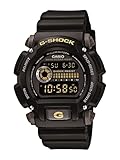
- Sport Type: Scuba Diving
- Uncertain mode. The watch is in a function you did not expect. Use the mode navigation steps above.
- A one-hour or 30-minute discrepancy. CASIO’s module pages link this to the summer-time (daylight saving) setting. Check that setting before assuming the clock is faulty.
- Hands out of alignment. The analogue hands may need realignment after a strong magnetic field or an impact. A digital display that is correct while the hands are wrong points to this rather than to a setup error.
Separating these from inherent usability matters. A watch that is simply in the wrong mode is not difficult by design, and a reader who recognises the state can usually fix it in a few presses.
What the sources cover
| Source | Model or scope | Date | What it supports | Limit |
|---|---|---|---|---|
| CASIO G-SHOCK UK, changing the time guide | Button roles for time setting; some models | Not stated | Button functions vary; Light button can take part in adjustment | Official guidance; does not cover every model |
| CASIO Support, module 5554/5555 and 5641 troubleshooting | Specific modules | Not stated | Mode uncertainty, summer-time discrepancy, hand alignment | Module-specific; button for mode navigation varies |
| TechRadar, GBD-H1000 review | GBD-H1000 only | Around 2020 | Unintuitive inputs, one-direction screen cycling, missed rapid presses | One reviewer, one model, several weeks of testing |
| CASIO US, DW-H5600 product page reviews | DW-H5600 | Individual review dates not stated | Customer criticism of the buttons | Individual customer comment |
| CASIO UK, 5600-series page review | 5600-series display | 7 December 2025 | Negative display hard to read at night or in a dark room | One customer’s experience, not a measurement |
| Reddit user discussions | DW-5600E and GW-5000U | Not stated | Hard-to-press buttons | Anecdotal; not for generalising |
No consistent cross-model test is available, so no model can be named the easiest to use. If you compare two models, judge them on the same points: button size, recess and press resistance; setup steps and mode navigation; display readability in the lighting you actually use; and how many functions sit behind each button.
Quick Recap
Product prices and availability are accurate as of the date/time indicated and are subject to change. Any price and availability information displayed on Amazon at the time of purchase will apply.




