If your Apple Watch battery is draining unusually fast, start with reversible checks: allow a few days after a watchOS update, review Low Power Mode and other settings, and check the watch’s connection and usage. If the problem persists, check Settings > Battery > Battery Health; Maximum Capacity compares the battery with its capacity when new, and “Battery Needs Service” is a reason to contact Apple Support.
There is no single setting that fixes every case. Work through the options below based on when the drain began and which features you use, then seek service if Battery Health indicates a problem.
1. If the drain began after an update, wait a few days
Some update-related tasks can continue in the background after watchOS is installed and may temporarily affect battery life. Apple advises waiting a few days and checking again before treating a post-update dip as a lasting problem. If it continues, try the other checks below; an update is not necessarily the only cause.
2. Test Low Power Mode
On the watch, press the side button to open Control Center, tap the battery percentage, then turn on Low Power Mode. It can extend use between charges, but it changes or disables some functions. Apple identifies Always On, background heart-rate and blood-oxygen measurements, and heart-rate notifications among the affected features; other notifications may be delayed, some connections limited, and emergency alerts may not arrive.
#1 Best Overall
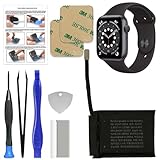
- 【Model Compatibility】: Compatible with Apple Watch Series 6 44mm. Not compatible with 40mm models. Please verify your device model before installation.(Battery Model: A2327)
- 【Complete Repair Kit Included】: Package includes precision tools, screen adhesive, and a step-by-step illustrated manual for efficient battery replacement without professional help.
- 【Reliable Battery Cell】: Fit For Watch Series 6 44mm OEM-grade 0-cycle Li-ion battery supports stable charging and extended performance. Built-in IC protects against overcharge, overheating, and short circuits.
- 【Adhesive and Seal Ready】: Pre-installed battery adhesive and included screen frame tapes ensure a secure, dust-resistant seal during reassembly—no extra materials needed.
- 【Secure and Precise Fit】: Engineered to match the original battery size for a perfect fit inside the watch. Ensures smooth installation and reliable performance after replacement.
Low Power Mode is a broad tradeoff, not a repair or a definitive diagnosis. If you want to identify a narrower cause, test display and app-refresh settings separately.
3. Test Always On and Background App Refresh
Turn off Always On
Open Settings > Display & Brightness > Always On and turn it off. Apple says disabling Always On can increase battery life. This is a focused, reversible test if you are willing to raise your wrist or tap the display to check the time.
Limit background app refresh
Open Settings > General > Background App Refresh. You can turn it off globally or disable it for selected apps. Apps with complications on the current watch face may continue refreshing even if their individual background-refresh setting is off, so remove complications you do not need if they are contributing to activity.
Rank #2

- 【Portable Charger for Apple Watch】Built-in 1000mAh battery, easy carry to anywhere, key ring design hook on the bag, extend Watch battery life in an emergency when the power low, about 2.5 hours quick charging your watch full power. it could charge the watch 1-1.5 times. thin little gadgets convenient in purse pocket mini bag wallet
- 【Rechargeable Battery Pack】This is an emergency charging re-charger,small lightweight and compact enough for a weekend getaway, combine a large travel power bank or other USB charging device, you can fast recharge to I Watches, the mobile charger will to be fully charged within 1.5 hours, easy to use when daily running exercise date office work
- 【Compatible】This little charger is made of ABS plastic material. size 2.36 inch *1.57 inch, very handy, it just charging compatible with Apple watch series 12 11 10 9 8 7 6 5 4 3 2, SE, SE 3, Ultra 2, Ultra 3,Ultra 4, 46/49/41/45/44/40/42/38mm,not for others smartwatch or phone
- 【Charging Protection】design for overcurrent, overvoltage, short circuit and overtemperature protection, provide a safe charging environment. it's cordless rapid magnetic charging i-watch chargers for camping, office, on the road, trip, airplane travel, car
- 【What You Get】1pc portable watch charger + 1pc type-C charging cable, 18-month warranty.If you have any questions, don't hesitate to contact us
4. Check connection and audio habits
Connection conditions and feature use affect battery life. When battery life is a priority, keep the watch near its paired iPhone so it can use Bluetooth. When away from the iPhone, prefer a strong Wi-Fi connection over mobile networks where possible; use a strong signal and consider Airplane Mode during extended time in weak or absent coverage.
Frequent audio playback through the built-in speaker on newer models can use more battery. If you already have AirPods or another Bluetooth audio device, use it for watch audio instead. Headphones are not a required purchase or a general fix for battery drain.
5. Check Battery Health and get service if indicated
On the watch, open Settings > Battery > Battery Health and review Maximum Capacity. Apple defines the displayed percentage as the battery’s capacity relative to when it was new; it is not a direct prediction of the exact hours remaining. If Battery Health says Battery Needs Service, or you think the battery needs replacement, contact Apple Support. Do not rely on an unsupported universal percentage cutoff.
Rank #3

- Compatibility Information: Please ensure your device model matches the specifications. This component only compatible with the Apple Watch Series 6th (40mm). Verifying your watch's model before purchase.
- New Li-ion Battery Cell: Equipped with an original, factory-fresh lithium polymer cell that delivers 100% battery health from the start. This ensures optimal power capacity, enhanced longevity for daily use, and reliable performance while maintaining the safety standards of your device.
- Included Screen Adhesive Set: The package contains two high-quality pre-cut screen adhesive stickers. This provides a convenient backup in case of application issues—simply remove any old adhesive residue from the watch frame thoroughly before applying the new one for a secure and clean fit.
- Complete Professional Repair Toolkit: You will receive a full set of specialized tools designed for watch repair, along with a battery that comes with pre-attached adhesive tape. This thoughtful inclusion simplifies the installation process, making it more accessible for DIY repair.
- Detailed Step-by-Step Guide: A comprehensive instruction manual is included to walk you through the entire repair process stage by stage. By following these directions, you can confidently perform the replacement yourself.
Apple documents capacity-estimate recalibration after certain updates on some models. This recalibration aims to estimate maximum capacity more accurately; it does not restore the battery’s physical capacity. For current model and software details, follow Apple’s support guidance.
Which troubleshooting option should I try?
| Option | When to try it | Tradeoff |
|---|---|---|
| Wait a few days after an update | The drain began just after installing watchOS | Does not address other possible causes |
| Low Power Mode | You need a broad, quick way to extend use between charges | Changes or limits several features and notifications |
| Turn off Always On or selected app refresh | You want to test a narrower setting change | May reduce display convenience or app updates |
| Adjust connection or audio use | Drain coincides with weak coverage, time away from iPhone, or frequent speaker playback | Depends on your location and habits |
| Contact Apple Support | Battery Health says “Battery Needs Service,” or you think service is needed | Service options depend on your watch and circumstances |
A quick diagnostic order
- If the drain began after an update, use the watch normally for a few days and check again.
- Test Low Power Mode if you need a broad temporary change.
- Test Always On and Background App Refresh separately; review active complications.
- Consider whether distance from the paired iPhone, weak coverage, or built-in-speaker audio coincides with the drain.
- Check Battery Health and contact Apple Support if it says “Battery Needs Service” or you think service is needed.
FAQ
Why did my Apple Watch battery start draining after an update?
Some update-related tasks can continue in the background after installation. Apple advises waiting a few days and checking again. If the drain persists, investigate other settings, connection conditions, and battery health.
Does Low Power Mode fix Apple Watch battery drain?
It can extend use between charges by changing or limiting some functions, but it does not repair a battery. It is a broad tradeoff; turning off Always On or selected app refresh is a narrower test.
Rank #4

- [SAFETY TESTED BATTERY CELLS]--- Our battery uses Grade A rated battery cells ensure longer battery life (500 cycles) and high-speed, efficient charging. Every 42mm watch series 1 battery is manufactured and tested under strict quality control standards. Build-in microchip to prevent over-charging, over-discharging, short-circuit and over-heating. Voltage protection and current protection for safer operation for both user and devices.
- [FOR COMPATIBLE MODEL]--- ★REAL 246mAh, SAME AS ORIGINAL CAPACITY.★ Compatible with Watch Series 1 42mm A1554 A1579 A1803. Please verify your old battery part number and model before purchasing this replacement battery. The repair kit contains the instruction to guide you step by step installation, and we have professional engineers to answer all your questions about the repair process.
- [HIGH CAPACITY BATTERY]--- ASDAWN for 42mm series 1 battery replacement is made of high quality Li-Polymer battery cell, the advanced technology makes this replacement battery capacity up to 246mAh and provides you a high-speed and efficient charging. Up to 48 hours of long lasting time, bring your battery's life back to glory and save the money. Choose ASDAWN battery restore your watch to like new performance!
- [FOR BEST PERFORMANCE]--- Please use your original charger and cable which came with your watch to charge this battery. Using up all the power of watch series 1 battery 42mm for the first three times before charging, and then take a full charge, thus the battery can be reached the optimum effect of using. Please remember that its full performance and longevity is only achieved after 3 to 5 complete charge and discharge cycles.
- [STRICT DUAL QUALITY CONTROL]--- We take care of all quality-related issues with a REPLACEMENT or REFUND. Our items are all produced in fully automated workshops, and the finished products are controlled and inspected by professional technical personnel to ensure that they are delivered to customers with superior performance and do not disappoint their trust in us. Only with excellent product quality can we go further!
What does Maximum Capacity mean on Apple Watch?
It compares the battery’s capacity with its capacity when new. It does not directly predict the exact hours of runtime remaining. If Battery Health says “Battery Needs Service,” contact Apple Support.
Can a charger or headphones fix fast battery drain?
A charger replenishes charge but is not evidence that it corrects the causes of fast discharge or degraded capacity. Bluetooth audio may use less battery than frequent built-in-speaker playback on newer models, but headphones are not a general fix.
Quick Recap
Product prices and availability are accurate as of the date/time indicated and are subject to change. Any price and availability information displayed on Amazon at the time of purchase will apply.
Quick wins for a faster PC:
Clear out junk files and repair common Windows errorsFree Scan →Fix the driver behind crashes, sound loss and screen glitchesFind Drivers →



