Wyze’s latest smart scale launch is aimed squarely at people who already track steps, workouts, and sleep, but still rely on a disconnected bathroom scale for one of the most important health signals: long‑term body trends. This isn’t Wyze trying to reinvent connected health hardware; it’s Wyze doing what it has consistently done well—lowering the cost barrier to features that usually live behind higher price tags.
At a glance, the new Wyze smart scale promises full body composition metrics, automatic syncing, and direct Fitbit integration at a price that undercuts most recognizable fitness brands. For anyone already wearing a Fitbit or logging health data daily, the appeal is obvious: fewer apps, fewer gaps, and one more data stream feeding into an existing routine without committing to a premium ecosystem.
Understanding what Wyze has actually launched, though, requires separating marketing shorthand from real-world functionality. This scale sits at a specific intersection of affordability, feature completeness, and ecosystem compatibility, and it’s important to understand where it meaningfully competes—and where it deliberately doesn’t.
A familiar Wyze playbook: maximum features at minimum price
Wyze’s new scale follows the same strategy as its cameras, earbuds, and smart home gear: offer a spec sheet that looks unusually generous for the money, then rely on software and scale to make it viable. The hardware itself is a traditional glass-top Bluetooth/Wi‑Fi smart scale with embedded bioelectrical impedance sensors, designed for daily weigh-ins rather than clinical assessments.
#1 Best Overall

- FSA/HSA Eligible
- BodyScan Handle with Dual-Frequency, 8-Electrode BIA — The built-in handle and 8 smart electrodes across both hands and feet work together to measure impedance through your arms, legs, and torso individually, providing detailed estimates of your body composition beyond weight alone.
- Advanced Body Composition Report with 44 Metrics — Access a detailed breakdown of your body composition with 44 metrics, including segmental fat and muscle weight and percentages for each arm, each leg, and your torso. Save and share your report as an image, and track supported whole-body metrics over time in the Wyze app.
- 4.3-inch Full-Color TFT Display with Wi-Fi & Bluetooth Connectivity — After initial setup in the Wyze app, a full-color screen presents selected whole-body metrics without requiring the app to be opened for each weigh-in. Customize your view to highlight the metrics that matter most. Once connected to 2.4 GHz Wi-Fi, your measurements upload automatically, even when your phone isn’t nearby.
- Unlimited Sharing and Smart User Recognition - Share Wyze Scale Ultra BodyScan with everyone in the family. It automatically recognizes and syncs data for up to 8 unique users. Take one-off measurements for an unlimited number of guests. Share data and trends with an unlimited number of people to stay motivated.
Build quality is functional rather than premium, with a slim footprint that fits easily in a bathroom or bedroom and a surface that’s durable enough for barefoot daily use. There’s no emphasis on luxury materials or visual flair here; the focus is on reliability, readability, and cost control.
Battery life is measured in months rather than weeks, typically using standard AAA batteries, which aligns with Wyze’s preference for low-maintenance ownership rather than frequent charging. That choice matters for users who want passive tracking rather than another device competing for a power outlet.
What “full body composition” actually means on this scale
Wyze advertises full body composition, but in practical terms this aligns with what most consumer-grade BIA scales provide. Users get weight, BMI, body fat percentage, lean body mass, muscle mass, body water percentage, and bone mass estimates, calculated using impedance readings combined with age, height, and sex inputs.
These metrics are trend-focused, not diagnostic. Like every scale in this category outside medical environments, absolute accuracy can vary day to day based on hydration, time of measurement, and recent activity, but consistency is where the value lies.
Quick wins for a faster PC:
Fix the driver behind crashes, sound loss and screen glitchesFind Drivers →Clear out junk files and repair common Windows errorsFree Scan →Wyze’s software emphasizes longitudinal charts rather than single readings, which is the correct approach for this type of data. The scale is designed to be stepped on daily, ideally under similar conditions, so users can see directional changes over weeks and months rather than obsess over individual numbers.
Why Fitbit integration is the most important part of this launch
The standout feature here isn’t the hardware—it’s native Fitbit integration. That allows weight and body composition data to sync directly into the Fitbit ecosystem without manual exports or third-party bridges.
For Fitbit users, this closes a long-standing gap. Fitbit’s own smart scales exist, but they’re often priced higher and haven’t always been the best value relative to their feature set. Wyze offers an alternative that still feeds into Fitbit’s dashboards, trend analysis, and health reports.
This integration matters most for users who care about correlating body changes with activity levels, calorie burn estimates, and long-term fitness goals. Seeing weight and body fat trends alongside step counts, workouts, and sleep data makes the scale feel like a natural extension of a Fitbit setup rather than a disconnected accessory.
Windows Errors? Fix Them Before They Spread
Repair common Windows errors and clear accumulated junk for a smoother, more stable PC - no reinstall needed.Free scan · no reinstallOutdated Drivers Are Slowing You Down
One free scan finds every outdated or missing driver and matches the right update for your exact hardware.Free scan · exact hardware matchWhere this scale sits among budget smart scale competitors
In the broader budget smart scale market, Wyze competes directly with brands like Eufy, Renpho, and Xiaomi. Feature-for-feature, the core metrics are very similar across these products, and most rely on the same underlying BIA technology.
What differentiates Wyze is ecosystem intent. Many budget scales funnel data into standalone apps that users check occasionally, while Wyze positions this scale as part of a larger connected lifestyle that includes wearables, cameras, and now health data flowing outward to Fitbit.
That doesn’t mean Wyze’s scale is inherently more accurate or advanced than its peers, but it does mean it’s more strategically aligned with users who already care about integrated health tracking rather than isolated numbers.
Who this scale is actually for—and who should skip it
This scale makes the most sense for Fitbit users who want affordable body composition tracking without buying into Fitbit’s own hardware lineup. It’s also well-suited to casual fitness trackers who value trends and integration over lab-grade precision.
Recommended Free Tools
Data-driven athletes or users deeply focused on body recomposition may still want higher-end scales or more controlled measurement tools, especially if they already use platforms like Apple Health with broader hardware options. Wyze isn’t targeting that audience, and it doesn’t pretend to.
Instead, this launch reinforces Wyze’s position as a budget-first enabler of connected health. It’s a practical, ecosystem-aware scale designed to quietly do its job every morning and send the data where it actually matters.
Full Body Composition Explained: What Metrics the Wyze Scale Measures and How Bioelectrical Impedance Works
To understand where Wyze’s new scale fits into a Fitbit-centered setup, it helps to unpack what “full body composition” actually means in day-to-day use. These metrics go well beyond basic weight, but they’re also not medical-grade measurements, and knowing how they’re generated is key to using them correctly.
The core metrics you’ll see in the Wyze app
At its foundation, the Wyze scale measures body weight, which remains the most repeatable and reliable data point it produces. Weight trends over time are where smart scales offer the most value, especially when synced into a broader activity and nutrition picture.
Do these 3 things before closing this tab:
1Repair Windows errors before they cause bigger problems2Scan for outdated or missing drivers - takes under a minute3Clear out junk files and repair common Windows errorsFrom there, the scale estimates body fat percentage, which is often the headline feature users care about. This metric is calculated rather than directly measured, and it’s best used to track directional change rather than obsess over the exact percentage shown on any given morning.
Wyze also provides lean body mass, which represents everything in your body that isn’t fat. This is useful for Fitbit users who are strength training or increasing activity levels and want to see whether weight changes are tied to muscle retention or loss rather than just scale movement.
Muscle, water, bone, and protein: what these numbers really mean
Like most budget smart scales, Wyze breaks lean mass down into sub-metrics such as muscle mass, body water percentage, bone mass, and protein. These figures are derived from the same underlying signal and should be viewed as contextual indicators, not precise measurements of specific tissues.
Muscle mass trends can still be useful over time, particularly when paired with workout volume and recovery data from a Fitbit. If your training load increases and estimated muscle mass slowly trends upward, that relationship can reinforce whether your routine is moving in the right direction.
Body water percentage fluctuates heavily based on hydration, sodium intake, and time of day. This makes it one of the most volatile metrics, but it also explains why weighing in under consistent conditions matters if you want usable long-term data.
Metabolic and physique indicators tied to daily habits
Wyze’s scale also estimates basal metabolic rate, or BMR, which reflects the calories your body burns at rest. While the number itself is formula-driven, it can provide helpful context when compared against Fitbit’s activity calories and overall energy expenditure.
Visceral fat rating is another metric many users notice immediately. This isn’t a direct measurement of internal fat around organs, but rather an index score derived from impedance patterns, body weight, and height, designed to flag higher-risk trends rather than give a diagnostic value.
Some versions of Wyze’s software also include a body score or physique rating that rolls multiple metrics into a single number. These scores are meant to simplify progress tracking, but serious users are better served by focusing on individual trends instead of a composite label.
How bioelectrical impedance actually works
All of these metrics rely on bioelectrical impedance analysis, or BIA, the same technology used by nearly every consumer smart scale in this price range. When you stand barefoot on the scale, a very small, harmless electrical current travels up one leg and down the other through your body.
Different tissues conduct electricity at different speeds. Water and muscle conduct well, while fat resists electrical flow, allowing the scale to estimate how your mass is distributed based on resistance and impedance timing.
Because the signal travels primarily through the lower body, BIA scales are more accurate for tracking overall trends than pinpointing exact fat distribution. This limitation is shared across Eufy, Renpho, Xiaomi, and even many higher-priced consumer scales.
Why consistency matters more than absolute accuracy
The biggest variable in BIA measurements isn’t the hardware, but the conditions under which you weigh in. Hydration, recent exercise, food intake, and even skin temperature can influence impedance readings from one day to the next.
For this reason, Wyze’s scale works best when used at the same time each day, ideally in the morning before eating or training. When used consistently, the relative changes become far more meaningful than the raw numbers themselves.
This is also where Fitbit integration adds practical value. When body composition data sits alongside sleep quality, training load, step counts, and recovery trends, it becomes easier to understand why certain metrics move the way they do rather than treating them as isolated facts.
What to trust, what to take lightly
Weight, long-term body fat trends, and general lean mass direction are the most reliable outputs from Wyze’s scale. These are the metrics most likely to align with changes you can feel in training performance, clothing fit, and overall energy levels.
More granular data like bone mass, protein percentage, and visceral fat scores should be treated as supporting context. They can add color to your health picture, but they’re not precise enough to guide clinical decisions or aggressive body recomposition strategies.
Free tools Windows power users keep installed
One-click scans. No signup required.
Viewed through that lens, Wyze’s full body composition suite does what it’s supposed to do. It turns a simple morning weigh-in into a richer data point that feeds directly into a Fitbit-driven fitness routine, without pretending to be something it isn’t.
Accuracy vs. Expectations: How Reliable Body Composition Data Is on Affordable Smart Scales
With Wyze positioning this scale as a low-cost gateway to full body composition tracking, it’s important to reset expectations around what “accuracy” really means in this category. The scale isn’t trying to compete with DEXA scans or clinical bioimpedance systems, and understanding that distinction is key to getting real value from it.
What Wyze’s body composition numbers are actually based on
Like nearly all consumer smart scales at this price point, Wyze relies on bioelectrical impedance analysis (BIA) through metal foot electrodes. A very small electrical signal passes through the body, and the scale estimates fat mass, lean mass, water, and related metrics based on how that signal is slowed by different tissues.
This approach is inherently indirect. Fat, muscle, bone, and water all conduct electricity differently, but the scale is making educated estimates based on population models rather than directly measuring those tissues in your body.
The Tool Desk
Outbyte Driver Updater FREEScan for outdated or missing drivers - takes under a minuteDriver Scan →Outbyte PC Repair FREEClear out junk files and repair common Windows errorsFree Scan →Rank #2

- FSA/HSA Eligible
- BodyScan Handle with Dual-Frequency, 8-Electrode BIA — The built-in handle and 8 smart electrodes across both hands and feet work together to measure impedance through your arms, legs, and torso individually, providing detailed estimates of your body composition beyond weight alone.
- Advanced Body Composition Report with 44 Metrics — Access a detailed breakdown of your body composition with 44 metrics, including segmental fat and muscle weight and percentages for each arm, each leg, and your torso. Save and share your report as an image, and track supported whole-body metrics over time in the Wyze app.
- 4.3-inch Full-Color TFT Display with Wi-Fi & Bluetooth Connectivity — After initial setup in the Wyze app, a full-color screen presents selected whole-body metrics without requiring the app to be opened for each weigh-in. Customize your view to highlight the metrics that matter most. Once connected to 2.4 GHz Wi-Fi, your measurements upload automatically, even when your phone isn’t nearby.
- Unlimited Sharing and Smart User Recognition - Share Wyze Scale Ultra BodyScan with everyone in the family. It automatically recognizes and syncs data for up to 8 unique users. Take one-off measurements for an unlimited number of guests. Share data and trends with an unlimited number of people to stay motivated.
Because the current travels mostly through the legs and lower torso, upper-body distribution is inferred rather than measured. That limitation isn’t unique to Wyze—it applies just as much to Eufy, Renpho, Xiaomi, and even some mid-range Fitbit and Garmin-compatible scales.
Where affordable smart scales tend to perform well
Day-to-day weight readings are the most dependable output, and Wyze’s scale is no exception here. On a hard, flat surface, readings are generally stable and repeatable, which is what matters most for long-term tracking.
Body fat percentage, when viewed as a trend rather than a fixed truth, can also be useful. Over weeks or months, consistent increases or decreases tend to reflect real changes, even if the exact percentage isn’t lab-grade precise.
Lean mass direction, rather than absolute lean mass numbers, is another area where affordable BIA scales can be surprisingly helpful. If you’re strength training or returning from a period of inactivity, the directional changes often line up with how your body and performance are actually changing.
What’s actually slowing this PC down?
Pick the symptom - the matching free tool is one click away.
Where the numbers start to get fuzzy
More granular metrics like visceral fat rating, bone mass, and protein percentage are where expectations should be dialed back. These values are heavily model-driven and can fluctuate without any meaningful physiological change, especially if hydration or meal timing varies.
Small day-to-day swings in body fat or muscle percentage are also common and shouldn’t be overinterpreted. A tough workout, a salty dinner, or even warmer skin can all shift impedance readings enough to move the needle.
This doesn’t make the data useless, but it does mean it works best as contextual information rather than decision-making fuel. Treat these metrics as signals, not diagnoses.
Why consistency matters more than raw precision
The biggest factor affecting BIA accuracy isn’t the scale’s hardware, but how and when you use it. Weighing in at different times of day, after workouts, or with varying hydration levels introduces far more noise than the difference between one budget scale and another.
Wyze’s scale delivers its most reliable insights when used under the same conditions each time—ideally first thing in the morning, before food, caffeine, or training. Under those conditions, the trend lines become far more meaningful than any single reading.
This is where Wyze’s software experience and automatic syncing start to matter. Frictionless logging reduces missed weigh-ins, which in turn improves the quality of the data you’re actually reviewing.
How Fitbit integration changes the value of “imperfect” data
On its own, body composition data can feel abstract. Inside Fitbit’s ecosystem, it gains context by sitting next to sleep scores, readiness indicators, step volume, heart rate trends, and logged workouts.
If body fat ticks up during a week of poor sleep and low activity, the explanation is often obvious. Likewise, gradual improvements during a structured training block feel more credible when multiple signals move in the same direction.
Free tools Windows power users keep installed
One-click scans. No signup required.
Fitbit doesn’t magically make the numbers more accurate, but it does make them more interpretable. That’s a meaningful distinction, especially for users who already rely on Fitbit dashboards to guide daily habits.
Setting realistic expectations for different types of users
For casual wellness users, Wyze’s body composition metrics offer motivation and awareness without demanding deep technical knowledge. Seeing trends evolve over time can reinforce positive habits without overwhelming the user with data anxiety.
For data-driven fitness enthusiasts, the scale works best as a supporting tool rather than a primary measurement device. It complements performance metrics and wearable data, but it shouldn’t override how training, recovery, and strength progression actually feel.
In both cases, Wyze’s scale succeeds by staying honest about what it is. It delivers accessible, trend-focused body composition insights at a price point that lowers the barrier to entry, especially for users already invested in a Fitbit-centered health setup.
Fitbit Integration: Why Syncing Weight and Body Fat Data Matters for Fitbit-Centered Users
For users already living inside Fitbit’s app, the value of Wyze’s new smart scale isn’t just in what it measures, but where that data ends up. Automatic syncing turns weight and body composition from isolated check-ins into signals that influence how the rest of your health data is interpreted day to day.
This matters because Fitbit’s platform is designed around patterns, not one-off metrics. When weight and body fat are logged consistently alongside activity, sleep, and heart rate, they become part of a broader feedback loop rather than a standalone number.
What actually syncs to Fitbit—and how it shows up
Wyze’s scale pushes core metrics like weight and body fat percentage directly into Fitbit without manual exports or third-party workarounds. Once connected, weigh-ins appear in Fitbit’s body metrics section, updating trend charts automatically.
While Fitbit doesn’t surface every raw body composition metric Wyze measures, the most actionable data points are there. For most users, weight trends and body fat changes are the primary drivers of behavior change, and those are the numbers Fitbit uses most effectively.
Recommended Free Tools
The key advantage here is consistency. A weigh-in recorded passively each morning becomes part of Fitbit’s historical record, which improves long-term insights even if individual readings aren’t perfectly precise.
Why Fitbit users benefit more than users of other platforms
Fitbit’s ecosystem is unusually sensitive to weight-related data compared to many competitors. Changes in body weight and composition influence how users interpret readiness, activity goals, and even motivation nudges inside the app.
When weight trends move in the opposite direction of training effort or step volume, it prompts useful questions. Is recovery suffering, is sleep quality slipping, or has nutrition drifted off plan? Without synced weight data, those connections are harder to spot.
For users wearing a Fitbit daily, adding a scale that feeds the same dashboard reduces mental friction. There’s no need to reconcile numbers across apps or decide which platform is the “source of truth.”
Context is more important than precision
Consumer smart scales, including Wyze’s, rely on bioelectrical impedance, which means body fat readings fluctuate based on hydration, timing, and recent activity. Fitbit integration doesn’t fix that, but it does reduce the temptation to overreact to a single anomalous reading.
Inside Fitbit’s weekly and monthly views, small day-to-day swings fade into more stable trend lines. That’s where body composition data becomes genuinely useful, especially when viewed alongside resting heart rate, sleep duration, and training volume.
This approach favors behavioral insight over clinical accuracy. For most users, understanding direction and consistency matters more than chasing an exact percentage.
How this compares to other budget smart scale integrations
Many affordable smart scales technically support Fitbit, but often through clunky syncing or delayed updates. Wyze’s integration is closer to a set-it-and-forget-it experience, which aligns better with Fitbit’s emphasis on passive tracking.
Quick wins for a faster PC:
Scan for outdated or missing drivers - takes under a minuteDriver Scan →Clear out junk files and repair common Windows errorsFree Scan →Fix the driver behind crashes, sound loss and screen glitchesFind Drivers →Unlike some competitors that prioritize Apple Health or require intermediary apps, Wyze’s direct Fitbit support feels intentional. That makes it more appealing to Android users and long-time Fitbit owners who haven’t migrated to other ecosystems.
At its price point, this level of integration is still relatively rare. It positions Wyze’s scale as a practical companion device rather than a standalone gadget competing for attention.
Who gets the most value from this setup
Fitbit users focused on weight management, general wellness, or habit-building stand to benefit the most. Regular weigh-ins feed Fitbit’s coaching cues and trend analysis without adding extra steps to the routine.
More advanced athletes will still want to rely on performance metrics, training load, and subjective recovery cues first. In that context, synced body composition data works best as background information rather than a decision-making trigger.
PC Slower Than It Used to Be?
A free scan shows the junk files, broken settings and background clutter dragging Windows down - then fixes them in one click.Free scan · Windows 10 & 11Outdated Drivers Are Slowing You Down
One free scan finds every outdated or missing driver and matches the right update for your exact hardware.Free scan · exact hardware matchThe common thread is convenience. When weight and body fat data flow automatically into a platform you already trust, you’re far more likely to engage with it consistently, and consistency is where these tools actually deliver value.
Metrics Breakdown: What Data Goes to Fitbit, What Stays in Wyze, and What You Can Actually Use
Once you understand who this scale is for, the next question is obvious: what data actually shows up in Fitbit, and what’s locked inside Wyze’s own app. This distinction matters more than the raw feature list, because it determines whether the scale enhances your existing setup or becomes yet another silo.
Wyze markets this as a full body composition scale, and that’s accurate. The caveat is that not all of those metrics carry equal weight once they leave the Wyze ecosystem.
The core metrics that sync to Fitbit
At launch, Wyze’s Fitbit integration focuses on the metrics Fitbit actually supports at a platform level. That means body weight is the primary data point, synced automatically after each weigh-in.
Rank #3

- 8-ELECTRODE SEGMENTAL BODY ANALYSIS – Grip the built-in handle to measure estimated body composition across your arms, legs, and torso, not just your lower body. Provides deeper, more personalized insights than typical bathroom scales.
- DETAILED REPORT WITH 44 METRICS IN THE WYZE APP – Access a detailed breakdown of your body composition with 44 metrics, including segmental fat and muscle weight and percentages for each arm, each leg, and your torso. Get a fuller picture of your body beyond weight, with no subscription required.
- 4.7-INCH LED DISPLAY – View 7 key metrics directly on the scale, including weight trends, body fat percentage, BMI, muscle mass, bone mass percentage, body water percentage, and protein.
- UNLIMITED USERS AND SMART RECOGNITION – Share Wyze Scale BodyScan with the whole family. The scale automatically recognizes and syncs data for up to 8 app users and includes guest measurements for occasional use. You can also share data and trends with family members or others you choose.
- SYNC WITH POPULAR FITNESS APPS – Connect your scale to the Wyze app via Bluetooth and sync your data with popular fitness apps, including Apple Health, Health Connect, and Fitbit, so you can track your progress where you track everything else.
Body fat percentage is the second key metric that makes the jump. This is the most meaningful addition for Fitbit users, because it feeds directly into Fitbit’s body composition trends alongside weight.
BMI is also calculated and synced, although this is more of a derived reference metric than something most users actively manage. Fitbit treats BMI as contextual information rather than a coaching driver.
Importantly, syncing is automatic once accounts are linked. There’s no manual export, no CSV files, and no need to open the Wyze app every time, which keeps the experience aligned with Fitbit’s passive-tracking philosophy.
What stays inside the Wyze app
Wyze’s scale measures a much broader set of bioelectrical impedance metrics, but these remain visible only in the Wyze app. This includes muscle mass, body water percentage, bone mass, protein percentage, visceral fat rating, basal metabolic rate, and metabolic age.
The Tool Desk
Outbyte PC Repair FREEClear out junk files and repair common Windows errorsFree Scan →Outbyte Driver Updater FREEScan for outdated or missing drivers - takes under a minuteDriver Scan →For data-oriented users, this is where the scale’s spec sheet looks most impressive. You get charts, historical trends, and per-metric explanations that are clear enough for non-experts to understand.
The limitation is that none of these advanced metrics flow into Fitbit, Apple Health, or Google Fit in a meaningful way. They’re designed to be referenced in isolation rather than blended into a broader training or recovery picture.
Which of these metrics are actually actionable
In day-to-day use, weight and body fat percentage remain the only metrics most users will meaningfully act on. These are the numbers that influence calorie targets, long-term goals, and behavioral nudges inside Fitbit.
Muscle mass and body water can be useful for spotting longer-term trends, especially during strength training phases or aggressive dieting. However, because they’re sensitive to hydration, time of day, and recent activity, they’re best interpreted as directional signals rather than precise measurements.
What’s actually slowing this PC down?
Pick the symptom - the matching free tool is one click away.
Metrics like bone mass, protein percentage, and metabolic age are largely informational. They’re interesting to look at, but they rarely change enough to guide real decisions, particularly on a consumer-grade scale.
Understanding accuracy and expectations
Wyze uses standard foot-to-foot bioelectrical impedance, which is consistent with most budget smart scales. This approach is reliable for tracking trends over time, but it is not clinically precise for absolute body composition values.
Small daily fluctuations are normal and often meaningless. This is why Fitbit’s weekly and monthly trend views, rather than Wyze’s per-reading breakdowns, tend to deliver more practical insight.
The key is consistency. Weighing in at the same time of day, under similar conditions, matters more than chasing a perfect percentage.
Do these 3 things before closing this tab:
1Scan for outdated or missing drivers - takes under a minute2Repair Windows errors before they cause bigger problems3Fix the driver behind crashes, sound loss and screen glitchesHow this compares to other Fitbit-compatible scales
Most affordable Fitbit-compatible scales stop at weight-only syncing. Some technically measure body fat, but don’t pass it through reliably or require manual syncing steps that undermine long-term adherence.
Wyze’s advantage is that body fat data arrives in Fitbit cleanly and consistently. That alone puts it ahead of many similarly priced alternatives, even if the deeper metrics stay locked in Wyze’s app.
More expensive scales offer broader ecosystem support or advanced analysis, but they also cost significantly more. Wyze’s approach favors practical integration over maximal data sharing.
What this means for real-world Fitbit users
If your primary dashboard is Fitbit, this scale effectively becomes a weight and body fat input device with minimal friction. That’s not a drawback; it aligns with how Fitbit’s coaching, insights, and health trends are designed to work.
The Wyze app then functions as a secondary reference tool. You might check it occasionally for muscle or hydration trends, but it doesn’t demand daily attention.
For users who value simplicity, this division of labor actually makes the setup easier to live with. Fitbit stays focused on habits and trends, while Wyze quietly handles the measurement side in the background.
App Experience and Daily Use: Wyze App vs. Fitbit App for Tracking Progress
Once the measurement itself fades into the background, the real value of a smart scale shows up in the app you open afterward. With Wyze’s new scale, that experience is split between two very different philosophies: Wyze’s data-dense utility app and Fitbit’s more behavior-driven health platform.
Using the Wyze app day to day
The Wyze app is where all of the scale’s raw detail lives. Open a weigh-in and you’ll see a full snapshot including weight, body fat percentage, muscle mass, body water, bone mass, visceral fat index, protein, and BMI.
Navigation is straightforward but utilitarian. Wyze prioritizes showing you everything at once rather than guiding you toward specific actions or interpretations.
Trend graphs are available for each metric, but they’re best suited to occasional check-ins rather than daily motivation. The app assumes you already understand what you’re looking at, which works for data-oriented users but can feel clinical for casual trackers.
Where the Wyze app falls short for habit building
What the Wyze app doesn’t do particularly well is behavior reinforcement. There’s little in the way of reminders, coaching prompts, or contextual insight tied to your weigh-ins.
You won’t see messages explaining why body water dipped or how muscle trends relate to your activity. For many users, especially those accustomed to smartwatch ecosystems, that lack of narrative can reduce long-term engagement.
What’s actually slowing this PC down?
Pick the symptom - the matching free tool is one click away.
That said, the app is fast, stable, and unobtrusive. It records measurements reliably and then gets out of the way, which aligns with Wyze’s broader smart home-first design philosophy.
Fitbit’s app as the primary progress dashboard
Once weight and body fat sync to Fitbit, the experience changes noticeably. Fitbit immediately places those metrics into a broader health context alongside activity, sleep, heart rate, and nutrition.
Instead of fixating on individual readings, Fitbit emphasizes rolling averages, weekly summaries, and long-term trends. This is where the earlier discussion about consistency pays off, because Fitbit is built to smooth out daily noise.
For users wearing a Fitbit smartwatch or tracker, this consolidation matters. Weight trends influence insights, goal progress, and even some coaching recommendations, making the scale feel like a natural extension of the wearable rather than a standalone gadget.
How progress tracking differs between the two apps
In Wyze, progress is granular but isolated. You see precise changes in muscle mass or hydration, but those numbers live in a vacuum.
In Fitbit, progress is contextual. Even with fewer metrics, weight and body fat are framed against steps taken, workouts logged, calories burned, and sleep quality.
For most users, especially those focused on sustainable fitness rather than body recomposition alone, Fitbit’s approach is easier to live with over months rather than weeks.
Notifications, reminders, and friction
Wyze keeps notifications minimal. You’re unlikely to be nudged to weigh in unless you actively enable reminders, and even then they’re basic.
Fitbit, by contrast, subtly reinforces routines. Weigh-in streaks, weekly summaries, and gentle nudges help keep the scale part of a broader habit loop without feeling intrusive.
This difference becomes more noticeable over time. The less mental effort required to remember and interpret your data, the more likely the scale becomes part of your daily or weekly rhythm.
Multi-user support and household use
The Wyze scale handles multiple users well, automatically recognizing profiles based on weight patterns. Each user gets their own Wyze account data, which keeps household measurements clean.
Fitbit integration remains user-specific, so each person must link their own Fitbit account. This adds a setup step but prevents data crossover, which is especially important for shared bathrooms.
Free tools Windows power users keep installed
One-click scans. No signup required.
Rank #4

- 8-ELECTRODE SEGMENTAL BODY ANALYSIS – Grip the built-in handle to measure estimated body composition across your arms, legs, and torso, not just your lower body. Provides deeper, more personalized insights than typical bathroom scales.
- DETAILED REPORT WITH 44 METRICS IN THE WYZE APP – Access a detailed breakdown of your body composition with 44 metrics, including segmental fat and muscle weight and percentages for each arm, each leg, and your torso. Get a fuller picture of your body beyond weight, with no subscription required.
- 4.7-INCH LED DISPLAY – View 7 key metrics directly on the scale, including weight trends, body fat percentage, BMI, muscle mass, bone mass percentage, body water percentage, and protein.
- UNLIMITED USERS AND SMART RECOGNITION – Share Wyze Scale BodyScan with the whole family. The scale automatically recognizes and syncs data for up to 8 app users and includes guest measurements for occasional use. You can also share data and trends with family members or others you choose.
- SYNC WITH POPULAR FITNESS APPS – Connect your scale to the Wyze app via Bluetooth and sync your data with popular fitness apps, including Apple Health, Health Connect, and Fitbit, so you can track your progress where you track everything else.
In practice, this setup works smoothly once configured, and it’s no more complex than other connected scales in this price range.
Which app you’ll actually open most often
For most Fitbit users, the answer is clear. The Fitbit app becomes the place where progress is reviewed, trends are interpreted, and goals are adjusted.
The Wyze app stays installed, quietly collecting detailed composition data in the background. You may revisit it during a training phase or body recomposition effort, but it rarely demands daily attention.
That division reinforces the scale’s role as a supporting device rather than a centerpiece. For a budget-friendly scale designed to complement a Fitbit-centric setup, that balance makes practical sense.
Hardware, Design, and Practical Details: Build Quality, Display, Multi-User Support, and Setup
All of that software and ecosystem discussion only matters if the scale itself fits seamlessly into daily life. Fortunately, Wyze’s latest smart scale sticks closely to the brand’s familiar playbook: understated hardware, sensible materials, and very few surprises once it’s on your bathroom floor.
Build quality and physical design
The scale uses a tempered glass platform with a low-profile footprint that’s comparable to other budget-friendly body composition scales. It feels sturdy underfoot, with minimal flex even when shifting weight during a measurement.
A matte finish on the glass helps reduce visible smudging, which sounds minor but matters if the scale lives in a shared bathroom. The overall look is neutral and modern, clearly designed to disappear rather than make a design statement.
At roughly the size and thickness you’d expect for this category, it slides easily under a vanity or shelf. Rubberized feet keep it planted on tile or hardwood, which is important for consistent readings over time.
The Tool Desk
Outbyte Driver Updater FREEFix the driver behind crashes, sound loss and screen glitchesFind Drivers →Outbyte PC Repair FREERepair Windows errors before they cause bigger problemsFix Now →Display clarity and on-scale feedback
Wyze uses a bright LED display that activates instantly when you step on. Weight readings are large, legible, and quick to lock, with no noticeable lag between stepping on and seeing a final number.
The display itself is intentionally minimal. You won’t see body fat percentages or muscle mass figures scroll across the screen, which keeps weigh-ins fast but does mean you’ll rely on the app for deeper insights.
That tradeoff works well for users who value frictionless weigh-ins. The scale behaves like a traditional digital scale first, with smart features handled quietly in the background.
Power, durability, and daily reliability
Battery-powered operation keeps setup simple, with no charging cables or docks to manage. Battery life is measured in months rather than weeks, assuming a typical household weighing in a few times per week.
The scale is rated for standard bathroom use rather than wet-room conditions, so it’s best kept away from showers or damp corners. As with most bioelectrical impedance scales, dry feet and a consistent placement on the floor help maintain reliable readings.
Over time, this consistency matters more than absolute accuracy. Small day-to-day fluctuations are normal, but stable hardware reduces unnecessary noise in long-term trends.
Multi-user recognition in real-world households
Wyze’s automatic user recognition works by matching weigh-ins to stored profiles based on weight ranges and trends. In households where users differ by more than a few pounds, this process is largely seamless.
Edge cases still exist. If two users are close in weight or actively gaining or losing at similar rates, the app may occasionally ask you to confirm who’s on the scale.
Quick wins for a faster PC:
Fix the driver behind crashes, sound loss and screen glitchesFind Drivers →Repair Windows errors before they cause bigger problemsFix Now →Once profiles are correctly assigned, data separation stays clean. Each user’s measurements remain isolated within their Wyze account and, when linked, their individual Fitbit account as well.
Setup process and Fitbit linking
Initial setup is handled through the Wyze app and takes only a few minutes. You pair the scale over Wi‑Fi, assign user profiles, and complete a short onboarding flow that collects basics like height, age, and sex for body composition estimates.
Linking Fitbit requires authorizing the Wyze integration within your Fitbit account. This step is per user, which is essential for shared scales but does add a layer of complexity during household setup.
Once connected, the process largely fades into the background. Weigh-ins sync automatically, with no need to open the Wyze app unless you want to review detailed composition metrics or troubleshoot connectivity.
Recommended Free Tools
Day-to-day usability versus “smart scale friction”
In daily use, the scale asks very little of you. Step on, step off, and trust that the data will land where it should.
That low-friction experience aligns well with the Fitbit-centric workflow described earlier. The hardware doesn’t demand attention, and the design choices reinforce the idea that the scale is a supporting tool rather than the focal point of your fitness routine.
For users who want a scale that simply works, blends into the home, and quietly feeds useful data into an existing ecosystem, Wyze’s hardware execution delivers exactly that.
How It Compares to Other Budget Smart Scales: Wyze vs. Fitbit Aria, Xiaomi, Eufy, and Withings
With day-to-day friction kept low, the real question becomes value relative to the rest of the budget smart scale market. This is where Wyze’s new scale lands in a crowded but uneven field, competing less on raw innovation and more on how well it fits into existing fitness ecosystems.
Wyze vs. Fitbit Aria: ecosystem depth versus affordability
Fitbit’s Aria Air and Aria 2 are still the most straightforward options for users who want native Fitbit hardware. Setup is simple, syncing is immediate, and weight trends integrate cleanly into the Fitbit app without third-party bridges.
The trade-off is feature depth. The Aria Air tracks only weight and BMI, while the older Aria 2 adds body fat percentage but stops there, with no muscle mass, water percentage, or visceral fat estimates.
Wyze undercuts Fitbit aggressively on price while offering a far broader set of body composition metrics. For Fitbit users who want more than basic weigh-ins, Wyze effectively fills a gap Fitbit has left open in its own hardware lineup.
Wyze vs. Xiaomi: metrics density and regional friction
Xiaomi’s Mi Body Composition scales are well-known for offering extensive metrics at low prices. They measure many of the same data points as Wyze, including body fat, muscle mass, water percentage, and basal metabolic rate.
Do these 3 things before closing this tab:
1Scan for outdated or missing drivers - takes under a minute2Clear out junk files and repair common Windows errors3Fix the driver behind crashes, sound loss and screen glitchesThe friction comes from software and ecosystem alignment. Xiaomi’s Mi Fitness and Zepp Life apps work well, but integration with Fitbit is indirect and often relies on Google Fit as a middle layer, which can introduce delays or missing fields.
Wyze’s direct Fitbit integration is the differentiator here. While Xiaomi may appeal to users already embedded in its app ecosystem or those using Xiaomi wearables, Wyze offers a cleaner path for Fitbit-first households without sacrificing metric depth.
Wyze vs. Eufy: similar hardware, different software priorities
Eufy’s smart scales sit close to Wyze in both price and feature set. Models like the Smart Scale C1 and P2 offer multi-user support, broad body composition tracking, and decent build quality for the money.
Where Eufy pulls ahead slightly is app polish. The EufyLife app presents data clearly and tends to offer more visual trend breakdowns without overwhelming casual users.
Windows Errors? Fix Them Before They Spread
Repair common Windows errors and clear accumulated junk for a smoother, more stable PC - no reinstall needed.Free scan · no reinstallOutdated Drivers Are Slowing You Down
One free scan finds every outdated or missing driver and matches the right update for your exact hardware.Free scan · exact hardware matchWyze counters with better ecosystem flexibility. Fitbit integration gives Wyze an edge for users who want their scale data to live alongside steps, workouts, and heart rate trends, rather than siloed in a separate app.
Wyze vs. Withings: clinical leanings versus budget pragmatism
Withings scales, even older models like the Body+, have a reputation for consistency and long-term reliability. Newer Withings models add features like vascular age and advanced heart health insights, leaning more toward medical-adjacent tracking.
That polish comes at a significantly higher cost. Even entry-level Withings scales often cost two to three times as much as Wyze, and some features are increasingly tied to subscription services.
Wyze does not match Withings in sensor refinement or historical brand trust in health data. What it does offer is a pragmatic alternative for users who want useful trends and ecosystem integration without paying a premium.
Recommended Free Tools
Best Value
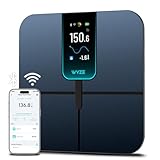
- FSA/HSA Eligible
- EXTRA-LARGE 4.3-INCH DISPLAY - This smart scale features a huge, customizable screen to view your body weight, body fat, and more at a glance. Choose the metrics you want to display on your scale on the app. Dimensions of the scale - 11.8*11.8*1.18 inch.
- WI-FI & BLUETOOTH CONNECTIVITY - Sync your data automatically via Wi-Fi or Bluetooth. Step on the scale without your phone nearby and still track your progress in the app. Perfect for busy, on-the-go users.
- 13 ESSENTIAL BODY METRICS - Track your weight, BMI, body fat percentage, muscle mass, heart rate, and more. Get precise, real-time results that help you stay on top of your fitness goals. Heart rate can only be displayed in the Wyze app.
- TRACK YOUR PROGRESS - Review trends on your weight and body composition changes right on the screen. Perfect for those focused on weight loss or muscle building. Beforing measuring, make sure the ground is flat or the smart scale is in a horizontal state when placed.
Accuracy expectations across the budget tier
All of these scales rely on bioelectrical impedance analysis, which means absolute accuracy is less important than consistency. Hydration, time of day, and recent activity affect readings across every brand mentioned here.
In practice, Wyze performs in line with its peers. Weight measurements are stable, and body composition trends move logically over time, which is what matters for fitness tracking rather than medical diagnostics.
Withings may edge ahead in repeatability, but the difference is marginal for most users. Wyze’s results are credible enough to support goal tracking when used under consistent conditions.
Which scale fits which type of user
If you want the simplest possible Fitbit experience and only care about weight, Fitbit Aria remains the cleanest option. If you want maximum metrics at the lowest cost and don’t mind app juggling, Xiaomi is still compelling.
Eufy suits users who prioritize a polished standalone app and don’t need deep ecosystem ties. Withings is best for those willing to pay more for perceived clinical rigor and long-term data continuity.
Wyze lands squarely in the middle. It offers unusually broad body composition tracking for the price, works smoothly in shared households, and integrates directly into Fitbit without demanding attention, making it one of the most balanced choices in the budget smart scale category.
Who This Scale Is Really For: Ideal Users, Limitations, and Use Cases
Viewed against the broader budget-scale landscape, Wyze’s appeal becomes clearer when you stop thinking in terms of raw sensor sophistication and start thinking about daily habits and ecosystem fit. This is a scale designed to quietly reinforce an existing fitness routine rather than redefine it.
Fitbit users who want more than just weight
The most obvious audience is anyone already invested in Fitbit’s ecosystem who feels limited by basic weigh-ins. Wyze fills a long-standing gap by pushing body fat percentage, lean mass, muscle mass, water weight, and bone mass directly into Fitbit without requiring a premium Fitbit scale.
For Fitbit smartwatch and tracker users, this matters because trends show up alongside activity, workouts, and heart rate data. That context makes body composition changes easier to interpret, especially when tied to training blocks, calorie targets, or recovery periods.
Budget-conscious users who still care about trends
Wyze is well suited to people who want meaningful longitudinal data but don’t need medical-grade precision. The scale’s real value is consistency over time, not single readings taken in isolation.
If you’re tracking fat loss, muscle gain, or general recomposition over months, Wyze gives you enough signal to understand direction and momentum. That’s the same use case most people rely on with significantly more expensive scales.
Shared households with mixed fitness goals
Multi-user support is one of Wyze’s quieter strengths. Automatic user recognition works reliably once profiles are established, and data separation remains clean even when several people use the scale daily.
This makes it practical for couples or families where one person is training seriously while another is focused on general wellness. Everyone gets their own metrics without manual profile switching or data confusion.
Casual wellness trackers who want depth without friction
Not everyone wants to obsess over charts, but many users still appreciate having richer data available when motivation dips. Wyze strikes a good balance by collecting a wide range of metrics while keeping day-to-day use simple.
Step on, step off, and the data syncs in the background. You can ignore the details until you’re ready to look deeper, which aligns well with how most people actually engage with health tech.
Where Wyze’s limitations matter
This is not the right scale if you expect clinically validated accuracy or advanced cardiovascular insights. Metrics like visceral fat and bone mass are estimates, and they should be treated as trend indicators rather than diagnostic tools.
Quick wins for a faster PC:
Clear out junk files and repair common Windows errorsFree Scan →Fix the driver behind crashes, sound loss and screen glitchesFind Drivers →Athletes with highly atypical body composition, or users who frequently weigh themselves under inconsistent conditions, may see more variability than they’d like. In those cases, higher-end models with tighter repeatability may feel more reassuring.
Use cases where it makes the most sense
Wyze fits best into routines where weigh-ins happen at the same time each day and progress is evaluated weekly or monthly. It pairs particularly well with strength training programs, calorie-controlled weight loss plans, and general fitness maintenance.
If your primary goal is to enrich a Fitbit-centered setup with body composition data at minimal cost, Wyze delivers exactly that. It doesn’t demand attention, subscriptions, or behavioral changes, which is ultimately why it works so well for the audience it’s built for.
Does It Meaningfully Improve a Fitbit Setup? Final Verdict on Value and Ecosystem Fit
Taken in context, Wyze’s smart scale feels less like a standalone gadget and more like a missing puzzle piece for Fitbit users who want a fuller picture of their health without changing platforms or paying more each month.
Do these 3 things before closing this tab:
1Fix the driver behind crashes, sound loss and screen glitches2Clear out junk files and repair common Windows errors3Scan for outdated or missing drivers - takes under a minuteThe real question isn’t whether the scale works, but whether it actually adds something meaningful to a Fitbit-centered routine rather than duplicating what users already have.
What Fitbit users actually gain
Fitbit excels at movement, activity intensity, heart rate trends, sleep staging, and recovery signals. What it doesn’t natively provide is regular body composition data beyond basic weight, unless you invest in Fitbit’s own higher-priced scales.
Wyze fills that gap cleanly. Body fat percentage, lean mass estimates, muscle mass, and water weight sync into Fitbit alongside daily weigh-ins, giving users a broader context for training progress or weight changes.
This matters most when the scale explains what the wrist can’t. Seeing weight stay flat while body fat trends down and muscle mass inches up is often the difference between staying motivated and abandoning a plan.
How well the integration fits into daily use
In practice, the Fitbit integration works best when you barely think about it. You step on the scale, Wyze syncs automatically, and Fitbit absorbs the data into its existing weight and body composition views without extra steps.
There’s no subscription gatekeeping, no secondary dashboard you’re forced to check, and no conflict with Fitbit’s own metrics. It behaves like a native extension rather than a workaround.
That seamlessness is important. If data friction creeps in, most users simply stop weighing themselves, and the scale becomes another forgotten bathroom accessory.
Where expectations should stay realistic
This doesn’t turn Fitbit into a clinical body analysis platform. The body composition metrics are based on bioelectrical impedance, which means hydration, timing, and consistency still matter.
Outdated Drivers Are Slowing You Down
One free scan finds every outdated or missing driver and matches the right update for your exact hardware.Free scan · exact hardware matchPC Slower Than It Used to Be?
A free scan shows the junk files, broken settings and background clutter dragging Windows down - then fixes them in one click.Free scan · Windows 10 & 11Fitbit users who already understand that wrist-based metrics are directional rather than absolute will be right at home here. Wyze follows the same philosophy: trends first, precision second.
If you’re chasing lab-grade accuracy or want deep metabolic or cardiovascular insights, this scale won’t change that equation. What it offers is consistency and context, not medical certainty.
Value compared to other smart scale options
Against similarly priced budget smart scales, Wyze stands out primarily because of its Fitbit compatibility. Many affordable scales either lock users into their own apps or rely on indirect syncing that breaks easily.
Compared to Fitbit’s own Aria lineup, Wyze undercuts on price while delivering comparable day-to-day utility for most users. You lose some brand-level polish, but you keep the data that actually influences behavior.
The Tool Desk
Outbyte PC Repair FREEClear out junk files and repair common Windows errorsFree Scan →Outbyte Driver Updater FREEFix the driver behind crashes, sound loss and screen glitchesFind Drivers →For households with multiple users, automatic recognition further strengthens the value proposition. Everyone gets clean data without turning weigh-ins into a shared tech chore.
The bottom line for Fitbit-centric users
Yes, it meaningfully improves a Fitbit setup, especially for users focused on weight management, recomposition, or long-term fitness trends rather than isolated daily numbers.
Wyze’s smart scale doesn’t demand loyalty, subscriptions, or behavioral changes. It quietly expands what Fitbit already does well by adding body composition context at a price that feels proportionate to the insight gained.
For Fitbit users who’ve been curious about body composition but hesitant to invest heavily, this is one of the easiest upgrades to recommend. It’s not flashy, it’s not perfect, but it fits naturally into the ecosystem—and that’s exactly why it works.
What’s actually slowing this PC down?
Pick the symptom - the matching free tool is one click away.
Quick Recap
Product prices and availability are accurate as of the date/time indicated and are subject to change. Any price and availability information displayed on Amazon at the time of purchase will apply.




