The Apple Watch award tied to Global Running Day was a limited-time challenge to record a 5-kilometer run—not a permanent “first 5K” badge. The 2024 challenge has ended, and a separate 2026 challenge was reported for June 3 but was not confirmed in an Apple announcement. You can still use Apple Watch to track and train for a 5K: Apple’s built-in Outdoor Run workout is the simplest option, and Fitness+ is not required.
What the Apple Watch 5K award was
Coverage published June 5, 2024, described a limited-edition Apple Watch Activity award for completing at least 5 kilometers—about 3.1 miles—on Global Running Day. The challenge was tied to that date, rather than being an ongoing achievement for running your first 5K. BGR’s 2024 report is the source for the original challenge details.
Apple’s award system includes different kinds of recognition, so the label matters. Regular Activity awards track ongoing goals and milestones; limited-edition awards are tied to particular events or dates. Fitness+ also offers awards for accomplishments, but those are not the same thing as a Global Running Day challenge. Apple’s Fitness+ page describes its awards and workout offerings.
Can you still earn the Global Running Day award?
The 2024 challenge date was June 5, 2024, so that specific award is no longer an active challenge and ordinarily cannot be earned retroactively. A separate report said Apple offered another Global Running Day 5K award on June 3, 2026. That date has also passed; because the report was not independently confirmed in an Apple announcement, treat it as a reported event, not an Apple-verified current offer. The 2026 report gives its date and account.
#1 Best Overall

- Athletic mesh upper with durable leather overlays for added dimension & midfoot support
- Charged+ midsole cushioning provides unmatched softness & all-day comfort
- Durable rubber outsole provides traction & durability with strategically-placed flex grooves for proper toe-off
- Upper contains at least 30% recycled content
- Weight: 10.2 oz , Lace type: Standard tie, NEUTRAL: For runners who need a balance of flexibility & cushioning
To see what is available to your account now, open Fitness on your iPhone and check Summary, Awards, or the current challenges area. The layout and labels can vary with software version and region. You can also check the relevant Activity or Fitness awards view on Apple Watch. A challenge appearing on your device is more useful evidence of your eligibility than an old news article.
How to record a 5K with Apple Watch
For the least complicated setup, use Apple’s built-in Workout app. A 5K is a distance, not a pace requirement: unless a specific challenge says otherwise, alternating running and walking still covers the distance.
Rank #2

- Athletic mesh upper with durable leather overlays for added dimension & midfoot support
- Charged+ midsole cushioning provides unmatched softness & all-day comfort
- Durable rubber outsole provides traction & durability with strategically-placed flex grooves for proper toe-off , Upper contains at least 30% recycled content
- Weight: 10.2 oz , Lace type: Standard tie
- NEUTRAL: For runners who need a balance of flexibility & cushioning
- Prepare the watch. Charge it, wear it snugly with the sensor against your skin, and allow location and motion/fitness permissions. If distance has seemed inaccurate, calibrate the watch with a normal outdoor walk or run.
- Open Workout and choose Outdoor Run. If running outside, wait for GPS to acquire a signal when the watch indicates it is ready.
- Start the workout. Follow the on-screen control, or let automatic workout detection begin if you have enabled it.
- Continue until the watch shows a little more than 5.00 km. A small buffer, such as 5.1 km, helps avoid a shortfall from GPS variation. The display may use miles instead; 5 km is approximately 3.11 miles.
- End and save the workout. Use the workout controls, choose End, then Save. Check that the completed run appears in Fitness or Health.
If a future challenge specifies a date, finish within the challenge’s stated local-day window. Avoid starting just before midnight and ending after it: a date-bound challenge may not count the activity as intended.
If you use another running app
A third-party app may count if it writes a compatible running workout to Apple Health and the challenge accepts that data. Eligibility depends on the challenge rules and how the app records the activity; an imported workout is not guaranteed to qualify. The 2024 report mentioned Health-synced third-party apps, but Apple’s built-in Outdoor Run remains the safest choice for minimizing permission and compatibility problems. BGR’s report discusses third-party syncing in connection with that event.
Do these 3 things before closing this tab:
1Clear out junk files and repair common Windows errors2Fix the driver behind crashes, sound loss and screen glitches3Repair Windows errors before they cause bigger problemsRank #3

- Men's stylish, slip-on sneakers
- SNUG FIT: Adjustable laces provide a secure fit
- FLEXIBLE UPPER: Soft textile upper is stretchy and comfortable
- CUSHIONED MIDSOLE: Cloudfoam midsole for step-in comfort and superior cushioning
- MADE IN PART WITH RECYCLED CONTENT: This product features at least 20% recycled materials. By reusing materials that have already been created, we help to reduce waste and our reliance on finite resources and reduce the footprint of the products we make
A beginner-friendly eight-week run-walk plan
If you do not currently run, do not try to force a continuous 5K on your first outing. This general framework uses three sessions per week, with at least one rest day between them. Start each session with a five-minute walk and finish with an easy walk. Keep the running portions comfortable; the aim is gradual practice, not speed.
| Week | Example main session |
|---|---|
| 1 | 30 seconds easy running, then 90 seconds walking; repeat 8–10 times. |
| 2 | 1 minute running, then 2 minutes walking; repeat 8 times. |
| 3 | 90 seconds running, then 2 minutes walking; repeat 7–8 times. |
| 4 | 2 minutes running, then 2 minutes walking; repeat 6–7 times. |
| 5 | 3 minutes running, then 2 minutes walking; repeat 5–6 times. |
| 6 | 5 minutes running, then 2 minutes walking; repeat 4–5 times. |
| 7 | 8–10 minutes running, then 2 minutes walking; repeat 3–4 times. |
| 8 | Use an easy run-walk session and progress toward covering 5 kilometers. |
This is a generic progression, not individualized medical or athletic advice. Repeat a week or ease back if the sessions feel too difficult; there is no need to increase the running interval on schedule. Aim for a pace at which you can speak in short sentences, and prioritize comfortable time on your feet over speed. Comfortable shoes and reflective clothing or a light in low visibility are sensible options, not requirements for recording a workout.
Rank #4
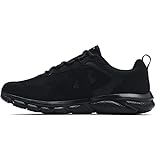
- Lightweight mesh upper with 3-color digital print delivers complete breathability
- Durable leather overlays for stability & that locks in your midfoot
- EVA sockliner provides soft, step-in comfort
- Charged Cushioning midsole uses compression molded foam for ultimate responsiveness & durability
- Solid rubber outsole covers high impact zones for greater durability with less weight
Stop for sharp pain, chest pain, faintness, severe shortness of breath, or other unusual symptoms. If you have a relevant medical condition or are unsure whether running is appropriate for you, seek advice from a health professional before starting.
Independent reader supportYour contribution helps us test, update, and keep practical guides available for everyone.Do you need Apple Fitness+ or another app?
No. Fitness+ is optional: the Workout app can record an Outdoor Run without a Fitness+ subscription. Fitness+ is useful if you want guided audio, treadmill sessions, or structured workout ideas. Apple lists audio-guided runs, workout sessions from 5 to 45 minutes, personalized recommendations and Custom Plans, and real-time metrics when used with Apple Watch. Its listed U.S. price was $9.99 per month or $79.99 per year after the stated trial, as shown on Apple’s page when checked August 18, 2026; availability and pricing can vary by region. See Apple Fitness+ details.
Best Value
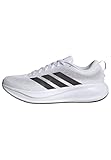
- Shoes with Cloudfoam midsole cushioning for comfort and support.
- Regular fit
- Laces
- Textile and synthetic upper
- Ortholite sockliner
Other app options
- Gentler Streak: Useful for viewing activity and recovery context. It should not be treated as a guarantee against injury or as a substitute for a dedicated beginner 5K plan. Gentler Streak.
- Strava: Offers social features and activity sharing; consider privacy preferences before sharing routes. Apple award eligibility is not guaranteed for its recorded or synced workouts. Strava.
- Nike Run Club: An option for guided runs and training content. Check its Apple Health permissions and do not assume every workout will satisfy an Apple challenge. Nike Run Club.
- Runna: A dedicated training-plan option if you want more structure than basic workout tracking. Runna.
Which Apple Watch is enough for a first 5K?
A beginner does not need the most expensive Apple Watch to record a normal 5K. Apple’s current lineup page lists the SE 3, Series 11, and Ultra 3. The SE is the value-oriented choice, Series is positioned as the general-purpose model, and Ultra is aimed at sports and demanding outdoor use. Choose based on features you will use beyond one run, such as battery needs or rugged outdoor capabilities—not because a first 5K requires an Ultra. Apple’s Watch lineup page lists the current models and positioning.
Why a run or award might not appear
- The challenge has ended. A date-specific award generally cannot be earned after its event window.
- The workout was not saved. Confirm that you chose Save rather than discarding it.
- The recorded distance was short. GPS can vary; check the saved workout and leave a buffer next time.
- The workout type did not match. An indoor treadmill session, walk, cycling workout, or manually entered record may not meet a challenge rule requiring an outdoor run.
- A third-party workout did not sync as expected. Check that the app has permission to write workouts to Health and that the workout appears there.
- The activity crossed the challenge date boundary. A challenge may require completion within its stated date window.
- The watch lost power or connection. Check whether a completed workout is present in Fitness or Health before assuming it counted.
If the workout is saved but an active award remains missing, check the challenge details and your device’s current software-specific Fitness or Activity screens. Apple’s support hub provides watch help, though the exact instructions depend on the software version. Apple Watch Support.
Quick Recap
Product prices and availability are accurate as of the date/time indicated and are subject to change. Any price and availability information displayed on Amazon at the time of purchase will apply.




