If your Apple Watch is not syncing with your iPhone, first check the connection icon in Watch Control Center: a red iPhone or red X means the devices are disconnected, while a green iPhone means they are connected. Bring them close together, check their wireless settings, and restart both in that order; troubleshoot missing notifications or app data separately if the connection is already active.
Apple’s first-line advice is: “Bring your Apple Watch and paired iPhone close together.” Follow the steps below and check the connection after each one. Save unpairing for later because it erases the Watch.
Start here: identify what “not syncing” means
“Not syncing” can mean the Watch is disconnected, a particular app or feature is not updating, or a specialized recovery or software-update problem is occurring. A cellular Watch being online does not necessarily mean every feature is syncing through the paired iPhone.
| What you see | What it may mean | Next step |
|---|---|---|
| Red iPhone or red X in Control Center | The Watch and iPhone are disconnected | Try the proximity, settings, and restart checks below |
| Green iPhone, but one feature or app is not updating | The devices are connected, but the issue may be feature- or app-specific | Check that feature’s settings and connection requirements |
| Pairing animation or red exclamation point | The Watch may need a recovery update or restore | Follow the separate recovery procedure below |
| “Unable to Verify Update” | The update may lack internet access or Watch storage | Follow the update-specific checks below |
1. Check the connection status
On current watchOS versions, press the side button to open Control Center. A red iPhone or red X indicates disconnection; a green iPhone indicates a connection. On watchOS 9 or earlier, open Control Center by touching and holding the bottom of the screen, then swiping up. Gestures and labels can vary by version.
#1 Best Overall

- Durable, woven cable with fast-charging capabilities for select Apple Watch models. Simply hold the connector near the back of the watch, where magnets cause it to snap into place automatically.
- Supports fast charging on Apple Watch Series 7 and later and Apple Watch Ultra models. Supports regular charge times on all other models.
- Compatible with all Apple Watch
- USB-C Cable Length: 1m or 3.2 feet
The Watch uses Bluetooth when the iPhone is nearby, then can use Wi-Fi when Bluetooth is unavailable. Cellular models with an active plan can use cellular when Bluetooth and Wi-Fi are unavailable. These paths switch automatically, but an alternate network connection does not guarantee that every feature is syncing through the paired iPhone.
2. Try the low-risk connection checks
- Bring the Watch and paired iPhone close together and wait briefly.
- On the iPhone, make sure Airplane Mode is off and Wi-Fi and Bluetooth are on.
- On the Watch, open Control Center and make sure Airplane Mode is off.
- Check Control Center again. If the devices remain disconnected, restart both normally and check again.
Apple recommends checking after each step rather than jumping straight to a reset. See Apple Support’s connection and pairing guidance.
3. Restart both devices normally
Use the normal shutdown and restart controls for your iPhone model and Apple Watch, then bring the devices together and check the connection. Do not force-restart the Watch as a routine first step; reserve it for an unresponsive or frozen device. Apple’s Apple Watch restart instructions explain the procedure for your software version.
Rank #2

- 【Safe and Fast Wireless Watch Charging】- Our wireless charger provides a safer and faster charging mode,for a more convenient charging experience,Please take off the watch case and use a 5V/1A adapter or original adapter(ETL/UL Certified).
- 【Wide Compatible】- Our wireless batteries charger is compatible with iWatch series Ultra2/Ultra/12/11/10/9/8/7/6/SE2/SE/5/4/3/2 (including the 38 mm/40 mm/41 mm/42 mm/44 mm/45 mm Version).Please take off the watch case and use a 5V/1A adapter or original adapter(ETL/UL Certified).
- 【Portable design】- This 3.3Ft charging cable for apple watch is convenient to carry around, especially for traveling,and is suitable as a backup charger for your watch.Please take off the watch case and use a 5V/1A adapter or original adapter(ETL/UL Certified).
- 【Advanced Safety】- Built-in protection device with safety functions such as overcurrent,overvoltage,short circuit and overtemperature protection. Protect your watch battery from overcharging damage.pls note:this is support usb c port,so pls use a usb c PD adapter,and 20w-30w is the best to use.Please take off the watch case and use a 5V/1A adapter or original adapter(ETL/UL Certified).
- 【12-Month Quality Assurance 】- As a responsible brand seller, you will receive xiwxi's 12-month Quality assurance and friendly customer service.Please take off the watch case and use a 5V/1A adapter or original adapter(ETL/UL Certified).
4. Check Wi-Fi compatibility and network restrictions
Apple Watch can use a Wi-Fi network the paired iPhone has connected to while linked with the Watch. Apple says Series 5 and earlier and Apple Watch SE support only 2.4 GHz Wi-Fi; other supported models may use 2.4 GHz or 5 GHz. The Watch does not connect to public networks requiring a login, subscription, or configuration profile. Check Apple’s Wi-Fi guidance for details.
Free tools Windows power users keep installed
One-click scans. No signup required.
5. If the Watch shows a recovery screen
A pairing animation asking you to bring the Watch near an iPhone, or a persistent red exclamation point, is a distinct recovery situation—not the usual first response to a disconnected icon.
- Keep an unlocked iPhone nearby, connected to Wi-Fi, with Bluetooth on and iOS 15.4 or later.
- Put the Watch on its charger.
- Double-click the Watch side button and follow the prompts on the iPhone.
- If recovery fails, try a 2.4 GHz Wi-Fi network and avoid captive or 802.1X networks.
If the red exclamation point persists, Apple says service may be needed. Follow Apple’s recovery instructions for the exact screen you see.
Rank #3

- Compatible: iPhone Watch Charger supports for all Apple Watch Series 9,8,7,6,5,4,3,2,1, Series SE. Also compatible with all watch sizes, including all 38mm, 40mm, 41mm, 42mm, 44mm and 45mm versions. Apple Watch Ultra, Apple Watch Sports.
- iWatch Charger Fast Charging: Our iWatch Charger uses the original adapter, which provides a safer and faster charging mode. It takes less than 3 hours to fully charge. For a more perfect charging experience, please take off the watch case.
- Safe and Reliabl: The Apple Watch Charger Cable made of high quality ABS+PC and pure copper wire, after more than 10,000 tests, it can automatically detect your equipment and provide a stable, fast and safe charging experience.
- Perfect Length and Lightweight: Small, light, portable, easy to travel. The perfect charging cable is suitable for your travel bag or pocket, which can be carried around or used at home, office, hotel, car to charge your watch anytime and anywhere.
- Packing: 1Pack 20W USB C Origina Charger with 6FT Apple Watch Magnetic Fast USB C Cable. If you have any questions welcome to find us!
6. If an update says “Unable to Verify Update”
For this specific message, check that the Watch has internet access through the iPhone, Wi-Fi, or cellular; restart the Watch and try again; and free Watch storage by removing synced media and then apps if needed. If those steps do not work, Apple instructs readers to unpair and update. Apple says the iPhone creates a new Watch backup before erasing content during that unpairing flow. See Apple’s Watch update guidance.
7. If only notifications, messages, calls, or one app is affected
If Control Center shows a green iPhone, the devices are connected; investigate the affected feature rather than assuming the entire Watch is disconnected. Check the relevant app and notification settings, and whether the iPhone or Watch is locked or using Focus. Apple’s notification guidance explains how alerts are routed.
Do these 3 things before closing this tab:
1Clear out junk files and repair common Windows errors2Fix the driver behind crashes, sound loss and screen glitches3Repair Windows errors before they cause bigger problemsMessages and calls can have different requirements depending on whether they use iMessage, SMS/MMS, Wi-Fi, or cellular. Review Apple’s Messages on Apple Watch guidance for the situation that applies. For an issue limited to one third-party app, check that app’s settings and support before resetting the Watch.
Rank #4
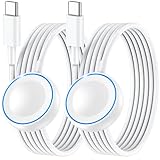
- ⚡𝟓𝐖 𝐅𝐀𝐒𝐓 𝐂𝐇𝐀𝐑𝐆𝐈𝐍𝐆 𝐒𝐔𝐏𝐏𝐎𝐑𝐓 – 𝟓𝟎% 𝐅𝐀𝐒𝐓𝐄𝐑 𝐂𝐇𝐀𝐑𝐆𝐈𝐍𝐆: Featuring the usb c fast charger technology, our iwatch charger fast charging delivers up to 50% faster charging speed compared to standard chargers. It only takes about 1 hour to fully charge the Apple Watch Series 11, reducing your wait time and ensuring your watch is always ready to go in a shorter time. (Tips: For faster and more efficient charging, please use a 20W or higher USB C charger and remove your watch case before charging.) Please Note: Fast charging requires Series 7 or later, Ultra series and New SE 3; earlier series 6 models and series SE 1-2 receive standard 2.5W charging.
- ⌚𝐓𝐑𝐀𝐕𝐄𝐋 𝐄𝐒𝐒𝐄𝐍𝐓𝐈𝐀𝐋𝐒(𝟒𝐅𝐓)– 𝐏𝐄𝐑𝐅𝐄𝐂𝐓 𝐅𝐎𝐑 𝐀𝐍𝐘 𝐒𝐂𝐄𝐍𝐀𝐑𝐈𝐎: With its sleek and lightweight design, this for Apple Watch fast charging cable features a 1.2m (4ft) long cord for extra reach and flexibility. Easily charge from a wall outlet behind the nightstand, under your desk, or in the car without being stuck close to the power source. It’s long enough for flexible charging setups in hotels, airports, or at your desk, yet still easy to pack and organize—ideal for travel, home, and office.
- ⌚𝐂𝐎𝐌𝐏𝐀𝐓𝐈𝐁𝐋𝐄 𝐖𝐈𝐓𝐇 𝐀𝐋𝐋 𝐀𝐏𝐏𝐋𝐄 𝐖𝐀𝐓𝐂𝐇 𝐌𝐎𝐃𝐄𝐋𝐒: This fast charger for Apple Watch is fully compatible with all Apple Watch models, 5W fast charging for Series Ultra 4/Ultra 3/ Ultra 2/Ultra 1, Series 12/11/10/9/8/7 (41/42/45/46/49mm)/SE3, 2.5W charging for Series 6/5/4/3/2 and SE/SE2 models (38/40/42/44mm). No matter the model, you can count on stable and efficient charging. Please note that our charger is slightly bulkier than the original. As a result, it is not compatible with standard market accessories or holders.
- 🧲𝐌𝐀𝐆𝐍𝐄𝐓𝐈𝐂 𝐃𝐄𝐒𝐈𝐆𝐍 𝐅𝐎𝐑 𝐄𝐀𝐒𝐘 𝐂𝐎𝐍𝐍𝐄𝐂𝐓𝐈𝐎𝐍: The strong magnetic design of Apple watch charger fast charging ensures precise alignment and connection with your watch. Simply place your watch on the charger, and it will automatically snap into place, offering a smooth, hassle-free charging experience.
- 🔋𝐒𝐀𝐅𝐄𝐓𝐘 𝐅𝐄𝐀𝐓𝐔𝐑𝐄𝐒 – 𝐎𝐕𝐄𝐑𝐂𝐇𝐀𝐑𝐆𝐄 𝐀𝐍𝐃 𝐎𝐕𝐄𝐑𝐇𝐄𝐀𝐓 𝐏𝐑𝐎𝐓𝐄𝐂𝐓𝐈𝐎𝐍: Equipped with multiple built-in safety mechanisms, including overcharge, overheat, and short-circuit protection, this for iphone watch charger ensures your device is charged safely and efficiently, helping to extend the lifespan of your watch.
8. Unpair and pair again only after the earlier checks
Unpairing is a later troubleshooting step: it erases the Watch. If you unpair through the paired iPhone, Apple says the process removes Activation Lock. Erasing the Watch directly without unpairing through that iPhone leaves Activation Lock in place, and you will need the Apple Account and password used to set it up.
- Keep the paired iPhone and Watch close together.
- Open the Watch app on the iPhone and tap My Watch → All Watches.
- Tap the information button next to the Watch, then tap Unpair Apple Watch and confirm.
- Follow the prompts to set up the Watch again.
Before unpairing, review Apple’s unpair and erase instructions and make sure you understand which data is backed up. Apple Watch backups do not include everything, so do not assume every recent record will be recoverable.
Independent reader supportYour contribution helps us test, update, and keep practical guides available for everyone.Frequently Asked Questions
What does a red iPhone or red X mean on Apple Watch?
Apple says either icon in Watch Control Center means the Watch is disconnected from its paired iPhone. A green iPhone icon indicates a connection.
The Tool Desk
Outbyte PC Repair FREEClear out junk files and repair common Windows errorsFree Scan →Outbyte Driver Updater FREEFix the driver behind crashes, sound loss and screen glitchesFind Drivers →Best Value

- Compatible with all Apple Watch: Our wireless charger is compatible with iWatch series 12 11 10 9 8 7 6 SE3 SE2 SE 5 4 3 2 1 Ultra4 Ultra2 Ultra3 including 38 mm 40 mm 41 mm 42 mm 44 mm 45 mm 49mm Version. Also compatible with Airpods 4 AirPods Pro 3 AirPods Pro 2
- Efficient Smart Charging: Our watch charger provides safe charging mode, it takes 2-3 hours to fully charge your S12-S4. Please note: Charging Ultra 4 3 2 1 will take less than 4 hours. We suggest that you purchase our store's 5W fast charging version for your Ultra series
- Multiple Protection: Built-in advanced chip with over-current, over-voltage, short-circuit, over-charge and over-temperature protection and other safety features. Protect your watch battery against damage
- Strong Magnetic Adsorption: The Watch Charger with built-in magnet has strong adsorption perfectly snaps and centers to the charging coil on the back of your watch, stable and will not fall off, resulting in a wonderful charging experience
- Travel Essentials: This 3.3FT 1M Watch charging cable is portable to carry around, especially for traveling and is suitable as a backup charger for your watch
Can Apple Watch use Wi-Fi if my iPhone is not nearby?
Yes. The Watch can use a Wi-Fi network the paired iPhone has connected to while linked with the Watch. Public networks that require a login, subscription, or profile are not supported.
What should I do if I see a pairing animation or red exclamation point?
Follow the recovery prompts with an unlocked, nearby iPhone on Wi-Fi and Bluetooth, and put the Watch on its charger. If recovery fails, try 2.4 GHz Wi-Fi; contact Apple about service if the red exclamation point persists.
Will unpairing Apple Watch remove Activation Lock?
Unpairing through the paired iPhone removes Activation Lock. Erasing the Watch directly without that iPhone does not; you will need the Apple Account and password used to set it up.
What should I do if an update says “Unable to Verify Update”?
Check the Watch’s internet access, restart it, and free storage by removing synced media and then apps if needed. If that fails, follow Apple’s update guidance for unpairing and updating.
The Bottom Line
Check the icon, bring the devices close, verify wireless settings, and restart both, checking the connection after each step. Use the specific recovery or update procedure for a pairing animation, red exclamation point, or “Unable to Verify Update” message. Unpair only after the simpler checks, and understand the Activation Lock and backup implications before proceeding.
Quick Recap
Product prices and availability are accurate as of the date/time indicated and are subject to change. Any price and availability information displayed on Amazon at the time of purchase will apply.




