If your Fitbit Charge 4 won’t charge, has a black screen, or seems to lose battery unusually fast, first check the model-specific charging cable and contact alignment, then try Fitbit’s documented restart. The Charge 4 is rated for up to seven days per charge, but regular GPS tracking can bring expected battery life to about four days—and that rating is not a guarantee for an older individual tracker.
First identify the problem: charging, unresponsive, or draining
These symptoms can have different causes, so start with what the tracker is doing:
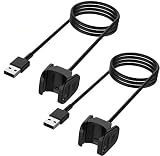
- It does not appear to charge: check the Charge 4 cable, its connection to the tracker, and whether the charging screen appears.
- The screen is black or the tracker will not respond: connect it to the charger and try the documented button restart.
- It works but the battery runs down quickly: consider GPS use and charging behavior before concluding the battery has failed.
User complaints and community questions show that people report charging and battery trouble, but they do not establish how common the problem is. The available official guidance also does not establish that a particular firmware release universally causes rapid drain.
Check that the Charge 4 is making a charging connection
- Use a Charge 4-specific charging cable. Fitbit’s Charge 4 manual says the Charge 3 charger does not work with Charge 4.
- Clip the charger on securely so its pins lock onto the tracker’s gold contacts.
- Look for the charging confirmation: a connected Charge 4 vibrates and displays a battery icon.
- Allow about one to two hours for a full charge, according to the manual. If the tracker is completely discharged and the screen remains black, Google’s general Fitbit charging guidance recommends giving it time on a known-good wall power source and inspecting the cable and contacts. This is general Fitbit guidance, not a Charge 4-specific repair procedure.
If the battery icon or vibration never appears after checking the fit, cable, and power source, the issue may be the charging connection rather than battery runtime. Do not assume a new cable will resolve battery aging or a hardware failure.
What’s actually slowing this PC down?
Pick the symptom - the matching free tool is one click away.
#1 Best Overall

- Plugs into USB port
- Securely holds tracker for optimal charging
- Designed and manufactured by Fitbit
- Country of origin is China
Restart an unresponsive Charge 4 without erasing data
If the tracker responds to the screen
Open Settings > About > Reboot Device.
If it is unresponsive
- Connect Charge 4 to its charging cable.
- Hold the tracker button for eight seconds.
- Release it when the tracker vibrates and shows the smile icon.
Fitbit says a restart reboots the device without deleting data. Do not insert a pin or paper clip into the small opening on the back: the manual identifies it as the altimeter sensor and warns that inserting objects can damage the tracker. Google’s restart and charging guidance covers the restart method as well.
What battery life to expect—and why GPS matters
Fitbit’s Charge 4 manual says: “A fully-charged Charge 4 has a battery life of up to 7 days. Battery life and charge cycles vary with use and other factors; actual results will vary.” The manual says regular GPS tracking brings expected life to about four days. A Fitbit Community moderator likewise identifies built-in GPS as a drain factor and gives an estimate of up to four days with regular use; that is usage guidance, not a measured statistic for all owners.
Rank #2

- Proven Compatibility: Only Compatible with Fitbit Charge 4 Heart Rate Fitness Wristband. Please check it is totally same with your original Fitbit Charger before you order it
- Fast Charging Speed: Original high-speed charging, do not worry this replacement charging cable is wasting your precious time
- Enhanced Durability: With 6000+ bend lifespan and reinforced cable joint, this charger is more than ready to handle the stresses and strains of daily use
- Safety & Reliability: The charging cable includes built-in over-current, over-voltage, short-circuit and over-temperature protection.Premium quality copper wire and pin gold-plated ensure charging safety and reliability
- What You Get: 1 pack 3.3Ft(1M) replacement charger for fitbit charge 4, our 12-month customer support and 24-hour friendly customer service, we're here to help with any product issues
Charge 4’s Dynamic GPS tries to use a nearby phone’s GPS sensors when available and falls back to built-in GPS when the phone is not nearby or moving. For long GPS activities, Fitbit recommends keeping the phone nearby where possible. If the battery drain appears mainly during GPS exercise rather than ordinary wear, GPS use is a useful clue—but changing how you use GPS cannot repair a worn or faulty battery.
Reduce avoidable battery demand and track the pattern
- Note whether the battery drops quickly during GPS activities or also during ordinary wear.
- Keep your phone nearby during long GPS activities where practical, so Dynamic GPS can try to use the phone’s sensors.
- Charge Charge 4 before starting a software update. The manual says updates consume battery power and require at least 50% charge to begin.
These steps address documented usage demands; they do not prove what is wrong with an individual tracker. A short runtime alone does not confirm battery failure.
Rank #3

- ▶Compatible with: This charger compatible with Fitbit Charge 3 & Charge 4 activity tracker.【Not fit for Charge 2, Charge 1st or any other model】
- ▶Premium & Speedy: The Charge 3 & Charge 4 charging cable is made of high quality wire, provides a stable performance and a fast charging, about an hour a full charge.
- ▶Safe Protection: The charger cable built in smart chip, protect your Charge 3 from over-current, over-voltage, over-circuit protection, offers a safe environment for charging.
- ▶Convenient and Easy to Use: To get a boost charging just plug it into USB port on your PC, laptop, notebook, wall charger or car charger. Geting a better experience, we suggest you to use the recommended adapter (5V 1A).
- ▶Package includes: 1 x 3.3ft/100cm Charger for Charge 3 & Charge 4 (watch is not included). with sincerely after-sales service, if have any question we will deal with it for you within 24 hours.
When to contact Fitbit support
If a known-good power source and correctly fitted Charge 4 cable do not produce a charging indication, or a restart does not restore operation, contact Google Fitbit support. The official guidance reviewed here does not provide a consumer battery-replacement procedure for Charge 4, so avoid an improvised teardown or treating a replacement battery as a confirmed fix.
Google lists Charge 4’s minimum security-update period through March 2024 in its device support information. That date is relevant context for an older tracker, but it does not explain the cause of a particular charging problem or battery drain.
Quick Recap
Best Value

- 1.Wall charger + charging cord Compatible with Fitbit Versa 3 & Versa 4 & Sense 2 & Sense, Pixel Watch 3/Pixel Watch 2 Smartwatch. Magnetic Charging Cable make charging your watch utterly effortless. You do not have to remove the case or bands when charging with this charger
- 2. [Raw Charging speed] The charger kit provides raw charging speed for about 1 hour on a full charge. Note: Please use the recommended USB adapter (5V/1A)。 Lightweight and portable: This charger is compact in size and light in weight, making it easy to carry and use. It is suitable for travel, work or daily life use.
- 3. Simple and easy to use: watch in the charger to start charging. The product also comes with a USB interface, which can be connected and used through a computer or other device.
- 4. Safety protection: The charger is made of high-quality materials and is equipped with a safety protection function to ensure that your device will not be damaged during use.
- 5. Reliable and durable: Due to its high-quality materials and manufacturing technology, the watch charger has a long life and is durable, and can always work normally after multiple uses.
Product prices and availability are accurate as of the date/time indicated and are subject to change. Any price and availability information displayed on Amazon at the time of purchase will apply.




