The Fitbit-wide syncing outage was on July 15, 2026, and it has been resolved. Google recorded the incident as affecting all users for 6 hours and 40 minutes. As of August 12, 2026, the available status check showed Google Health operational, so a Fitbit that still will not sync is more likely to have an account, app, Bluetooth, phone, or device-specific problem—although isolated reports can continue.
Fitbit is not confirmed to be experiencing another platform-wide outage as of August 12, 2026. The major Google Health sync incident occurred on July 15, 2026, affected Fitbit and Pixel Watch users, and lasted 6 hours and 40 minutes according to Google’s Health Status Dashboard. A current-status check at 07:50 UTC on August 12 reported the service operational, although individual users may still be experiencing device, account, Bluetooth, or app-specific problems.
If your Fitbit is not syncing now, check the service status before resetting anything. If there is no broad incident, work through the account, app, connection, restart, update, and re-pairing steps below. Avoid a factory reset until you have protected any data that may still be stored only on the device.
What happened during the July 15 Fitbit outage?
Google’s Health Status Dashboard recorded the July 15 incident as Sync not working for all users.
The disruption lasted 6 hours and 40 minutes. Contemporary reporting said Fitbit and Pixel Watch owners could not reliably sync activity, sleep, and other tracker data into the app.
Windows Errors? Fix Them Before They Spread
Repair common Windows errors and clear accumulated junk for a smoother, more stable PC - no reinstall needed.Free scan · no reinstallCrashes, No Sound, or Screen Glitches?
Random freezes, missing sound and display glitches usually trace back to one bad driver. Find and replace yours safely.Free scan · under a minute#1 Best Overall
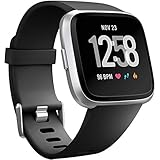
- ✅Compatible Models: The bands compatible with Fitbit Versa 2, compatible with Fitbit Versa, compatible with Fitbit Versa Lite, not compatible with Fitbit Versa 3, not compatible with Fitbit Versa 4, not compatible with Fitbit Sense, not compatible with Fitbit Sense 2. Notice: the smart watch not included
- ✅Premium Material: The bands compatible with Fitbit Versa 2 bands is made of soft and flexible elastomer, lightweight and sweat resistant. Premium material can prevent skin from irritation. Very soft and comfortable to wear
- ✅Buckle + Notch Design: The buckle is made of stainless steel, easy to assemble and resize. Besides, there is a notch under the ring, can double hold your band securely in place and secure the extra length
- ✅Two Sizes: The bands compatible with Fitbit Versa 2 bands for women have two sizes, small size for 5.5 "-7.2" wrist, large size for 7.2 "-8.7" wrist
- ✅More Colors Choice: Various black, white, rose pink, plum, lavender, fuchsia, dark green, pink, slate blue, gray, teal, navy blue, etc available for your watch, can personalize your watch to fit your mood and outfit in daily life
The problem was broader than a single watch failing to connect over Bluetooth. The incident also affected Google Health Coach’s Ask and Summaries features. However, that does not mean every Fitbit feature stopped working or that every user lost data.
Google did not publicly specify the root cause in the incident information reviewed. There is therefore no evidence-based reason to blame a particular Fitbit model, Bluetooth, an app update, or the transition from Fitbit accounts to Google Accounts.
Is Fitbit down right now?
There is no evidence in the reviewed official status history of another widespread device-sync incident on August 12, 2026. StatusGator reported Fitbit operational at 07:50 UTC that day. Its monitoring also showed individual reports involving devices shutting down, connection failures, Android app-opening problems, and earlier Charge 6 syncing complaints.
Those reports are consistent with isolated or intermittent problems, not proof that Fitbit is down for everyone. Before troubleshooting, check the Google Health Status Dashboard. If it shows an all-user sync incident, repeated Bluetooth resets and factory resets are unlikely to help and could put locally stored data at risk.
Do these 3 things before closing this tab:
1Repair Windows errors before they cause bigger problems2Fix the driver behind crashes, sound loss and screen glitches3Clear out junk files and repair common Windows errorsCould the outage have erased Fitbit data?
There is no evidence that the July 15 outage permanently erased everyone’s data. Fitbit and Pixel Watch devices can retain some information locally, so data recorded during the disruption may have been uploaded after service resumed. That recovery was described as possible, not guaranteed.
Google’s documentation explains that syncing transfers data collected by the device to the Google Health account. Most Fitbit trackers and watches sync through Bluetooth Low Energy with a nearby phone or tablet. Fitbit Aria and Aria 2 scales use Wi-Fi instead. Fitbit devices generally sync automatically during the day and when the Google Health app is opened while the device is nearby.
After service restoration, open the app with the Fitbit close to your phone and allow time for the backlog to upload. Compare the recovered activity, sleep, and exercise records with what the device displays. Do not assume that a successful connection means every missing record has been restored.
How to fix Fitbit syncing problems
Follow these steps in order. The sequence is designed to preserve locally stored activity before using more disruptive options.
Free tools Windows power users keep installed
One-click scans. No signup required.
1. Check for a Google Health outage
Look at the Google Health Status Dashboard before changing device settings. A confirmed broad incident requires a service-side fix, not a new charger or factory reset. Save a screenshot of any important information shown on the Fitbit itself while you wait.
Rank #2

- 【Superb Visual Experience & Effortless Operation】Diving into the latest 1.58'' ultra high resolution display technology, every interaction on the fitness watch is a visual delight with vibrant colors and crisp clarity. Its always on display clock makes the time conveniently visible. Experience convenience like never before with the intuitive full touch controls and the side button, switch between apps, and customize settings with seamless precision.
- 【Comprehensive 24/7 Health Monitoring】The fitness watches for women and men packs 24/7 heart rate, 24/7 blood pressure and blood oxygen monitors. You could check those real-time health metrics anytime, anywhere on your wrist and view the data record in the App. The heart rate monitor watch also tracks different sleep stages for light and deep sleep,and the time when you wake up, helps you to get a better understanding of your sleep quality.
- 【120+ exercise modes & All-Day Activity Tracking】There are more than 120 exercise modes available in the activity trackers and smartwatches, covering almost all daily sports activities you can imagine, gives you new ways to train and advanced metrics for more information about your workout performance. The all-day activity tracking feature monitors your steps, distance, and calories burned all the day, so you can see how much progress you've made towards your fitness goals.
- 【Messages & Incoming Calls Notification】With this smart watch fitness trackers for iPhone and android phones, you can receive notifications for incoming calls and read messages directly from your wrist without taking out your phone. Never miss a beat, stay in touch with loved ones, and stay informed of important updates wherever you are.
- 【Essential Assistant for Daily Life】The fitness watches for women and men provide you with more features including drinking water and sedentary reminder, women's menstrual period reminder, breath training, real-time weather display, remote camera shooting, music control,timer, stopwatch, finding phone, alarm clock, making it a considerate life assistant. With the GPS connectivity, you could get a map of your workout route in the app for outdoor activity by connecting to your phone GPS.
2. Confirm the app and Google Account
Google’s 2026 account transition is an important diagnostic branch. Users could no longer access Fitbit with a standalone Fitbit account after May 19, 2026. Fitbit users needed to move their account to Google to continue using the service, and Google Accounts are required for the Google Health app and newly released Fitbit and Pixel devices.
Make sure you are signed into the Google Account that received your Fitbit data during migration. A successful login to a different Google Account can make historical data and a device appear to be missing even when the account is working correctly.
3. Open Google Health and manually sync
Put the Fitbit near the phone or tablet, open Google Health, and try a manual sync:
- Open the Today tab.
- Pull down to refresh.
- If that does not work, open Connections and select Sync, where that option is shown.
Keep the app open for a few minutes if the device has several hours or days of unsynced records. Do not repeatedly remove the device or reset it while a backlog may still be stored locally.
4. Check Bluetooth and internet access
Google Health needs both a working internet connection and Bluetooth access. Confirm that:
- Bluetooth is enabled on the phone or tablet.
- Google Health has permission to use Bluetooth and nearby devices.
- The phone has internet access through Wi-Fi or mobile data.
- The Fitbit is charged and close to the phone.
Toggle Bluetooth off, wait a few seconds, turn it back on, then reopen Google Health and retry the sync. If your phone uses battery or background-activity restrictions, allow Google Health to operate in the background.
5. Remove competing phone or tablet connections
A Fitbit may struggle when another nearby phone or tablet is still paired with it. Check devices used previously, including an old phone, tablet, or a family member’s device. On secondary devices, forget or remove the Fitbit from Bluetooth settings and close the Fitbit or Google Health app.
What’s actually slowing this PC down?
Pick the symptom - the matching free tool is one click away.
Then retry with only the intended phone nearby. This step is especially useful when the Fitbit connects intermittently, appears in Bluetooth settings but not in Google Health, or keeps reconnecting to another device.
6. Restart the Fitbit and phone
Restart both devices before attempting a more destructive fix. Google’s troubleshooting guidance says a normal device restart does not erase activity data. The exact button sequence varies by Fitbit model, so use the model’s normal restart command rather than holding buttons indefinitely or selecting a reset option.
Rank #3
![SAMSUNG Galaxy FIT 3 [2025, 40MM] 1.6' AMOLED Display | IP68 Water Resistant | 14 Days Battery Life | 100+ Watchfaces | 100+ Exercise Modes | International Model (Fast Charger Bundle, Black)](https://m.media-amazon.com/images/I/418RlYE+wfL._SL160_.jpg)
- Vibrant 1.6” AMOLED Display – Large, high-res screen with smooth touch for easy navigation
- 5ATM & IP68 Water Resistance – Swim-ready and dust-resistant for active lifestyles
- Up to 14 Days Battery Life – Powerful 208mAh battery for long-lasting performance
- 101+ Workout Modes with Auto Detection – Automatically tracks common workouts for seamless fitness tracking. Advanced Health Tracking – Includes sleep coaching, SpO2, heart rate, and snore detection
- International Model No Warranty in the US. ONLY compatible with Android devices. Samsung Pay - Not Supported. NOT compatible with iPhone or iOS devices.
After both devices restart, turn Bluetooth back on if necessary, open Google Health, and try the manual sync again.
7. Install available updates
Update the phone’s operating system, Google Health, and Fitbit firmware when updates are available. An outdated app or device firmware can create a connection problem that resembles an outage. Keep the Fitbit charged and near the phone while firmware installation completes.
If the problem began immediately after an update, do not assume the update caused the July 15 incident or the current failure. The official incident record did not identify a model-specific or update-related cause.
8. Forget and re-pair the Fitbit
Use this step only after checking the service, account, app, Bluetooth, competing pairings, and updates.
- Remove the Fitbit from the device list in Google Health.
- Open the phone’s Bluetooth settings and forget the Fitbit there as well.
- Restart the phone if the old pairing remains visible.
- Open Google Health and set up the Fitbit again.
Re-pairing can repair a damaged local connection, but it may not solve an account-side or Google Health service problem. If the dashboard shows an outage, wait for restoration before taking this step.
9. Use a factory reset only as a last resort
A factory reset can erase locally stored unsynced activity statistics, alarms, goals, and notification settings. That makes it a particularly risky first response after an outage: the device may contain the only remaining copy of recent activity.
Try to sync or obtain support before resetting. If a reset is unavoidable, understand that it may permanently remove records that never reached Google Health. A factory reset is more appropriate for a persistent device-specific fault after the service is confirmed operational and ordinary re-pairing has failed.
Independent reader supportYour contribution helps us test, update, and keep practical guides available for everyone.What if the Fitbit also will not charge or turn on?
A charging or power failure is a separate branch from a Google Health server outage. Inspect the charging contacts on the device and the cable pins, clean them carefully as recommended by Google, and try a known-good power source. Leave the device charging long enough to determine whether it is deeply discharged.
A Fitbit replacement charging cable may be reasonable if the cable is damaged or the device charges only when held at a particular angle. It will not repair a cloud-side sync outage, and replacing the cable should not be treated as a fix for missing data when the device powers on normally.
Rank #4

- Fitbit Charge 6 tracks key metrics from calories and Active Zone Minutes to Daily Readiness and sleep; move more with 40+ exercise modes, built-in GPS, all-day activity tracking, 24/7 heart rate, automatic exercising tracking, and more[1]
- See your heart rate in real time: Just link your Charge 6 to compatible exercise machines, like treadmills, ellipticals, and more[2]; and stay connected with YouTube Music controls[3]
- Tune into your body: Track your response to stress with a stress management score; learn about the quality of your sleep with a personalized nightly Sleep Score; and wake up more naturally with the Smart Wake alarm
- Run your routine with Google essentials: Find your way seamlessly during runs or rides with turn-by-turn directions from Google Maps on Fitbit Charge 6; and when you need a snack break on the go, just tap to pay with Google Wallet[1,4]
- Unlock more with Google Health Premium: With a premium membership, get personalized coaching that’s built with Gemini and adapts to your life[7]; get a 3-month trial at no cost to you[5] (Google Health Premium subscription sold separately)
Should you buy a new Fitbit?
Not to solve the July 15 outage. Buying another tracker cannot repair a Google Health service incident, migrate missing records, or fix a problem with the wrong Google Account.
Quick wins for a faster PC:
Fix the driver behind crashes, sound loss and screen glitchesFind Drivers →Repair Windows errors before they cause bigger problemsFix Now →Replacement hardware becomes reasonable only when the service is operational and the existing device has an independent fault, such as a failed battery, broken display, charging failure, or repeated shutdowns after troubleshooting. For readers replacing an aging tracker, the Fitbit Charge 6 is an option to consider as a replacement or upgrade—not as an outage remedy. Verify model compatibility, account support, and current availability before purchasing.
When to contact support
Contact Google or Fitbit support when:
- the official status page is operational but your device still will not sync after the full sequence above;
- your migrated Google Account is missing historical Fitbit data;
- the device repeatedly shuts down or will not charge;
- re-pairing fails on more than one compatible phone or tablet; or
- important activity remains missing after service restoration and several manual sync attempts.
When requesting help, include the Fitbit model, phone model, operating-system version, Google Health version, approximate time the sync stopped, whether the device still shows the activity locally, and whether another phone or tablet has been paired with it. Do not factory-reset the device before support has advised you if unsynced records may matter.
Frequently Asked Questions
Is Fitbit down right now?
The documented broad incident was resolved. As of 07:50 UTC on August 12, 2026, StatusGator reported Fitbit operational. Individual device, account, Bluetooth, and app problems can still occur while the platform is operational.
Did the Fitbit outage delete my data?
Possibly. Fitbit devices can retain some data locally, so activity recorded during the outage may sync after service resumes. Recovery was not guaranteed, so compare the device’s records with Google Health rather than assuming everything returned.
The Tool Desk
Outbyte Driver Updater FREEScan for outdated or missing drivers - takes under a minuteDriver Scan →Outbyte PC Repair FREEClear out junk files and repair common Windows errorsFree Scan →Do I need a Google Account for Fitbit?
A standalone Fitbit account could no longer be used after May 19, 2026. Confirm that you migrated to Google and are signed into the Google Account associated with your Fitbit history.
Should I factory-reset my Fitbit if it will not sync?
No. A factory reset can erase locally stored unsynced activity statistics, alarms, goals, and notification settings. Check service status and try safer troubleshooting steps first.
The Bottom Line
The documented Fitbit-wide sync outage happened on July 15, 2026, lasted 6 hours and 40 minutes, and was resolved. As of August 12, the available status check showed Google Health operational. For a current failure, verify the status page and Google Account first, then check Bluetooth, internet access, competing pairings, restarts, and updates. Re-pair only afterward, and treat a factory reset as a last resort because it can erase unsynced data.




