Quick wins for a faster PC:
Fix the driver behind crashes, sound loss and screen glitchesFind Drivers →Clear out junk files and repair common Windows errorsFree Scan →Garmin software version 17.20, reported on May 20, 2024, delivered a wide-ranging update for the fēnix 7 Pro family. It added features such as Garmin Messenger, Indoor Walk and dynamic heart-rate source switching, while also addressing crashes, Outdoor Maps+ problems, activity glitches, interface issues and translations.
Important: version 17.20 is now historical. Garmin’s checked support page lists newer releases, including version 26.09 from April 2026. If your watch offers a newer official update, install that instead of trying to find 17.20.
As an Amazon Associate I earn from qualifying purchases.
What Garmin software 17.20 changed
The 28-item changelog was not 28 major features. It was a mixture of new capabilities, maintenance updates, renamed functions and narrowly targeted bug fixes. The contemporary report described the release as covering the fēnix 7 Pro, 7S Pro and 7X Pro family; it should not automatically be treated as a universal update for every original fēnix 7, 7S or 7X variant.
PC Slower Than It Used to Be?
A free scan shows the junk files, broken settings and background clutter dragging Windows down - then fixes them in one click.Free scan · Windows 10 & 11Crashes, No Sound, or Screen Glitches?
Random freezes, missing sound and display glitches usually trace back to one bad driver. Find and replace yours safely.Free scan · under a minuteGarmin’s support documentation later exposed closely related fēnix 7 Series notes for version 17.23, released in June 2024. Those notes corroborate many of the feature additions associated with the 17.20 report, but 17.20 and 17.23 should not be presented as the same release. See the contemporary 17.20 report and Garmin’s release notes.
#1 Best Overall

- Multisport GPS watch with a large 1.4” display in a resilient 51 mm fiber-reinforced polymer case with a steel bezel and rear cover
- Power Glass solar charging lens uses the sun’s energy for weeks of battery life in smartwatch mode
- Built-in LED flashlight with variable intensities and strobe modes gives you greater awareness while you train at night and provides convenient illumination when you need it
- New hill score feature measures your running strength/endurance during ascents and gauges your progress over time
- New endurance score feature combines training data from all your athletic pursuits to help you better understand how training impacts your overall endurance
The most useful new features
Find My Phone during a GPS activity
You can use Find My Phone while already recording a GPS activity, which is useful if your phone has been misplaced at a trailhead or during a workout. The feature still depends on an active watch-phone connection. It is not cellular service, satellite messaging or independent phone tracking.
Garmin Messenger
The Garmin Messenger app brought access to Garmin’s messaging ecosystem on supported watches. It does not mean the watch independently provides full messaging without a compatible phone or the required service configuration.
Dynamic heart-rate source switching
During running, the watch can select between wrist-based heart rate and a compatible chest heart-rate monitor. The goal is to use the best available source, but this is not a guarantee of universally higher accuracy. Results depend on sensor quality, fit, connection stability and the activity being recorded.
Indoor Walk
A dedicated Indoor Walk activity profile was added. Indoor pace and distance remain dependent on the watch’s motion sensors and settings, and may require calibration or suitable personal data for useful results.
Rank #2

- Multisport GPS watch with a large 1.4” display in a resilient 51 mm fiber-reinforced polymer case with a titanium bezel and rear cover
- Scratch-resistant Power Sapphire solar charging lens uses the sun’s energy for weeks of battery life in smartwatch mode
- Built-in LED flashlight with variable intensities and strobe modes gives you greater awareness while you train at night and provides convenient illumination when you need it
- New hill score feature measures your running strength/endurance during ascents and gauges your progress over time
- New endurance score feature combines training data from all your athletic pursuits to help you better understand how training impacts your overall endurance
Recovery Advisor in Morning Report and Glances
Recovery Advisor became easier to reach through Morning Report and Glances. It is a training and wellness estimate, not a medical measurement or diagnosis.
More Self Evaluation support
Self Evaluation was extended to additional activity types, allowing you to record subjective feedback after an activity. This adds user-entered context; it is not a new sensor measurement.
Expanded touch-keyboard characters
Pressing and holding some keyboard keys exposes additional characters. The available characters can vary with language and keyboard layout.
Outdoor Maps+ support
The release added or improved aspects of Garmin’s paid Outdoor Maps+ ecosystem. The firmware did not make all Outdoor Maps+ content free. Downloads, layers, storage, connectivity and account entitlement still affect what is available.
Rank #3
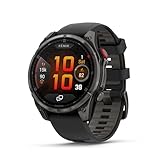
- Multisport GPS smartwatch with built-in inReach technology for two-way satellite and LTE connectivity (active subscription required; coverage limitations may apply; some jurisdictions regulate or prohibit the use of satellite communication devices)
- Rugged design with a bright 1.4" AMOLED touchscreen display, titanium bezel, scratch-resistant sapphire lens and other premium materials
- In an emergency, inReach satellite technology allows you to trigger an interactive SOS message to the Garmin ResponseSM coordination center for 24/7 assistance (active subscription required; coverage limitations may apply; some jurisdictions regulate or prohibit the use of satellite communication devices)
- LTE network connectivity lets you leave your phone behind; use your watch to exchange messages and make voice calls — plus let friends follow along with LiveTrack location sharing (30-second update rate) and location check-ins with the on-device Garmin Messenger app (active subscription required; coverage limitations may apply)
- inReach technology allows you to send messages and get location check-ins over satellite when taking on an off-grid adventure (active subscription required; coverage limitations may apply; some jurisdictions regulate or prohibit the use of satellite communication devices)
The reported 28 changes, organized by impact
The following groups preserve the meaning of the reported changelog while separating user-facing additions from maintenance work.
Added, improved or renamed
- Added: Find My Phone during GPS activities.
- Added: Garmin Messenger support.
- Added: dynamic heart-rate source switching during running.
- Added: the Indoor Walk activity profile.
- Added: Recovery Advisor access in Morning Report.
- Added: Recovery Advisor access in Glances.
- Added or expanded: Self Evaluation for additional activity types.
- Improved: touch-keyboard access to additional characters.
- Improved: Outdoor Maps+ support and map workflows.
- Improved: Connect IQ behavior and reliability.
- Renamed: the Climb sport to Mountaineering.
- Updated: translations.
Renaming Climb to Mountaineering should not be read as proof that Garmin introduced an entirely new sport mode.
Stability, maps and activity fixes
- Fixed: a possible shutdown inside the Body Battery widget.
- Fixed: a possible shutdown on the Navigate page.
- Fixed: a possible shutdown while loading activity history with Auto Lock enabled.
- Fixed: problems downloading large music playlists.
- Fixed: Outdoor Maps+ repeatedly requesting data.
- Fixed: unexpected deletion of Outdoor Maps+ layers.
- Changed: Wi-Fi behavior when deleting an already-downloaded Outdoor Maps+ bundle.
- Fixed: a potential weather-map overlay problem.
- Fixed: incorrect battery estimates before Expedition activities.
- Fixed: an erroneous trolling-motor warning.
- Fixed: Auto Pause speed-picker behavior.
- Fixed: ski-run counting in the Last Sport glance.
- Fixed: the “Lap Discarded” message continuing to flash after saving an activity.
- Fixed: the altimeter glance in large-font mode.
- Fixed: incorrect cadence-flashlight activation after using Resume Later.
- Fixed: heart-rate charts missing from some watch faces.
The report also described additional general crash and Connect IQ maintenance work. Garmin’s release-note presentation can group or word items differently between regional support pages and later revisions, which is why the reported count and Garmin’s later entries may not appear as a perfectly matching list.
Fixes users were most likely to notice
Fewer crashes and shutdowns
Owners affected by shutdowns in Body Battery, navigation or activity history had the clearest reason to update. A reboot during navigation or recording can interrupt an activity and, in some cases, risk lost data.
Rank #4

- Multisport GPS watch with a 1.3” display in a resilient 47 mm fiber-reinforced polymer case with a steel bezel and rear cover
- Power Glass solar charging lens uses the sun’s energy for weeks of battery life in smartwatch mode
- Built-in LED flashlight with variable intensities and strobe modes gives you greater awareness while you train at night and provides convenient illumination when you need it
- New hill score feature measures your running strength/endurance during ascents and gauges your progress over time
- New endurance score feature combines training data from all your athletic pursuits to help you better understand how training impacts your overall endurance
More reliable Outdoor Maps+ workflows
The map fixes covered separate problems rather than one general “better maps” improvement: repeated data requests, deleted layers, download and deletion behavior, and a possible weather-overlay issue. Map behavior can still depend on region, storage, connectivity, download state and account entitlement.
Activity-specific corrections
Expedition battery estimates, Auto Pause controls, ski-run totals, lap-discard messaging, altimeter display and cadence-flashlight behavior were all targeted edge cases. They are useful corrections, but not evidence of a wholesale redesign of Garmin’s sports features.
Heart-rate charts, music and interface details
The update also addressed missing heart-rate charts on some watch faces, large music-playlist downloads, the old Twitter “X” icon, keyboard characters, translations and Connect IQ issues.
Which fēnix watches were covered?
| Watch or configuration | What can safely be said |
|---|---|
| fēnix 7S Pro | Part of the Pro family described in the contemporary report, subject to the exact Garmin product page and region. |
| fēnix 7 Pro | Part of the reported scope, subject to model-specific availability. |
| fēnix 7X Pro | Part of the reported Pro-family scope, subject to model-specific availability. |
| Original fēnix 7, 7S and 7X | Do not assume they received every 17.20 change. Check the exact support page. |
| Solar and Sapphire variants | Hardware branding alone does not establish identical software availability. |
| Wi-Fi and non-Wi-Fi configurations | Update methods and map behavior can differ according to connectivity hardware. |
Garmin’s product and regional support pages are the authority for a particular serial-number family, language and market. Health-related features also vary by device, software version and region; Garmin’s ECG documentation illustrates why features should not be generalized across the whole fēnix 7 line.
Best Value

- Multisport GPS watch with a large 1.4” display in a resilient 51 mm fiber-reinforced polymer case with a titanium bezel and rear cover
- Scratch-resistant Power Sapphire solar charging lens uses the sun’s energy for weeks of battery life in smartwatch mode
- Built-in LED flashlight with variable intensities and strobe modes gives you greater awareness while you train at night and provides convenient illumination when you need it
- New hill score feature measures your running strength/endurance during ascents and gauges your progress over time
- New endurance score feature combines training data from all your athletic pursuits to help you better understand how training impacts your overall endurance
How to install the update safely
Garmin Connect
- Synchronize recent activities first.
- Charge the watch and keep it near the paired phone.
- Open Garmin Connect and let synchronization finish.
- Accept the software update when the watch or device settings offer it. Menu wording varies by app version and model.
- Keep the watch near the phone until installation and restart are complete.
- Synchronize again and confirm the installed software version.
Garmin Express
- Open Garmin Express on a computer.
- Connect the watch with its charging/data cable.
- Allow Express to detect the device.
- Install the offered software update.
- Leave the watch connected until Express reports completion.
- Disconnect only after installation and synchronization finish.
Wi-Fi
On Wi-Fi-capable models, connect to a configured network, open the watch’s software-update function and install the offered version. Keep the watch adequately charged during the download and installation. Garmin notes that Wi-Fi updating applies only to devices capable of making a Wi-Fi connection. Its software support page lists Garmin Connect, Garmin Express and Wi-Fi where supported.
Before you begin
- Back up or synchronize recent activities.
- Charge both the watch and phone or computer.
- Check available storage if the watch holds maps or music.
- Note custom data screens, sensor pairings and unusual activity settings.
- Do not update immediately before a critical race, expedition or long navigation outing.
If the update does not appear or fails
The update is not offered
Confirm the exact model, installed version and region. The watch may not be covered, the rollout may be staged, Garmin Connect may not have synchronized, or the watch may already be on a later version. Do not downgrade simply to obtain a feature listed for 17.20.
The installation stalls
- Place the watch on its charger.
- Restart Garmin Connect or Garmin Express.
- Restart the watch if it remains responsive.
- Retry using the other official update route.
- Check the phone or computer’s internet connection.
- Do not delete files or factory-reset the watch before consulting Garmin’s support guidance.
A problem appears afterward
Reboot the watch, force a Garmin Connect synchronization, check sensor connections and confirm the activity profile and data screens. Test the affected function during a non-critical activity before relying on it for an event. Later Garmin releases show that 17.20 did not permanently resolve every fēnix 7 Pro issue.
Do these 3 things before closing this tab:
1Repair Windows errors before they cause bigger problems2Scan for outdated or missing drivers - takes under a minute3Clear out junk files and repair common Windows errorsIs version 17.20 still current?
No. Garmin’s checked fēnix 7 Pro support page lists version 26.09, released in April 2026, along with later releases after 17.20, including 21.19, 23.18, 23.48 and 25.11. The exact latest version can vary by model and region, so check your own Garmin product page rather than relying on a headline from 2024.
If your watch offers a newer official version, install that version. Version 17.20 is relevant mainly as a historical explanation of the features and fixes introduced in that part of the software timeline.
Should you update?
Yes—if your fēnix offers an official update, updating is generally sensible, particularly if you have experienced crashes, navigation interruptions, Outdoor Maps+ download problems, incorrect Expedition battery estimates or activity-recording glitches. The update does not establish a general battery-life increase, although a bug fix could indirectly reduce abnormal drain for affected users.
After updating, test navigation, maps, sensors and any activity you depend on. Recovery Advisor, Self Evaluation and heart-rate features are training and wellness tools, not medical diagnoses or treatment guidance.
Recommended Free Tools
Quick Recap
Product prices and availability are accurate as of the date/time indicated and are subject to change. Any price and availability information displayed on Amazon at the time of purchase will apply.




