What’s actually slowing this PC down?
Pick the symptom - the matching free tool is one click away.
To change the time on a Casio Illuminator, first find the watch’s model or module number and use that number to open the matching Casio operation guide. “Illuminator” covers multiple watches with different controls and setting sequences. If your watch has both hands and a digital display, you may need to set them separately.
Find your watch’s model or module number
-
Turn the watch over and look for the model or module number on the case back. Casio manuals identify the module number for the models they cover; for example, see the 2737/2738 operation guide.
-
Open Casio’s official watch manual finder and search by model name or module number. Casio recommends trying the module number if a model search does not return the guide.
-
Follow the instructions for the exact module printed on your watch. Button names and sequences differ, so a procedure for one Illuminator should not be assumed to apply to another.
Special offer. See more information about Outbyte and uninstall instructions. Please review EULA and Privacy policy.#1 Best Overall
Sale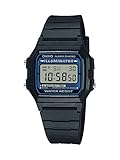 Casio F-105W-1A Vintage Illuminator | Classic Digital Watch | EL Backlight | 1/100-Second Stopwatch | Daily Alarm | 7-Year Battery | Water Resistant | Unisex
- EL backlight
- 1/100 second digital stopwatch
- Daily alarm
- Accuracy: +/-30 seconds per month
- Water-resistant
Check whether the watch has hands and a digital display
On some analog-digital models, the digital time and the analog hands are set independently. Casio’s guide for module 2358 explicitly says the two times must be set separately; consult the 2358 operation guide for that module’s instructions. If the digital display is right but the hands are wrong, look for the guide’s hand-setting or hand-correction procedure rather than repeating the digital time adjustment.
Examples of module-specific setting procedures
These examples show why you need the module number. Use them only if the number on your watch matches the one named below; otherwise, use your own module’s guide.
Rank #2
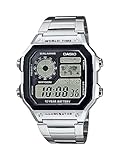
- ICONIC WORLD TIME DIGITAL WATCH WITH RETRO DESIGN Experience Casio's legendary AE-1200 series featuring a distinctive multi-display digital face, world map display, and stainless steel bracelet. Designed for everyday wear, travel, work, and adventure.
- BUILT FOR GLOBAL TRAVEL & EVERYDAY ADVENTURES Track multiple time zones with World Time functionality covering 31 time zones and 48 cities. Easily switch between your home city and world time city while traveling internationally.
- LONG-LASTING 10-YEAR BATTERY LIFE Enjoy years of dependable performance with an approximate 10-year battery life, reducing the need for frequent battery replacements.
- MULTI-FUNCTION DIGITAL PERFORMANCE Packed with useful features including 1/100-second stopwatch, countdown timer, five daily alarms, full auto calendar, 12/24-hour format, and LED illumination for easy viewing day or night.
- DURABLE STAINLESS STEEL CONSTRUCTION & WATER RESISTANCE Featuring a stainless steel band, triple-fold clasp, resin glass crystal, and 100-meter water resistance for reliable performance during everyday activities, swimming, and outdoor use.
| Watch/module | Enter setting | Select and change | Finish or hand adjustment |
|---|---|---|---|
| Analog-digital, modules 2737/2738 | In Timekeeping Mode, hold A until the seconds flash. | Press C to move through settings; use B or D to change values. | Press A to exit digital setting. Hand correction is separate: press C five times to enter Hand Setting Mode, hold A until the setting screen appears, then press D to advance the hands. See the 2737/2738 guide. |
| Digital-only, module 3523 | Enter Timekeeping Mode and press A to start setting. | Press C to select a flashing field and B to change its value. | Press A to complete. The setting screen exits automatically after about two or three minutes without operation, according to the 3523 guide. |
If the time still looks wrong
-
Only the hands are wrong: On a model with an independent analog display, use its hand-setting procedure in the matching guide.
-
The button sequence does not match: Stop and confirm the module number. Do not continue with a sequence intended for another model.
Free tools Windows power users keep installed
One-click scans. No signup required.
Special offer. See more information about Outbyte and uninstall instructions. Please review EULA and Privacy policy.Rank #3
Sale Casio A168WA-1 Vintage Digital Watch for Men & Women, Stainless Steel Bracelet, Electro-Luminescent Backlight, 7-Year Battery, Daily Alarm, Stopwatch, Water Resistant
- ICONIC VINTAGE DESIGN A true Casio classic, the A168WA-1 combines timeless retro styling with dependable digital functionality. Its polished stainless steel bracelet and signature square case create an iconic look that's perfect for everyday wear, business casual, or vintage-inspired fashion.
- BRIGHT ELECTRO-LUMINESCENT BACKLIGHT Unlike standard LED illumination, the A168 features Casio's Electro-Luminescent (EL) backlight, providing a bright, even blue-green glow across the entire display for outstanding nighttime visibility.
- PRACTICAL EVERYDAY FEATURES Stay on schedule with a 1/100-second stopwatch, daily alarm, hourly time signal, auto calendar, and selectable 12/24-hour time format. Designed for reliable everyday performance whether you're at work, school, or on the go.
- LIGHTWEIGHT COMFORT & LONG BATTERY LIFE Weighing just 50 grams with an adjustable stainless steel bracelet, the A168WA-1 is comfortable enough for all-day wear. Its dependable CR2016 battery provides approximately seven years of operation under normal use.
- DEPENDABLE CASIO QUALITY Built with Casio's legendary reliability, this watch features quartz accuracy of approximately ±30 seconds per month, water resistance for daily use, a durable chrome-plated resin case, and a stainless steel bracelet designed to withstand years of everyday wear.
-
The setting screen disappeared: Some procedures time out; the module 3523 guide specifies an automatic exit after about two or three minutes of inactivity. Re-enter setting mode using that guide’s instructions.
Quick Recap
SaleBestseller No. 1
Product prices and availability are accurate as of the date/time indicated and are subject to change. Any price and availability information displayed on Amazon at the time of purchase will apply.




