The Tool Desk
Outbyte PC Repair FREERepair Windows errors before they cause bigger problemsFix Now →Outbyte Driver Updater FREEFix the driver behind crashes, sound loss and screen glitchesFind Drivers →Apple has not established that iOS 26.2 itself causes Apple Watch battery drain. If the Watch was also updated, give it a few days for update-related background tasks to settle; otherwise, check its connection, optional power-consuming features, and Battery Health.
Keep the Watch near its paired iPhone with Bluetooth enabled, and try the settings changes below as temporary tests rather than guaranteed fixes. If Battery Health says “Battery Needs Service,” contact Apple Support.
1. Allow a recent Watch update to settle
If the Apple Watch itself recently updated to watchOS, wait a few days before deciding that the drain is persistent. Apple Support says certain tasks related to a watchOS update continue in the background and may affect battery life, even though the Watch is ready to use.
This explanation concerns a Watch update. If only the iPhone updated to iOS 26.2, the timing alone does not show that iOS caused the Watch’s battery drain.
#1 Best Overall

- Durable, woven cable with fast-charging capabilities for select Apple Watch models. Simply hold the connector near the back of the watch, where magnets cause it to snap into place automatically.
- Supports fast charging on Apple Watch Series 7 and later and Apple Watch Ultra models. Supports regular charge times on all other models.
- Compatible with all Apple Watch
- USB-C Cable Length: 1m or 3.2 feet
2. Check the connection
Keep the Watch near its paired iPhone and leave Bluetooth enabled. Apple says the Watch is most efficient when connected to its paired iPhone over Bluetooth. When you are away from the iPhone, use Wi-Fi instead of cellular where practical; signal conditions and connectivity can affect power use.
3. Temporarily reduce optional power use
Try Low Power Mode
Open Control Center, tap the battery percentage, and turn on Low Power Mode. Apple says it reduces or turns off some features, including Always On display, background sensor readings, and some network behavior. This can extend battery life, but may limit sensor readings, notifications, or connectivity. Low Power Mode turns off automatically when the Watch charges above 80 percent.
Rank #2

- 【Safe and Fast Wireless Watch Charging】- Our wireless charger provides a safer and faster charging mode,for a more convenient charging experience,Please take off the watch case and use a 5V/1A adapter or original adapter(ETL/UL Certified).
- 【Wide Compatible】- Our wireless batteries charger is compatible with iWatch series Ultra2/Ultra/12/11/10/9/8/7/6/SE2/SE/5/4/3/2 (including the 38 mm/40 mm/41 mm/42 mm/44 mm/45 mm Version).Please take off the watch case and use a 5V/1A adapter or original adapter(ETL/UL Certified).
- 【Portable design】- This 3.3Ft charging cable for apple watch is convenient to carry around, especially for traveling,and is suitable as a backup charger for your watch.Please take off the watch case and use a 5V/1A adapter or original adapter(ETL/UL Certified).
- 【Advanced Safety】- Built-in protection device with safety functions such as overcurrent,overvoltage,short circuit and overtemperature protection. Protect your watch battery from overcharging damage.pls note:this is support usb c port,so pls use a usb c PD adapter,and 20w-30w is the best to use.Please take off the watch case and use a 5V/1A adapter or original adapter(ETL/UL Certified).
- 【12-Month Quality Assurance 】- As a responsible brand seller, you will receive xiwxi's 12-month Quality assurance and friendly customer service.Please take off the watch case and use a 5V/1A adapter or original adapter(ETL/UL Certified).
Consider display and workout settings
If you do not want Low Power Mode, you can turn off Always On separately in Settings > Display & Brightness > Always On. Apple also identifies Wake Screen behavior and workout power settings as options to review. These are trade-offs to test, not guaranteed fixes.
4. Review Battery Health
On the Watch, open Settings > Battery > Battery Health and check Maximum Capacity. Apple describes this as the battery’s capacity compared with when it was new. Battery age and usage affect battery life, so a persistent problem may reflect battery wear rather than the recent iPhone update.
Rank #3

- Compatible: iPhone Watch Charger supports for all Apple Watch Series 9,8,7,6,5,4,3,2,1, Series SE. Also compatible with all watch sizes, including all 38mm, 40mm, 41mm, 42mm, 44mm and 45mm versions. Apple Watch Ultra, Apple Watch Sports.
- iWatch Charger Fast Charging: Our iWatch Charger uses the original adapter, which provides a safer and faster charging mode. It takes less than 3 hours to fully charge. For a more perfect charging experience, please take off the watch case.
- Safe and Reliabl: The Apple Watch Charger Cable made of high quality ABS+PC and pure copper wire, after more than 10,000 tests, it can automatically detect your equipment and provide a stable, fast and safe charging experience.
- Perfect Length and Lightweight: Small, light, portable, easy to travel. The perfect charging cable is suitable for your travel bag or pocket, which can be carried around or used at home, office, hotel, car to charge your watch anytime and anywhere.
- Packing: 1Pack 20W USB C Origina Charger with 6FT Apple Watch Magnetic Fast USB C Cable. If you have any questions welcome to find us!
Apple says Apple Watch Series 7 and Apple Watch SE (2nd generation) recalibrate their battery-capacity estimates after updating to watchOS 26 or later. This is an adjustment to the estimate, not a battery repair, and it does not apply to every model.
5. Contact Apple Support if the drain persists
If rapid drain continues after a few days and the basic connection and settings checks, contact Apple Support. Do so especially if Battery Health displays Battery Needs Service or you believe the battery needs replacement. Avoid opening the Watch or attempting a DIY battery replacement.
Rank #4
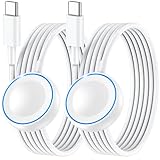
- ⚡𝟓𝐖 𝐅𝐀𝐒𝐓 𝐂𝐇𝐀𝐑𝐆𝐈𝐍𝐆 𝐒𝐔𝐏𝐏𝐎𝐑𝐓 – 𝟓𝟎% 𝐅𝐀𝐒𝐓𝐄𝐑 𝐂𝐇𝐀𝐑𝐆𝐈𝐍𝐆: Featuring the usb c fast charger technology, our iwatch charger fast charging delivers up to 50% faster charging speed compared to standard chargers. It only takes about 1 hour to fully charge the Apple Watch Series 11, reducing your wait time and ensuring your watch is always ready to go in a shorter time. (Tips: For faster and more efficient charging, please use a 20W or higher USB C charger and remove your watch case before charging.) Please Note: Fast charging requires Series 7 or later, Ultra series and New SE 3; earlier series 6 models and series SE 1-2 receive standard 2.5W charging.
- ⌚𝐓𝐑𝐀𝐕𝐄𝐋 𝐄𝐒𝐒𝐄𝐍𝐓𝐈𝐀𝐋𝐒(𝟒𝐅𝐓)– 𝐏𝐄𝐑𝐅𝐄𝐂𝐓 𝐅𝐎𝐑 𝐀𝐍𝐘 𝐒𝐂𝐄𝐍𝐀𝐑𝐈𝐎: With its sleek and lightweight design, this for Apple Watch fast charging cable features a 1.2m (4ft) long cord for extra reach and flexibility. Easily charge from a wall outlet behind the nightstand, under your desk, or in the car without being stuck close to the power source. It’s long enough for flexible charging setups in hotels, airports, or at your desk, yet still easy to pack and organize—ideal for travel, home, and office.
- ⌚𝐂𝐎𝐌𝐏𝐀𝐓𝐈𝐁𝐋𝐄 𝐖𝐈𝐓𝐇 𝐀𝐋𝐋 𝐀𝐏𝐏𝐋𝐄 𝐖𝐀𝐓𝐂𝐇 𝐌𝐎𝐃𝐄𝐋𝐒: This fast charger for Apple Watch is fully compatible with all Apple Watch models, 5W fast charging for Series Ultra 4/Ultra 3/ Ultra 2/Ultra 1, Series 12/11/10/9/8/7 (41/42/45/46/49mm)/SE3, 2.5W charging for Series 6/5/4/3/2 and SE/SE2 models (38/40/42/44mm). No matter the model, you can count on stable and efficient charging. Please note that our charger is slightly bulkier than the original. As a result, it is not compatible with standard market accessories or holders.
- 🧲𝐌𝐀𝐆𝐍𝐄𝐓𝐈𝐂 𝐃𝐄𝐒𝐈𝐆𝐍 𝐅𝐎𝐑 𝐄𝐀𝐒𝐘 𝐂𝐎𝐍𝐍𝐄𝐂𝐓𝐈𝐎𝐍: The strong magnetic design of Apple watch charger fast charging ensures precise alignment and connection with your watch. Simply place your watch on the charger, and it will automatically snap into place, offering a smooth, hassle-free charging experience.
- 🔋𝐒𝐀𝐅𝐄𝐓𝐘 𝐅𝐄𝐀𝐓𝐔𝐑𝐄𝐒 – 𝐎𝐕𝐄𝐑𝐂𝐇𝐀𝐑𝐆𝐄 𝐀𝐍𝐃 𝐎𝐕𝐄𝐑𝐇𝐄𝐀𝐓 𝐏𝐑𝐎𝐓𝐄𝐂𝐓𝐈𝐎𝐍: Equipped with multiple built-in safety mechanisms, including overcharge, overheat, and short-circuit protection, this for iphone watch charger ensures your device is charged safely and efficiently, helping to extend the lifespan of your watch.
Apple’s guidance does not identify a universal fix or establish that iOS 26.2 caused a particular Watch’s battery drain. Treat the timing as a clue, not a diagnosis.
Independent reader supportYour contribution helps us test, update, and keep practical guides available for everyone.FAQ
How long should I wait after an update before judging Apple Watch battery life?
If the Watch itself updated to watchOS, Apple recommends waiting a few days because related tasks may continue in the background and affect battery life. An iPhone update alone does not establish that the Watch needs a settling period.
Recommended Free Tools
Best Value

- Compatible with all Apple Watch: Our wireless charger is compatible with iWatch series 12 11 10 9 8 7 6 SE3 SE2 SE 5 4 3 2 1 Ultra4 Ultra3 Ultra2 including 38 mm 40 mm 41 mm 42 mm 44 mm 45 mm 49mm Version. Also compatible with Airpods 4 AirPods Pro 3 AirPods Pro 2
- Efficient Smart Charging: Our watch charger provides safe charging mode, it takes 2 hours to fully charge your S12-S4. Please note: Charging Ultra 4 3 2 1 will take less than 4 hours. We suggest that you purchase our store's 5W fast charging version for your Ultra series
- Multiple Protection: Built-in advanced chip with over-current, over-voltage, short-circuit, over-charge and over-temperature protection and other safety features. Protect your watch battery against damage
- Strong Magnetic Adsorption: The Watch Charger with built-in magnet has strong adsorption perfectly snaps and centers to the charging coil on the back of your watch, stable and will not fall off, resulting in a wonderful charging experience
- Travel Essentials: This 3.3FT 1M Watch charging cable is portable to carry around, especially for traveling and is suitable as a backup charger for your watch
Does Low Power Mode stay on permanently?
No. Apple says it turns off automatically when the Watch charges above 80 percent. It also reduces or disables some features while active.
Does a lower Maximum Capacity prove an update damaged my battery?
No. Maximum Capacity compares the battery’s capacity with when it was new, and Apple says certain models recalibrate this estimate after updating to watchOS 26 or later. The estimate alone does not show what caused a particular episode of drain.
When should I contact Apple Support?
Contact Apple if Battery Health says “Battery Needs Service,” you think the battery needs replacement, or rapid drain persists after the basic checks.
Quick Recap
Product prices and availability are accurate as of the date/time indicated and are subject to change. Any price and availability information displayed on Amazon at the time of purchase will apply.




