Casio watches do not share one universal time-setting sequence. First find the watch’s module number on the case back, then open the matching Casio operation guide and follow its instructions. A button sequence for one module may not work on another, and watches with hands and a digital display may require both displays to be set separately.
Before you change the time, identify the watch
- Find the module number. Check the case back for a number, or use Casio’s watch manual search to find the guide that matches your watch.
- Check the controls and display. Note whether the watch uses buttons, a crown, or both, and whether it is digital-only or has hands as well as a digital screen.
- Follow that module’s entry and exit steps. The setting controls and button labels vary. Do not assume that an example below applies to your watch unless the module matches.
For example, module 3523 uses buttons to select flashing settings, while module 5467 uses a crown and button B. Casio’s manuals show different procedures for different modules.
Set the time on a button-based digital watch
Module 3523
- Enter Timekeeping Mode.
- Press A. The seconds begin to flash.
- Press C until the field you want to change flashes.
- Press B to change the flashing value. Repeat for other fields.
- Press A to finish.
For this module, pressing B while seconds are flashing resets them to 00. If the seconds were 30–59, the minutes advance by one; if they were 00–29, the minutes do not change. See Casio’s module 3523 Operation Guide for the complete sequence and field order.
Module 3564
- Enter Timekeeping Mode and hold A for at least two seconds.
- Press C to move to the setting field you want.
- Use D or E to change the value.
- Press A to complete the setting.
The controls differ from module 3523, so use the module 3564 guide rather than substituting another watch’s button sequence. Casio notes in this guide: “If your watch cannot connect with your phone for some reason, you can use watch operations to adjust date and time settings.”
Quick wins for a faster PC:
Repair Windows errors before they cause bigger problemsFix Now →Scan for outdated or missing drivers - takes under a minuteDriver Scan →#1 Best Overall

- XBDSW Natural high-quality resin strap, waterproof and sweatproof, durable and comfortable to wear
- Compatible with AE-1000W AE-1300 AE-1200 SGW-300H SGW-400H SGW-500H AQ-S810 AQ-S810W AQ-S800W W-S200H W-800H W-216H W-735H F-108WH W-215 AEQ-110 model watch band(the interface size is 18mm (0.7")
- Please make sure your watch model is listed in the description before purchasing, if not, use a metric ruler to measure the lug width or the width of the current strap connection (18mm (0.7")).To save your precious time and effort, and avoid the hassle of returns and exchanges, choose the correct size for your watch. It is very important to be accurate to the millimeter
- XBDSW High quality stainless steel buckle, durable
- If you have any technical problems or quality problems, please contact us XBHSW, we will be happy to resend replacement straps or accessories, please buy with confidence
Set the time on a crown-operated watch
Module 5467
- Pull the crown out to the second click.
- Rotate the crown to set the minutes.
- Press B to switch to hour setting, then continue through the date fields in the order shown in the module guide.
- Push the crown back in at the top of a minute, using a time signal as directed by Casio.
Do not pull the crown to a different position or assume the same rotation direction works on another model. Consult the module 5467 Operation Guide for its full setting sequence.
Set both displays on a hybrid watch
If your Casio has hands and a digital screen, check both after setting the time. Some modules have separate procedures for the two timekeeping systems. Casio’s module 2737/2738 guide says: “This watch features separate digital and analog timekeeping. The procedures for setting the digital time and analog time are different.” Modules 5565 and 2737/2738 provide separate digital and analog adjustment instructions; use the guide matching your module rather than assuming one adjustment changes both displays.
Rank #2

- Universal Compatibility: Perfectly fits Casio F-105W-1ASV/F-105W-1ASVY/F-105W-1ASW/F-105W-1ASWY/F-91W-3W/F-91WG-9W/F-94WA-8W/F-94WA-9W/F-91WG-9V/F-105W-9V 05W-1AV/F-106W-1A and other 18mm lug-width Casio watches. Ideal for both men and women.
- Durable and Comfortable: Made of flexible TPU material, offering sweat resistance, lightweight comfort, and long-lasting durability for daily wear or sports activities.
- Easy Installation:Equipped with a sturdy stainless-steel buckle, the installation and adjustment process is a breeze.Additionally, a free set of matching spring bars and an installation tool are included. Even if you're replacing the strap for the first time, you can handle it easily.
- Sleek and Versatile Design: Classic style complements any outfit, from casual to professional, while maintaining the iconic Casio look.
- Complete Package: Comes with one 18mm TPU strap and three stainless steel spring bars, ensuring a hassle-free replacement experience. If you encounter any problems during or after purchase, please contact lddal after-sales, thank you for your support.
See the module 5565 guide or the module 2737/2738 guide, as applicable.
Check the home city and summer-time settings
If the displayed time remains offset after adjustment, check whether the watch has a Home City or summer-time setting. These settings affect how local time is displayed on models that support them. Module 3501, for example, has separate procedures for Home City, summer time, and time/date adjustment. Follow the module 3501 guide if that is your watch; other modules may use different labels or steps.
Free tools Windows power users keep installed
One-click scans. No signup required.
Rank #3

- The strap is made of high-quality resin rubber, which is neither too hard nor too soft. It is stronger than ordinary rubber straps, waterproof and sweatproof, comfortable and durable
- Suitable for: AE-1200 series, SGW400H, SGW-300H, SGW-500H, AE-1100W, AE-1100W, AE-1200WH, AE-1000w, AE-1300WH,W-219H,W218H except for the compatible models mentioned above, no other models are available
- Made of non-allergic, water-resistant natural resin. There are non-slip lines on the back. Ergonomic design for improved wearing comfort
- strap width: interface size 18mm, the widest position of the strap is 25.5mm. Length: 135mm / 80mm
- You can get: 1 set of straps, 1 tool, 2 spring bars. Quickly and easily install and change frequency bands. Although most people can do this with their fingers, we also provide assistive tools to meet your needs
When the watch can correct time from a phone
Some models support automatic time correction through a phone, but this is not a feature of every Casio watch. Module 5467 automatically corrects the day and time while connected to a phone. If that model still shows the wrong time, check its configured time and date settings and use its operation guide. Do not apply this phone-sync procedure to a watch unless its own guide confirms support.
Independent reader supportYour contribution helps us test, update, and keep practical guides available for everyone.Time setting is not a factory reset
The procedures above adjust the displayed time and, where specified, date or related settings. They are not a universal factory-reset procedure. If you mean restoring a watch’s broader settings, look up that separate procedure in the exact module guide; do not treat ordinary time adjustment as a reset of all watch settings.
Quick Recap
Best Value
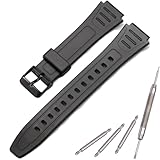
- Made of natural resin, soft, lightweight, durable, and comfortable to wear
- MCXGL resin strap Fit for W800HG W-800H watch band
- It is important to measure the correct size to avoid any inconvenience caused by returns or exchanges.
- Adopting non allergic stainless steel needle buckle, sturdy and durable
- Package included: 1 x resin Strap, 1 x tool ,2 x spring bars. easy to replace with our free tools. Watches take on a new look! Non original, a great substitute
Rank #4

- Universal Compatibility: Perfectly fits Casio F-105W-1ASV/F-105W-1ASVY/F-105W-1ASW/F-105W-1ASWY/F-91W-3W/F-91WG-9W/F-94WA-8W/F-94WA-9W/F-91WG-9V/F-105W-9V 05W-1AV/F-106W-1A and other 18mm lug-width Casio watches. Ideal for both men and women.
- Durable and Comfortable: Made of flexible TPU material, offering sweat resistance, lightweight comfort, and long-lasting durability for daily wear or sports activities.
- Easy Installation:Equipped with a sturdy stainless-steel buckle, the installation and adjustment process is a breeze.Additionally, a free set of matching spring bars and an installation tool are included. Even if you're replacing the strap for the first time, you can handle it easily.
- Sleek and Versatile Design: Classic style complements any outfit, from casual to professional, while maintaining the iconic Casio look.
- Complete Package: Comes with one 18mm TPU strap and three stainless steel spring bars, ensuring a hassle-free replacement experience. If you encounter any problems during or after purchase, please contact lddal after-sales, thank you for your support.
Product prices and availability are accurate as of the date/time indicated and are subject to change. Any price and availability information displayed on Amazon at the time of purchase will apply.




