To update an Apple Watch to watchOS 26, confirm compatibility, update the paired iPhone to iOS 26, connect the iPhone to Wi‐Fi, charge the watch to at least 50%, and use the Apple Watch app to install the update. You can also update directly on a watch running watchOS 6 or later over Wi‐Fi.
To update an Apple Watch to watchOS 26, first confirm that the watch and paired iPhone are compatible, then update the iPhone, connect it to Wi‐Fi, charge the watch to at least 50%, and install the update from the Apple Watch app. Apple Watch models running watchOS 6 or later can also check for and install an update directly from the watch over Wi‐Fi.
Check whether your Apple Watch can run watchOS 26
watchOS 26 supports:
- Apple Watch SE (2nd generation) and later
- Apple Watch Series 6 and later
- Apple Watch Ultra and later
You also need an iPhone 11 or later, or an iPhone SE (3rd generation) or later, running iOS 26. Older watches—including Apple Watch Series 5, Series 4, Series 3, Series 2, Series 1, and the first-generation Apple Watch—cannot be updated to watchOS 26.
Eligibility does not guarantee that every watch receives every watchOS 26 feature. Feature availability can vary by hardware, paired iPhone, language, region, and other requirements. The most reliable way to find out what your specific watch can install is to open Software Update and use the version Apple offers there.
Recommended Free Tools
#1 Best Overall

- 【Safe and Fast Wireless Watch Charging】- Our wireless charger provides a safer and faster charging mode,for a more convenient charging experience,Please take off the watch case and use a 5V/1A adapter or original adapter(ETL/UL Certified).
- 【Wide Compatible】- Our wireless batteries charger is compatible with iWatch series Ultra2/Ultra/12/11/10/9/8/7/6/SE2/SE/5/4/3/2 (including the 38 mm/40 mm/41 mm/42 mm/44 mm/45 mm Version).Please take off the watch case and use a 5V/1A adapter or original adapter(ETL/UL Certified).
- 【Portable design】- This 3.3Ft charging cable for apple watch is convenient to carry around, especially for traveling,and is suitable as a backup charger for your watch.Please take off the watch case and use a 5V/1A adapter or original adapter(ETL/UL Certified).
- 【Advanced Safety】- Built-in protection device with safety functions such as overcurrent,overvoltage,short circuit and overtemperature protection. Protect your watch battery from overcharging damage.pls note:this is support usb c port,so pls use a usb c PD adapter,and 20w-30w is the best to use.Please take off the watch case and use a 5V/1A adapter or original adapter(ETL/UL Certified).
- 【12-Month Quality Assurance 】- As a responsible brand seller, you will receive xiwxi's 12-month Quality assurance and friendly customer service.Please take off the watch case and use a 5V/1A adapter or original adapter(ETL/UL Certified).
Prepare before installing the update
- Update the paired iPhone to the latest iOS version available for it. For watchOS 26, the iPhone must meet the iOS 26 requirement above.
- Charge the Apple Watch to at least 50 percent.
- Connect the iPhone to a stable Wi‐Fi network.
- Keep the iPhone close to the Apple Watch throughout the update.
- Put the Apple Watch on its charger before installation begins and leave it there until the update is complete.
The update may take several minutes or up to about an hour. If you do not need the watch immediately, starting the process overnight is practical: both devices can remain charging while the installation runs.
If your existing charger is missing, damaged, or unreliable, an Apple Watch magnetic charger USB-C cable can provide a replacement. Buying a new cable is not required if your current charger works. Apple’s magnetic fast-charging cable is designed to charge compatible Apple Watch models; the watch must still remain on its charger during installation. A 20W USB-C power adapter is an optional power source if you have the cable but not a suitable adapter—it is not a separate watchOS requirement.
Update Apple Watch using the iPhone
This is the standard method and usually the best choice because it lets the iPhone check compatibility, download the software, and manage the watch update.
- Open the Apple Watch app on the paired iPhone.
- Tap My Watch.
- Tap General.
- Tap Software Update.
- Tap Download or the available update command.
- Enter the iPhone or Apple Watch passcode if prompted.
- Wait for the progress wheel to appear on the Apple Watch.
- Keep the watch on its charger, keep the iPhone nearby, and leave the Apple Watch app open while installation is in progress.
Do not restart either device or remove the watch from its charger during installation. The Apple Watch should restart automatically when the update finishes.
Quick wins for a faster PC:
Repair Windows errors before they cause bigger problemsFix Now →Fix the driver behind crashes, sound loss and screen glitchesFind Drivers →Rank #2

- Durable, woven cable with fast-charging capabilities for select Apple Watch models. Simply hold the connector near the back of the watch, where magnets cause it to snap into place automatically.
- Supports fast charging on Apple Watch Series 7 and later and Apple Watch Ultra models. Supports regular charge times on all other models.
- Compatible with all Apple Watch
- USB-C Cable Length: 1m or 3.2 feet
Install the update overnight
If the watch displays a notification that an update is available, tap Update Tonight and confirm on the iPhone. Put the Apple Watch and iPhone on charge, keep them near each other, and allow the watch to update overnight.
Update directly on the Apple Watch
Apple Watch models running watchOS 6 or later can check for updates without using the iPhone. The watch must be connected to Wi‐Fi, and it should be placed on its charger before installation.
- Open Settings on the Apple Watch.
- Tap General.
- Tap Software Update.
- Tap Install if an update is available.
- Follow the onscreen instructions.
- Leave the watch on its charger and do not restart it while the update installs.
The Apple Watch restarts automatically after installation. If no update appears, confirm that the watch is connected to Wi‐Fi and use the iPhone method to check whether the paired-device requirements are satisfied.
Which watchOS 26 version will your watch receive?
Do not assume that every compatible Apple Watch will show the same watchOS 26 point release. Software Update determines the newest version available for that model and its current software state. Depending on when you update, the screen may offer a later 26.x release rather than the original watchOS 26 release.
Rank #3

- Compatible: iPhone Watch Charger supports for all Apple Watch Series 9,8,7,6,5,4,3,2,1, Series SE. Also compatible with all watch sizes, including all 38mm, 40mm, 41mm, 42mm, 44mm and 45mm versions. Apple Watch Ultra, Apple Watch Sports.
- iWatch Charger Fast Charging: Our iWatch Charger uses the original adapter, which provides a safer and faster charging mode. It takes less than 3 hours to fully charge. For a more perfect charging experience, please take off the watch case.
- Safe and Reliabl: The Apple Watch Charger Cable made of high quality ABS+PC and pure copper wire, after more than 10,000 tests, it can automatically detect your equipment and provide a stable, fast and safe charging experience.
- Perfect Length and Lightweight: Small, light, portable, easy to travel. The perfect charging cable is suitable for your travel bag or pocket, which can be carried around or used at home, office, hotel, car to charge your watch anytime and anywhere.
- Packing: 1Pack 20W USB C Origina Charger with 6FT Apple Watch Magnetic Fast USB C Cable. If you have any questions welcome to find us!
Install the latest watchOS 26 update offered to your Apple Watch. Point releases can include bug fixes, feature changes, and security updates. If Software Update offers an earlier compatible version first, install it and check again afterward if Apple presents another update.
What changes with watchOS 26?
watchOS 26 introduces Apple’s Liquid Glass design and includes features such as Sleep Score, Workout Buddy, and Smart Stack improvements. It also includes selected Apple Intelligence-related capabilities. These are useful reasons to update, but they should not be treated as guaranteed on every eligible model: some features require particular hardware, an appropriate iPhone, supported language or region settings, or other conditions.
What to do if the Apple Watch update will not start
Work through Apple’s basic troubleshooting sequence in this order:
- Check that the Apple Watch is properly seated on its charger.
- Restart the Apple Watch.
- Restart the paired iPhone.
- Try the update again from Apple Watch app > My Watch > General > Software Update.
- If it still will not start, open the Apple Watch app and go to My Watch > General > Storage.
- Delete the downloaded update file.
- Return to Software Update and download the update again.
Deleting the downloaded file is useful when the download is incomplete or corrupted. It does not erase the watch or remove your normal watch data. If Apple Watch reports Cannot Install Update or says there is not enough storage, follow Apple’s additional storage and update guidance rather than repeatedly retrying the same download.
Rank #4
- ⚡𝟓𝐖 𝐅𝐀𝐒𝐓 𝐂𝐇𝐀𝐑𝐆𝐈𝐍𝐆 𝐒𝐔𝐏𝐏𝐎𝐑𝐓 – 𝟓𝟎% 𝐅𝐀𝐒𝐓𝐄𝐑 𝐂𝐇𝐀𝐑𝐆𝐈𝐍𝐆: Featuring the usb c fast charger technology, our iwatch charger fast charging delivers up to 50% faster charging speed compared to standard chargers. It only takes about 1 hour to fully charge the Apple Watch Series 11, reducing your wait time and ensuring your watch is always ready to go in a shorter time. (Tips: For faster and more efficient charging, please use a 20W or higher USB C charger and remove your watch case before charging.) Please Note: Fast charging requires Series 7 or later, Ultra series and New SE 3; earlier series 6 models and series SE 1-2 receive standard 2.5W charging.
- ⌚𝐓𝐑𝐀𝐕𝐄𝐋 𝐄𝐒𝐒𝐄𝐍𝐓𝐈𝐀𝐋𝐒(𝟒𝐅𝐓)– 𝐏𝐄𝐑𝐅𝐄𝐂𝐓 𝐅𝐎𝐑 𝐀𝐍𝐘 𝐒𝐂𝐄𝐍𝐀𝐑𝐈𝐎: With its sleek and lightweight design, this for Apple Watch fast charging cable features a 1.2m (4ft) long cord for extra reach and flexibility. Easily charge from a wall outlet behind the nightstand, under your desk, or in the car without being stuck close to the power source. It’s long enough for flexible charging setups in hotels, airports, or at your desk, yet still easy to pack and organize—ideal for travel, home, and office.
- ⌚𝐂𝐎𝐌𝐏𝐀𝐓𝐈𝐁𝐋𝐄 𝐖𝐈𝐓𝐇 𝐀𝐋𝐋 𝐀𝐏𝐏𝐋𝐄 𝐖𝐀𝐓𝐂𝐇 𝐌𝐎𝐃𝐄𝐋𝐒: This fast charger for Apple Watch is fully compatible with all Apple Watch models, 5W fast charging for Series Ultra 4/Ultra 3/ Ultra 2/Ultra 1, Series 12/11/10/9/8/7 (41/42/45/46/49mm)/SE3, 2.5W charging for Series 6/5/4/3/2 and SE/SE2 models (38/40/42/44mm). No matter the model, you can count on stable and efficient charging. Please note that our charger is slightly bulkier than the original. As a result, it is not compatible with standard market accessories or holders.
- 🧲𝐌𝐀𝐆𝐍𝐄𝐓𝐈𝐂 𝐃𝐄𝐒𝐈𝐆𝐍 𝐅𝐎𝐑 𝐄𝐀𝐒𝐘 𝐂𝐎𝐍𝐍𝐄𝐂𝐓𝐈𝐎𝐍: The strong magnetic design of Apple watch charger fast charging ensures precise alignment and connection with your watch. Simply place your watch on the charger, and it will automatically snap into place, offering a smooth, hassle-free charging experience.
- 🔋𝐒𝐀𝐅𝐄𝐓𝐘 𝐅𝐄𝐀𝐓𝐔𝐑𝐄𝐒 – 𝐎𝐕𝐄𝐑𝐂𝐇𝐀𝐑𝐆𝐄 𝐀𝐍𝐃 𝐎𝐕𝐄𝐑𝐇𝐄𝐀𝐓 𝐏𝐑𝐎𝐓𝐄𝐂𝐓𝐈𝐎𝐍: Equipped with multiple built-in safety mechanisms, including overcharge, overheat, and short-circuit protection, this for iphone watch charger ensures your device is charged safely and efficiently, helping to extend the lifespan of your watch.
If you installed an iOS or watchOS beta
A beta or developer seed can prevent the expected public update from appearing. If you installed one, remove the beta profile, restart both devices, and check for the update again.
To remove an Apple Watch beta profile from the paired iPhone:
- Open the Apple Watch app.
- Tap My Watch.
- Tap General.
- Tap Profiles.
- Remove the Apple Watch beta profile.
Then restart the iPhone and Apple Watch and revisit My Watch > General > Software Update. Beta software can also affect the update path, so the version offered may not match the version shown on another person’s watch.
Independent reader supportYour contribution helps us test, update, and keep practical guides available for everyone.When the iPhone says the Apple Watch software is out of date
Some iPhone updates require a corresponding watchOS update. If the iPhone says the Apple Watch software is out of date, update the watch using the steps above. Keeping both devices on compatible software helps data—including Activity data—continue syncing correctly between the watch and iPhone.
Do these 3 things before closing this tab:
1Clear out junk files and repair common Windows errors2Fix the driver behind crashes, sound loss and screen glitches3Repair Windows errors before they cause bigger problemsBest Value

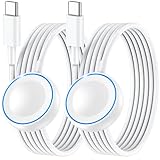
- 1.5H Efficient Charging : For pleasure charging experience, we recommend you to use 5V/1A adapter with our iWatch charger, which will provide original safe charging via USB-C port 20W Charger and fully charge for Apple watch in 1-1.5H
- Upgraded Watch Smart Chip : Hzevn for iWatch charger is equipped with automatic chip recognition, built-in magnet charging module, over-current, over-voltage and over-temperature protection to provide a safe charging environment for your watch
- High-Quality Materials : Excellent TPE charging cable, offering robust durability and flexibility. The 3 feet cable accommodating different daily scenarios
- Compatible with Apple Watch : Hzevn for iWatch charger fast charging works with iWatch Ultra2 Ultra Series 11/10/9/8/7/6/SE/SE2/5/4/3/2/1- including 38mm 40mm 42mm 44mm 46mm 49mm versions
- 2Pack You Will Get : 2Pack 3FT 5W USB C to iWatch Cable White. 2Pcs watch chargers,You can use one for home and the other for the office
Quick checklist
- Is the watch an Apple Watch SE (2nd generation) or later, Series 6 or later, or Ultra or later?
- Is the paired iPhone an iPhone 11 or later, or iPhone SE (3rd generation) or later?
- Is the iPhone running iOS 26?
- Is the iPhone connected to Wi‐Fi and close to the watch?
- Is the watch at least 50% charged and on its charger?
- Have you allowed several minutes—and potentially up to an hour—for installation?
- If the update fails, have you restarted both devices and removed the downloaded file under My Watch > General > Storage?
If an ineligible model is the reason the update is unavailable, no software troubleshooting step can make it run watchOS 26. If a compatible watch still fails after charging, restarting, deleting the update file, and retrying, use Apple’s support options for the specific error or storage problem.
Frequently Asked Questions
Which Apple Watch models can update to watchOS 26?
watchOS 26 supports Apple Watch SE (2nd generation) and later, Apple Watch Series 6 and later, and Apple Watch Ultra and later. You also need an iPhone 11 or later, or iPhone SE (3rd generation) or later, running iOS 26.
Can I update an Apple Watch without an iPhone?
Yes, if the watch is running watchOS 6 or later and is connected to Wi‐Fi. Open Settings on the watch, tap General, tap Software Update, and tap Install when an update appears.
How long does a watchOS 26 update take?
Charge the watch to at least 50%, connect the iPhone to Wi‐Fi, keep both devices close together, and leave the watch on its charger during installation. The process can take several minutes or up to about an hour.
Free tools Windows power users keep installed
One-click scans. No signup required.
What should I do if my Apple Watch update will not install?
Restart the Apple Watch and paired iPhone. If it still will not start, open the Apple Watch app and go to My Watch > General > Storage, delete the downloaded update file, and try again.
Will every compatible Apple Watch get the same watchOS 26 features?
No. Software Update offers the newest version that the particular Apple Watch can use. Compatible models may not all show the same watchOS 26 point release, and feature availability varies by hardware and other requirements.
The Bottom Line
For most people, the dependable route is Apple Watch app > My Watch > General > Software Update, with the watch at least 50% charged and left on its charger. Check the offered version on the individual watch rather than expecting every compatible model to receive the same watchOS 26 release or features.
Quick Recap
Product prices and availability are accurate as of the date/time indicated and are subject to change. Any price and availability information displayed on Amazon at the time of purchase will apply.




