Quick wins for a faster PC:
Repair Windows errors before they cause bigger problemsFix Now →Fix the driver behind crashes, sound loss and screen glitchesFind Drivers →The GWG-B1000 uses Casio module 5713. Press C from Timekeeping Mode for the compass, press A for the altimeter, and cycle modes with B to reach the barometer. Hold B for at least two seconds to return to Timekeeping Mode from another mode. Each sensor needs a different kind of setup: level the watch for a bearing, correct altitude against a known elevation, and read pressure trends with changes in elevation in mind.
How to use the GWG-B1000 compass
Take a bearing
- From Timekeeping Mode, press C. The display shows COMP and compass readings begin.
- Hold the watch level and point its 12 o’clock position toward the object or direction you want to check. The second hand indicates north; the digital display shows a direction label or bearing angle.
- Press C to take another reading. After the initial reading, the watch continues measuring about once per second for roughly 60 seconds, then returns to Timekeeping Mode.
Normally, the compass indicates magnetic north. Casio’s module 5713 guide says you can configure true-north readings using magnetic-declination calibration. For map use, align the map’s north with the watch’s north indication, then compare map bearings with the surrounding terrain. Casio cautions that determining your location or destination from a map requires map-reading skills and experience. Casio module 5713 digital compass instructions.

As an Amazon Associate I earn from qualifying purchases.
Calibrate the compass when readings disagree
Casio recommends figure-eight or three-point calibration if the reading differs from another compass, or before a climb or trek. Strong magnetism can prevent accurate readings and calibration, so move away from magnetic interference before taking or calibrating a bearing.
PC Slower Than It Used to Be?
A free scan shows the junk files, broken settings and background clutter dragging Windows down - then fixes them in one click.Free scan · Windows 10 & 11Crashes, No Sound, or Screen Glitches?
Random freezes, missing sound and display glitches usually trace back to one bad driver. Find and replace yours safely.Free scan · under a minute- For figure-eight calibration, enter Compass Mode, loosen and pull out the crown, then press C.
- Move your arm in a figure eight, twisting your wrist and keeping your arm away from your body. The display indicates OK when calibration succeeds.
- For three-point calibration, follow the watch’s on-screen prompts and take the three requested orientations.
A bearing is normally relative to magnetic north unless you configure the true-north declination setting. Casio module 5713 compass calibration instructions.
#1 Best Overall

- Triple Sensor (compass, altimeter/barometer, and thermometer)
- Solar Powered
- Radio- Controlled
- Bluetooth Mobile Link
- Double LED
How to use the GWG-B1000 altimeter
Check altitude
- Press A from Timekeeping Mode to enter Altimeter Mode. Measurement starts automatically and the watch displays the altitude for your current location.
- Press A to retrigger a measurement. Press B to return to Timekeeping Mode.
The watch takes readings every second for about the first three minutes, then follows the selected automatic measurement interval. Casio specifies a measurement range of −700 to 10,000 m (−2,300 to 32,800 ft) and units of 1 m (5 ft); readings outside the range appear as dashes. These are manufacturer specifications, not independent accuracy results. Casio module 5713 altitude measurement instructions.
Correct the altitude against a known elevation
- Enter Altimeter Mode, loosen the crown and pull it out.
- Rotate the crown until the displayed altitude matches a reliable local elevation marker.
- Push the crown in and lock it.
Set the reference before setting out and update it during activities when readings matter. The watch estimates altitude from environmental pressure and temperature, so changing weather or temperature can make its display differ from actual elevation. A trail sign or map elevation can provide a useful reference when comparing the watch’s reading with stated elevations. Casio module 5713 altitude correction instructions.
Rank #2

- Triple Sensor (compass, altimeter/barometer, and thermometer)
- Solar Powered
- Radio- Controlled
- Bluetooth Mobile Link
- Double LED
How to use the GWG-B1000 barometer
Read pressure and the graph
Cycle modes with B until Barometer Mode appears. Measurement starts automatically, showing local barometric pressure and a pressure graph. Press A to retrigger measurement. The watch samples about every five seconds for three minutes, then about every two minutes. Casio specifies a measurement range of 260–1,100 hPa (7.65–32.45 inHg), in units of 1 hPa (0.05 inHg); readings outside the range appear as dashes. Casio module 5713 barometer instructions.
The graph can show either 20 hours or 20 minutes of pressure history. In the 20-hour setting, readings are taken every two minutes; in the 20-minute setting, they are taken every five seconds. The 20-minute setting returns to the 20-hour graph after 24 hours. The rightmost square is the latest pressure reading. Casio module 5713 pressure graph instructions.
Casio describes rising pressure as meaning conditions “probably will be fair” and falling pressure as “probably will be bad.” Treat this as a trend cue, not a definite forecast.
Use pressure-change alerts at a steady elevation
The watch can beep and show an arrow when it detects significant pressure changes, including patterns associated with rapid ascent or descent and passing high- or low-pressure areas. Casio recommends enabling the alert where altitude is constant, such as at a camp, lodge or by the ocean. Changes in elevation also change pressure, making the indication unreliable during a climb. The alert turns off automatically after 24 hours. Casio module 5713 pressure-change alert instructions.
Rank #4
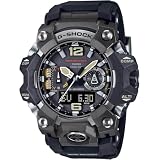
- Enjoy both fearless adventure and a comfortable fit with this tough and rugged Master of G Mudmaster flagship timepiece
- This analog-digital combination watch delivers more comfortable fit and outstanding durability with a robust exterior incorporating a guarding structure built with metal components
- The comfortably sized GWG-B1000 features a metal exterior crafted with high-precision forging techniques and a carbon fiber-reinforced resin case that offers high strength and outstanding durability
What each sensor tells you—and what can affect it
| Sensor | Reading | Setup or context | Main limitation |
|---|---|---|---|
| Compass | Direction or bearing; second hand indicates north | Hold the watch level and point its 12 o’clock position toward the objective | Magnetic interference; magnetic north is the normal reference unless true-north declination is configured |
| Altimeter | Estimated elevation | Correct the displayed altitude against a known elevation marker | Environmental pressure and temperature changes can shift the reading |
| Barometer | Local atmospheric pressure and its recent trend | Read pressure trends with elevation changes in mind | Elevation changes affect pressure, so pressure alerts are unreliable while ascending or descending |
Casio’s published ranges and intervals describe the watch’s specifications; the operation guide does not provide an independent accuracy study or field-test results. For navigation or decisions where a wrong reading could matter, use the sensor as one input rather than treating it as a verified measurement.
Recommended Free Tools
Quick Recap
Best Value
![CASIO GWG-2000-1A1JF [G-Shock Carbon MUDMASTER Radio Solar Triple Sensor]Shipped from Japan](https://m.media-amazon.com/images/I/51QajkabT4L._SL160_.jpg)
- Item Trademark: Casio
- Item Category: Watch
- Manufacturer: CASIO
- Manufacturer: CASIO
Product prices and availability are accurate as of the date/time indicated and are subject to change. Any price and availability information displayed on Amazon at the time of purchase will apply.




