Crashes, No Sound, or Screen Glitches?
Random freezes, missing sound and display glitches usually trace back to one bad driver. Find and replace yours safely.Free scan · under a minuteWindows Errors? Fix Them Before They Spread
Repair common Windows errors and clear accumulated junk for a smoother, more stable PC - no reinstall needed.Free scan · no reinstallFirst, find the module number on the case back or paperwork and open the matching Casio operation guide. Edifice chronograph controls differ by module, so there is no single button sequence that applies to every watch. If your watch matches one of the analog modules below, you can use its specific start, stop, and reset steps.
Find your Edifice module before pressing buttons
Look for the module number engraved on the case back or printed in the watch paperwork, then search Casio’s official operation guides for that number. Confirm the number matches your watch; a similar-looking dial does not guarantee the same controls or stopwatch capacity.
| # | Preview | Product | Price | |
|---|---|---|---|---|
| 1 |
|
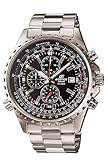
Casio Men's EF527D-1AV "Edifice" Stainless Steel Multi-Function Watch | $144.99 | Buy on Amazon |
As an Amazon Associate I earn from qualifying purchases.
The examples below show why checking matters: modules 5633, 5137, and 5126/5127 use A to start, stop, and resume, and B to reset. Modules 5697 and 5734 handle mode entry and reset differently. Use the instructions for your own module rather than transferring a sequence from another Edifice.
Do these 3 things before closing this tab:
1Clear out junk files and repair common Windows errors2Fix the driver behind crashes, sound loss and screen glitches3Repair Windows errors before they cause bigger problemsHow to start, stop, and reset the stopwatch
For analog modules 5633, 5137, and 5126/5127
- Make sure the crown is pushed in. The module 5633 manual warns: “Do not operate the stopwatch with the crown pulled out.”
- Press A once to start timing.
- Press A again to stop. Press A again to resume if you want to continue measuring the same elapsed time.
- Record the displayed time before resetting if you need it. With the stopwatch stopped, press B to return the display to zero.
The same A/B sequence is documented for these three modules, but their capacities and display increments differ. Module 5126/5127 also has a 1/20-second hand behavior that changes during the first 60 seconds; consult its guide if you need to interpret that hand.
#1 Best Overall
- Silver-tone watch featuring left-handed crown and black dial with 1/20-second chronograph function, slide-rotating inner bezel, and date window
- 45.5 mm stainless steel case with mineral dial window
- Quartz movement with analog display
- Stainless steel band featuring fold-over push-button clasp with safety
- Water resistant to 100 m (330 ft): In general, suitable for swimming and snorkeling, but not scuba diving
For module 5697
- From Calendar Mode, press A. This enters Stopwatch Mode and starts elapsed-time measurement.
- Press B to reset the elapsed time.
- To return to Calendar Mode, reset the stopwatch to zero and press B again.
Because A also enters the mode and starts timing, this is not the same sequence as the three analog modules above.
For module 5734
- Use the watch’s mode navigation to enter Stopwatch Mode.
- Operate the stopwatch from that mode using the controls described in the module 5734 guide.
- Press A to reset.
The 5734 display shows hundredths of a second during the first hour and seconds after the first hour. Its mode navigation and display differ from a conventional two-pusher analog chronograph, so check the guide for the exact operating controls.
How capacities and timing displays vary
These figures are manufacturer specifications for the named modules, not a universal specification for the Edifice line.
The Tool Desk
Outbyte PC Repair FREERepair Windows errors before they cause bigger problemsFix Now →Outbyte Driver Updater FREEScan for outdated or missing drivers - takes under a minuteDriver Scan →| Module | Control sequence and mode entry | Maximum elapsed time and increment | Other documented timing features |
|---|---|---|---|
| 5697 | From Calendar Mode, A enters Stopwatch Mode and starts timing; B resets. Reset to zero, then press B again to return to Calendar Mode. | Capacity and precision are not stated on the cited elapsed-time page. | Calendar Mode return requires zeroing first. |
| 5734 | Enter Stopwatch Mode using mode navigation; A resets. | Hundredths of a second for the first hour, then seconds. The cited guide does not state a maximum elapsed time. | Mode navigation and display differ from conventional two-pusher analog watches. |
| 5633 | A starts, stops, and resumes; B resets. | 29 minutes 59 seconds, in 1-second increments. | Supports split-time and two-finisher measurement. |
| 5137 | A starts, stops, and resumes; B resets. | 11 hours 59 minutes 59 seconds, in 1-second units. | The cited guide documents elapsed-time measurement. |
| 5126/5127 | A starts, stops, and resumes; B resets. Another B press returns the 1/20-second hand to its timekeeping indication. | 59 minutes 59.95 seconds, in 1/20-second units. | The 1/20-second hand behaves differently during the first 60 seconds. |
Split-time or multiple-finisher functions are documented for module 5633; do not assume another module offers them unless its guide says so. A subdial’s appearance alone does not establish its function.
Independent reader supportYour contribution helps us test, update, and keep practical guides available for everyone.If the chronograph hands do not return to zero
Consult the hand-alignment correction section in the guide for your exact module. Casio documents alignment correction for modules 5633, 5137, and 5126/5127, but the procedures differ; do not use one module’s correction steps on another watch.
If the stopwatch is still running, note the reading before resetting. Reset returns the display to zero and erases the current elapsed-time reading.
Quick Recap
Official Casio operation guides
- Casio module 5697 operation guide
- Casio module 5734 operation guide
- Casio module 5633 operation guide (2019 guide)
- Casio module 5137 operation guide (guide MA0909-EA)
- Casio module 5126/5127 operation guide
Product prices and availability are accurate as of the date/time indicated and are subject to change. Any price and availability information displayed on Amazon at the time of purchase will apply.




