Yes. The original HUAWEI WATCH GT Runner received an official upgrade from HarmonyOS 2.1 to HarmonyOS 3. Contemporary rollout reports identified the firmware as 3.0.0.73, with a download of about 83.06 MB. The rollout began in late 2022 and was staged by market and device channel, so it was not necessarily available to every owner at the same time.
What was updated
This update applies to the original HUAWEI WATCH GT Runner, not the later GT Runner 2. Huawei launched the watch with HarmonyOS 2.1 as a running-focused model built around training plans, recovery guidance and health monitoring. The move to HarmonyOS 3 was therefore a platform-generation upgrade rather than an ordinary security patch. Huawei’s launch announcement identifies the original software version and the watch’s running-oriented hardware.
| Item | Reported detail |
|---|---|
| Device | Original HUAWEI WATCH GT Runner |
| Launch software | HarmonyOS 2.1 |
| Upgrade | HarmonyOS 3 |
| Firmware build | 3.0.0.73 |
| Package size | Approximately 83.06 MB, reported by contemporary coverage; the delivered size can vary by region or distribution channel |
| Timing | Late 2022 rollout, with staged regional distribution |
The build number is reported by Huawei Update. A contemporary video report also identified the approximately 83.06 MB package: YouTube report. Neither source establishes simultaneous worldwide availability.
What HarmonyOS 3 changed—and what is not confirmed
Confirmed at platform level
- The GT Runner moved from HarmonyOS 2.1 to the HarmonyOS 3 generation.
- The update was distributed as an official firmware rollout rather than an unofficial package.
- Owners could receive newer system components, interface changes, application compatibility updates and stability improvements associated with the new software generation.
Not established by an accessible official changelog
Huawei’s currently indexed support pages do not provide a complete, GT Runner-specific HarmonyOS 3 changelog. It is therefore not possible to verify that the watch received every feature seen on the Huawei Watch 3 or Watch GT 3. Claims about particular menus, sport modes, training algorithms, battery life, GPS accuracy, heart-rate accuracy, sleep or SpO₂ processing, third-party sensors, or Huawei Health synchronization should not be treated as confirmed unless they appear in the on-device changelog for your unit.
#1 Best Overall

- Easy-to-use running smartwatch with built-in GPS for pace/distance and wrist-based heart rate; brilliant AMOLED touchscreen display with traditional button controls; lightweight design in 43 mm size
- Up to 11 days of battery life in smartwatch mode and up to 19 hours in GPS mode
- Reach your goals with personalized daily suggested workouts that adapt based on performance and recovery; use Garmin Coach and race adaptive training plans to get workout suggestions for specific events
- 25+ built-in activity profiles include running, cycling, HIIT, strength and more
- As soon as you wake up, get your morning report with an overview of your sleep, recovery and training outlook alongside weather and HRV status (data presented is intended to be a close estimation of metrics tracked)
HarmonyOS 3 also cannot add hardware. The watch retains its original screen, buttons, battery, GPS, sensors, altitude barometer, compass and connectivity characteristics. It does not become a GT Runner 2, a Wear OS watch or an Apple Watch through software alone.
How to check for and install the update
From the watch
- Press the upper button to open the app list.
- Open Settings.
- Tap the watch name to enter About.
- Tap Check for updates.
- Follow the on-screen instructions.
Huawei’s current watch instructions are available at Huawei global update instructions. Connect the watch to the internet before checking. Huawei states that firmware rollback is not supported.
From Huawei Health
- Open Huawei Health.
- Open the GT Runner’s device-details page.
- Tap Firmware update.
- Allow the app to check for a release and follow the installation prompts.
Huawei’s general guidance also documents automatic-download controls, including Wi-Fi downloading and automatic installation and restart while the watch is idle. Menu names can differ by device and software version; see Huawei’s watch and band update instructions.
Before starting
- Charge the watch adequately and keep it close to the phone.
- Use a reliable Wi-Fi connection for the download.
- Do not interrupt Bluetooth, power or the installation process.
- Synchronize health and activity data in Huawei Health first as a precaution; Huawei does not promise an identical backup and recovery process for every data type.
- Allow time for a restart and post-update synchronization.
Why the update may not appear
A missing update does not necessarily mean that the watch is unsupported. Huawei rollouts can be staged by country, model variant and firmware channel. An outdated Huawei Health installation, incomplete pairing, low storage, low battery or poor network connection can also block the check.
Rank #2

- Designed with a bright, colorful AMOLED display, get a more complete picture of your health, thanks to battery life of up to 11 days in smartwatch mode (5 days display always-on)
- Body Battery energy monitoring helps you understand when you’re charged up or need to rest, with even more personalized insights based on sleep, naps, stress levels, workouts and more (data presented is intended to be a close estimation of metrics tracked)
- Get a sleep score and personalized sleep coaching for how much sleep you need — and get tips on how to improve plus key metrics such as HRV status to better understand your health (data presented is intended to be a close estimation of metrics tracked)
- Find new ways to keep your body moving with more than 30 built-in indoor and GPS sports apps, including walking, running, cycling, HIIT, swimming, golf and more
- Wheelchair mode tracks pushes — rather than steps — and includes push and handcycle activities with preloaded workouts for strength, cardio, HIIT, Pilates and yoga, challenges specific to wheelchair users and more (data presented is intended to be a close estimation of metrics tracked)
- Update Huawei Health through the relevant official app store.
- Confirm that the watch is paired and synchronized.
- Restart both the phone and watch.
- Check Huawei Health > device details > Firmware update.
- Check directly on the watch through its update menu.
- Contact Huawei support if the model is eligible but remains stuck.
If installation fails or loops, retry with both devices charged, nearby and connected to stable Wi-Fi. Do not install unofficial firmware or attempt a downgrade. If the watch becomes unusable, use Huawei’s regional support or service center.
Phone, country and feature limitations
Huawei’s current compatibility page lists the original GT Runner for HarmonyOS phones running HarmonyOS 2 or later, Android phones running Android 6.0 or later, and iPhones running iOS 9.0 or later: GT Runner compatibility details. These are baseline phone requirements, not a promise of identical features across platforms.
- China-market and international models can expose different apps, watch faces, payment functions and health-research services.
- AppGallery content and watch-face availability may vary overseas.
- NFC, access cards, Alipay and some heart-health research functions are restricted to China or otherwise limited by market.
- iPhone users can encounter more restrictions than users of Huawei phones or Android devices.
- Availability can depend on the Huawei Health version, country, model code, account region and store region.
Huawei’s app-compatibility documentation lists the original GT Runner separately and gives version requirements for some apps. For example, the watch version of WeChat is listed at version 2.1.0.409 or later, requires a continuing Bluetooth connection to the phone and does not support iOS: Huawei GT-series app compatibility.
What HarmonyOS 3 does not guarantee
- It does not add NFC, eSIM, a speaker, new sensors or other physical hardware.
- It does not provide every HarmonyOS 3 feature found on newer Huawei watches.
- It does not turn the watch into a full third-party-app platform comparable with Wear OS or watchOS.
- It does not guarantee new sport modes, better GPS or heart-rate accuracy, longer battery life or new sensor compatibility.
- It does not make the original GT Runner identical to the GT Runner 2.
- It is not evidence that the watch will receive HarmonyOS 4, 5 or 6.
Should you install it?
Good reasons to update
- It is the intended official upgrade beyond the launch software.
- Newer system components may improve interface behavior, app compatibility and stability.
- Later Huawei Health or watch-app requirements may depend on newer firmware.
Reasons to plan carefully
- Your release may arrive later because distribution is staged by region or model variant.
- The complete feature list is not currently verifiable from Huawei’s indexed public pages.
- A major firmware change can alter menus, notifications, battery behavior or app behavior.
- Huawei provides no supported rollback path.
- Regional and iPhone restrictions remain after updating.
For an existing owner, installing the official package when it appears is generally the sensible choice, provided the watch is not being used for an event where any short-term post-update behavior change would be unacceptable. Synchronize first and allow time to test notifications, workouts and health-data syncing afterward.
Rank #3
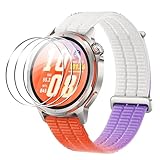
- [Applicable phone models] Compatible for Huawei Watch GT Runner 2
- [Highly Transparent]This kind of screen protector is 99% High Definition Clarity, 99% light transmittance, keeps the brightness and colorful image quality of your Huawei Watch GT Runner 2 screen protector
- [Perfect Protection]9H hardness tempered glass screen protector, stronger than ordinary film. It is strong enough to protect your phone from scratch, crush and break
- [Easy Installation]Dust-free, fingerprint-free, bubble-free, super easy one-touch installation
- [Warranty Service] If you have any problems with your product, please contact us. We will solve the problem for you within 24 hours, we will provide you with a free replacement or refund.
2026 support outlook
As of August 18, 2026, Huawei’s wearable security policy still lists the original WATCH GT Runner in the quarterly security-update group. The newer GT Runner 2 is listed in the monthly group, which indicates a more favorable support cadence for the newer generation: Huawei wearable security-update policy.
Quarterly security coverage means the original watch remains recognized by Huawei; it is not a promise of future major HarmonyOS upgrades or feature parity with current models. Buyers seeking the longest update horizon, broader sensor integration or newer training-platform features should compare current-generation watches rather than buying the original GT Runner solely because it received HarmonyOS 3. Huawei’s official support portal for the model is available here.
Buying advice in 2026
Existing GT Runner owner
Install the official update if offered, after synchronizing your data and checking that your phone and region support the functions you use.
Budget buyer
The original GT Runner can make sense only at a substantial discount and when its regional app, payment and iPhone limitations are acceptable.
Free tools Windows power users keep installed
One-click scans. No signup required.
Rank #4
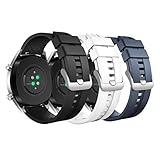
- COMPATIBLE MODELS: The silicone replacement band is compatible with Huawei Watch GT 5 Pro 46mm, GT 5 46mm, GT 4 46mm, GT 3 46mm, GT 3 Pro 46mm, GT Runner, GT 2 Pro, GT 2e, GT 2 46mm, GT 46mm, GT Active, GT Sport, GT Classic, Watch 4, Watch 4 Pro, Watch 3 Pro new, Watch 3, Watch 3 Pro, Watch D, Watch Ultimate, Watch Buds, Samsung Galaxy Watch 3 45mm, Galaxy Watch 46mm, Gear S3 Frontier, Gear S3 Classic, Honor MagicWatch 2 46mm, and other watches with 22mm bands. Note: Excludes smartwatches.
- PREMIUM MATERIAL: The GT 5 Pro band is made of soft silicone material that is durable, skin-friendly, water-resistant, lightweight and easy to clean, ensuring a secure wearing experience without causing skin irritation. It is very comfortable to wear even for long periods of time.
- WRIST SIZE: The GT 4 band is adjustable and fits wrists from 6.1-8.7 inches (155-220 mm). It looks great on both men and women. It features a metal clasp and double band loops to ensure that your watch stays securely on during strenuous exercise.
- EASY TO INSTALL: With the quick-release spring bars, you can change bands in just seconds, and the GT 3 bands are available in a variety of vibrant colors to match your different outfits and moods, whether it's for casual or business occasions.
- AFTER-SALES SERVICE: The GT 2 band is breathable for better air circulation, which helps to expel sweat from sports and daily activities and get rid of the sticky feeling. If you have any questions about silicone watch bands, please contact us.
Long-term buyer
A current Huawei running watch, including the GT Runner 2, offers a newer hardware platform and a longer expected support horizon. Verify local availability and features before purchase.
iPhone or NFC buyer
Check the exact model and country support first. Huawei documents platform-specific restrictions, and NFC or payment functions are not universal across markets.
Never install GT Runner 2 firmware on the original GT Runner. They are separate products with different firmware channels and support classifications.
Quick Recap
Product prices and availability are accurate as of the date/time indicated and are subject to change. Any price and availability information displayed on Amazon at the time of purchase will apply.
Do these 3 things before closing this tab:
1Fix the driver behind crashes, sound loss and screen glitches2Repair Windows errors before they cause bigger problems3Scan for outdated or missing drivers - takes under a minute



