Quick wins for a faster PC:
Scan for outdated or missing drivers - takes under a minuteDriver Scan →Clear out junk files and repair common Windows errorsFree Scan →Fix the driver behind crashes, sound loss and screen glitchesFind Drivers →VITURE glasses are wearable private displays with built-in audio, not standalone smart glasses. Most models need a compatible USB-C video source, such as a Steam Deck, Windows handheld, MacBook, iPad, or compatible Android phone. For wireless projection, Android apps, remote play, and more advanced multi-screen features, you generally need VITURE’s Pro Neckband or another compatible host device.
For most buyers, the decision comes down to three current models: VITURE Beast for the best gaming and cinematic experience, VITURE Luma Pro as the middle ground, and VITURE Luma as the value choice. The older Pro XR can still make sense at a substantial discount, particularly for Amazon shoppers, but it is no longer the company’s flagship.
VITURE glasses: the short verdict
- Best overall and best for gaming: VITURE Beast. It has the widest field of view in the current range, native VisionPair 3DoF, spatial display modes, strong brightness, and the most immersive presentation.
- Best value: VITURE Luma. It delivers a large 50-degree private screen, 1200p-class resolution, electrochromic dimming, audio, and up to -6.0D myopia adjustment.
- Best middle ground: VITURE Luma Pro. It offers a wider and brighter display than Luma, built-in tinting, and -4.0D adjustment without the price of Beast.
- Best older-model bargain: VITURE Pro XR, but only when heavily discounted and when built-in 3DoF is not important.
- Best standalone-style setup: compatible VITURE glasses paired with the Pro Neckband. This provides Android, wireless projection, remote play, and spatial features, but it costs more and is less simple than plugging glasses directly into a phone or handheld.
The main limitation applies to every model: these are not self-contained computers. Before buying, confirm that the device you intend to use supports video output over USB-C DisplayPort Alt Mode.
What VITURE glasses actually are
VITURE’s XR glasses place a virtual display in front of the wearer’s eyes and route audio through built-in speakers. They can function like a private external monitor for a handheld, laptop, tablet, or phone. That makes them useful for films on a plane, oversized handheld-gaming screens, and portable workspaces where carrying a monitor would be impractical.
Recommended Free Tools
#1 Best Overall

- Dual-Lens Waveguide Display Technology: Engineered with an advanced binocular waveguide optical system, these AR smart glasses deliver a truly immersive viewing experience. The ultra-bright 1200-nit MicroLED display produces crisp, vivid visuals, allowing you to view notifications clearly, real-time data, and digital content. Includes translation of more than 40 languages.
- All-Day Comfort, Virtually Weightless: Designed to feel natural from the moment you put them on, these ultralight 37g AR smart glasses combine an ergonomic frame with two soft nose pads for lasting comfort. From focused work sessions to active evenings, they stay comfortable, secure, and effortlessly wearable throughout your day.
- Your Personal AI Assistant, Always On: Designed for seamless everyday use, these AI AR agent glasses put a powerful AI assistant at your fingertips. Easy access to leading AI models delivers instant answers, intelligent recommendations, and hands-free support, helping professionals, students, and innovators stay informed and productive wherever they go.
- Live Basketball Updates Anywhere: Stay connected with real-time, text-based basketball scores and game updates displayed directly in your field of view. Designed for sports fans on the go, these smart glasses let you follow live games hands-free while commuting, working, traveling, or staying active. It's the ultimate basketball fan-themed gift for sports lovers!
- Real-Time Communication, Translation, Messaging, Music, Teleprompter, Navigation: These smart AR glasses act as a companion, offering real-time multilingual translation. Integrated messaging alerts keep you informed instantly, while the built-in teleprompter supports meetings, presentations, or content creation. Enjoy immersive access to music, notifications, and information suitable for global travelers, business professionals, and presenters who need efficiency and convenience on the go. (Auxiliary route guidance, prioritizing safe observation of the real-world environment.)
They are different from camera-equipped smart glasses that independently run apps, capture photos, or provide a fully autonomous augmented-reality experience. The glasses themselves normally receive video through their USB-C connection. Installing VITURE’s SpaceWalker software can add spatial screens and software features, but it does not turn the glasses into a standalone computer; the host device still supplies the computing power and, in many cases, the content.
The Pro Neckband is the component that makes the VITURE setup feel more self-contained. It runs Android, supports Google Play, offers Miracast and DLNA wireless projection, works with Bluetooth controllers and peripherals, and supports remote-play applications, multi-screen features, hand gestures, and 3DoF. VITURE lists 8GB/128GB and 12GB/256GB versions, a 3,280mAh battery, and more than four hours of video or remote-play use. Its usefulness is real, but it changes the economics: a buyer who only wants a wired private screen may not need it.
Current VITURE lineup compared
| Model | Display and view | Spatial features | Myopia adjustment | Best for |
|---|---|---|---|---|
| VITURE Beast | 1200p-class; up to 1250 nits perceived brightness; 58-degree FOV; 174-inch virtual screen at four meters | Built-in VisionPair 3DoF, Anchor, Smooth Follow, UltraWide, and Side modes | No built-in myopia dials; investigate prescription options | Gaming, films, travel, and maximum immersion |
| VITURE Luma Pro | Up to 1200p; 1000 nits perceived brightness; 52-degree FOV; 108% sRGB coverage | Does not include Beast’s native 3DoF hardware | Adjustable to -4.0D | Large private display without flagship pricing |
| VITURE Luma | 1200p-class; up to 1000 nits perceived brightness; 50-degree FOV | Primarily a direct-display and screen-mirroring model | Up to -6.0D | Value, ordinary mirroring, and nearsighted users |
| VITURE Pro XR | 1080p; up to 120Hz; approximately 46-degree FOV; electrochromic film | Previous-generation feature set | Adjustable myopia support | Discount buyers who do not need the newest spatial features |
VITURE’s brightness figures are described as perceived brightness. They should not be compared directly with a conventional monitor’s measured panel luminance or HDR brightness as if they were identical testing methods.
VITURE Beast review: the most immersive option
Beast is the strongest VITURE recommendation for gaming, cinema-style viewing, and travel. Its 58-degree field of view is materially larger than the roughly 46-degree view of the original Pro XR, and its 1200p-class display, OLED contrast, high perceived brightness, and dynamic electrochromic dimming create the most convincing large-screen experience in the lineup.
Free tools Windows power users keep installed
One-click scans. No signup required.
The headline feature is built-in VisionPair 3DoF. Beast supports Anchor, Smooth Follow, UltraWide, and Side modes, allowing the virtual screen to behave more like a positioned or spatial display rather than simply moving with the glasses. That is a meaningful advantage for games, films, and users who want a more stable virtual monitor.
Independent testing from Tom’s Guide’s VITURE Beast review found the glasses sharp and comfortable, and reported that firmware updates improved image fidelity, anchoring, color, and feature completeness. The same testing noted some edge blur and chromatic aberration. In practical terms, that makes Beast especially persuasive for centered video and games, but less obviously ideal as a full-day spreadsheet or text monitor.
Beast’s most important fit drawback is the removal of the adjustable myopia dials found on some earlier VITURE models. Buyers who need prescription correction should investigate model-specific prescription inserts and pay close attention to IPD sizing before ordering. The absence of built-in correction is not a deal-breaker, but it makes fit more consequential than the specification sheet suggests.
The US price listed in the research snapshot is $549. Treat that as a store price checked in the relevant snapshot rather than a permanent worldwide MSRP; regional pricing, bundles, promotions, and stock can change.
Rank #2

- YOUR PRIVATE 147” BIG SCREEN, ANYWHERE — Plug the a01+ into your phone, tablet, handheld, or laptop and a giant 147” screen appears in front of you—for movies, gaming, or getting work done on the couch, on a flight, or in bed. A true portable display you wear, in a soda-can-sized 210g case that drops in your pocket.
- ALWAYS RIGHT IN FRONT OF YOU — The screen follows your view with smooth, stabilized tracking and stays centered as you look around—nothing to anchor or set up, and no drift to reset. Press play and your big screen is simply there.
- 62G — LIGHT ENOUGH TO FORGET — At just 62g, with three nose-pad sizes and flexible temples, the a01+ stays comfortable through a long movie or flight, even lying down.
- LOOKS LIKE SUNGLASSES, NOT A GADGET — A slim, sunglasses-style frame with a signature semi-transparent chassis and neon logo—light and low-profile enough to actually wear out.
- WORKS WITH YOUR USB-C GEAR — No Battery to Charge — Connects and powers over a single USB-C DisplayPort cable: iPhone 15/16/17, iPad, DP-capable Android phones, Steam Deck, ROG Ally, Mac and PC. Nintendo Switch/Switch 2 and older (Lightning) iPhones need an adapter. For long phone sessions, add the XREAL Hub to charge and watch at once.
VITURE Luma Pro review: the sensible premium middle ground
Luma Pro is aimed at buyers who want a large, bright private screen and built-in tinting but do not need Beast’s native spatial hardware. Its 52-degree field of view sits between Luma and Beast, while its up-to-1200p display, up-to-1000-nit perceived brightness, and listed 108% sRGB coverage make it a strong choice for video and games.
The electrochromic film can vary transmittance from 0.5% to 40%, and VITURE lists nine levels of brightness and volume control. That gives Luma Pro a practical way to reduce interference from a bright cabin, room, or window without relying on a separate shade. It also has diopter adjustment to -4.0D.
Luma Pro weighs 79 grams in the regular size and 81 grams in the large size. It remains a wired display, however, so the attractive screen specifications do not remove the need for a compatible USB-C source, adapter, dock, or Neckband.
With a listed US-store price of $499 in the research snapshot, Luma Pro is the logical compromise for someone who values display size and brightness more than the lowest price, but does not want to pay Beast pricing. If native 3DoF is central to the purchase, the extra money for Beast is easier to justify.
VITURE Luma review: the value choice
Luma is the better fit for buyers who mainly want a private cinema screen or an oversized display for a USB-C handheld. It has a 50-degree field of view, 1200p-class resolution, up to 1000 nits of perceived brightness, electrochromic lenses, and Harman/ACC audio.
Its strongest practical advantage is the adjustment range: VITURE lists myopia correction up to -6.0D, broader than Luma Pro’s -4.0D and more accommodating than Beast’s lack of built-in myopia dials. That does not guarantee a perfect fit. IPD, nose-pad position, face shape, and prescription accuracy still determine whether the image is comfortable and sharp.
Luma is not the choice for buyers specifically seeking Beast’s built-in 3DoF and spatial modes. It is instead the straightforward screen-mirroring option. The US store showed a Luma configuration at $399 in the research snapshot, with other configurations and promotional prices varying.
VITURE Pro XR: still worth considering?
The original Pro XR uses Sony Micro-OLED panels, offers 1080p resolution and up to 120Hz refresh, has approximately a 46-degree field of view, includes electrochromic film, and supports adjustable myopia correction. Earlier reviews praised its display quality, brightness, tinting, and comfort, while noting its narrower view and some edge softness compared with newer designs.
Crashes, No Sound, or Screen Glitches?
Random freezes, missing sound and display glitches usually trace back to one bad driver. Find and replace yours safely.Free scan · under a minuteWindows Errors? Fix Them Before They Spread
Repair common Windows errors and clear accumulated junk for a smoother, more stable PC - no reinstall needed.Free scan · no reinstallRank #3

- HDR10 AR Glasses with 201” Virtual Screen – Experience over 10 billion colors and ultra-deep contrast on a massive 201-inch virtual display. Compared to standard LCD screens, HDR10 delivers brighter highlights and richer blacks, making movies, Netflix streaming, and gaming more immersive at home, in bed, or on flights.
- Vision 4000 Chip with AI SDR-to-HDR Upscaling – Co-developed with Pixelworks, this processor enhances color, sharpness, and motion clarity in real time. Enjoy smooth 120Hz visuals for PS5, Steam Deck, Switch 2, and mobile gaming without lag or motion blur.
- 3D Movie Glasses for Immersive Viewing – Watch native 3D films or convert 2D videos into 3D with AI depth enhancement. Transform any room into a private cinema experience with theater-like depth and realism—perfect for movie nights or travel entertainment.
- Audio by Bang & Olufsen – Four precision speakers deliver immersive 360° spatial sound for movies and gaming. Use whisper mode for private listening in public spaces. Optional Sound Tube accessory boosts volume up to 15dB (sold separately).
- Universal USB-C Compatibility – No WiFi or Apps Required. Connect directly to iPhone 17/16/15 (USB-C models), Android phones, MacBook, iPad, Steam Deck, and PlayStation consoles. No battery inside—lighter weight and instant setup wherever you go.
Its case is now primarily about price. Current Amazon-facing results list VITURE Pro XR Glasses among video-display-glasses results, but availability and seller status can change. Consider it a previous-generation bargain, not the current flagship. It makes sense when the discount is substantial, you want built-in myopia adjustment, and you are happy with a narrower field of view. It is a weaker choice if you specifically want native 3DoF, the widest image, or the newest spatial features.
A newer Pro 2 has also been reported as an emerging model, with early coverage describing a more comfortable and less expensive successor to the original Pro. Because the researched material did not establish final official specifications, broad long-term testing, or settled availability, it should not yet be treated as the automatic best buy. Check VITURE’s official product information before relying on early reports.
Image quality and the edge-clarity trade-off
VITURE’s appeal comes from a combination of OLED-like contrast, strong perceived brightness, electrochromic dimming, and a screen that appears far larger than the glasses themselves. Films benefit from the private, centered presentation, while handheld games can feel much less cramped than they do on a built-in display.
The limitation is that clarity is not perfectly uniform from edge to edge. Independent testing of Beast found slight edge blur and chromatic aberration even after firmware improvements. This is less distracting when watching a film or playing a game with important content near the center. It becomes more noticeable with spreadsheets, browser interfaces, dense text, and productivity layouts that place information at the periphery.
What’s actually slowing this PC down?
Pick the symptom - the matching free tool is one click away.
Electrochromic dimming is more than a cosmetic feature. Current models can darken the lenses to reduce ambient-light interference and improve contrast. VITURE lists nine levels of control on Beast and Luma Pro. The optional Lens Shade can provide more complete blackout on supported older models, but it further reduces awareness of the surrounding environment.
Compatibility: check this before buying
The most important purchase check is not the phone brand or the USB-C connector. It is whether the port supports DisplayPort Alt Mode, DisplayPort over USB-C, or compatible Thunderbolt video output. A USB-C port used only for charging and data will not drive the glasses.
VITURE’s compatibility guide lists devices including Steam Deck and Steam Deck OLED, ASUS ROG Ally models, Lenovo Legion Go, compatible Windows handhelds, supported Android phones, USB-C iPhone 15 and 16 models, MacBooks, iPads, and computers with compatible video output. Regional phone variants and software versions can affect the result, so check the exact model rather than assuming that a product family is universally supported.
Use this pre-purchase checklist
- Name the host device. Decide whether you will use a Steam Deck, handheld PC, phone, tablet, laptop, console, or another source.
- Verify video output. Look for DP Alt Mode, DisplayPort over USB-C, or Thunderbolt support in the device specifications.
- Check model-specific exceptions. VITURE specifically notes that iPhone 16e and iPhone Air are not compatible, and that some Google Pixel models may not support the resolution required for Immersive 3D.
- Plan for power. A single USB-C port may need to provide video while the device is also charging. A compatible dock or charging adapter may be required.
- Plan for HDMI sources. Nintendo Switch, PlayStation, Xbox, HDMI PCs, TV sticks, and similar devices generally require a dock or HDMI adapter rather than a direct glasses connection.
For readers buying accessories to solve a specific connection problem, the relevant options include a VITURE Lens Shade, VITURE Mobile Dock, and USB-C charging adapter. Choose based on the source device: a shade addresses light control, a Mobile Dock addresses console or HDMI-style use cases, and a charging adapter addresses power while playing. These are not mandatory additions for every buyer.
Rank #4
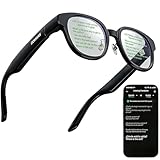
- 【AI Translation Glasses for Global Business & Travel】Communicate naturally across languages with premium AI translation glasses designed for meetings, travel, study abroad, trade shows, and daily multilingual conversations. These smart glasses deliver real-time translation directly on the AR display, helping you read live subtitles, understand conversations faster, and stay confident without constantly checking your phone. Ideal bluetooth smart glasses for professionals, travelers, students, and global communication.
- 【Private AR Display Glasses with Floating Visual Prompts】Experience information that appears before your eyes with advanced AR display glasses built for private, hands-free viewing. These smart glasses with display project translations, text prompts, notifications, navigation cues, and AI responses into your line of sight, creating a discreet HUD-style experience for work, communication, and everyday productivity. Unlike ordinary bluetooth glasses, they are built as true augmented reality glasses for real-world use.
- 【Invisible Teleprompter Glasses for Speech & Presentations】Turn every speech, meeting, livestream, lecture, sales pitch, or training session into a more confident performance with invisible teleprompter glasses for speech. Upload your script through the app and view private prompts while facing your audience naturally. These AI smart glasses with display work as professional teleprompter glasses for executives, creators, teachers, speakers, and anyone who needs smooth, discreet presentation support.
- 【AI Assistant, Voice Control & Smart Notifications】Stay productive hands-free with built-in AI assistant smart glasses that support intelligent Q&A, text processing, voice interaction, reminders, and real-time information prompts. Pair with iPhone or Android via Bluetooth to view messages, answer calls, receive navigation guidance, and reply by voice. These bluetooth smart glasses for men and women combine voice control, open-ear speakers, and AR prompts for a more effortless digital lifestyle.
- 【Lightweight Smart Glasses for All-Day Comfort & AR Navigation】Built for premium daily wear, these lightweight smart glasses feature a 43g frame, simple touchpad gestures, open-ear audio, and a balanced design that feels comfortable from work to travel. Use them as navigation glasses for walking, cycling, commuting, business trips, and outdoor exploration, with real-time HUD-style route prompts shown in your field of view. Stylish smart glasses for men and women, designed for productivity, communication, and all-day comfort.
SpaceWalker and the Pro Neckband
SpaceWalker is VITURE’s software layer for iOS, Android, macOS, and Windows-related workflows. Depending on the host device and feature support, it can provide multiple virtual screens, productivity tools, native 3D or VR video support, and spatial video support on compatible iPhone models. The capabilities are host-dependent; installing the software does not remove the need for a device that can run it and send or supply the relevant content.
The Pro Neckband is more substantial. VITURE lists Android and Google Play support, Miracast and DLNA wireless projection, Bluetooth controller and peripheral support, remote-play applications, multi-screen functions, hand gestures, and 3DoF. Its battery is listed at 3,280mAh, with more than four hours of video or remote-play use.
That makes a glasses-plus-Neckband bundle appealing for wireless streaming, remote console play, and people who want an Android-based portable media setup. It is unnecessary overhead for someone who already owns a compatible USB-C laptop or handheld and only wants a private monitor. The Neckband also means another device to charge, carry, and manage.
Audio, comfort, privacy, and prescription fit
Audio
Current VITURE models use Harman-tuned speakers or Harman AudioEFX branding. Reviews generally find the audio surprisingly effective for personal viewing, but it is not the same as sealed headphones. External noise can overpower it, and some sound leakage is possible. In a quiet airplane cabin, office, or shared room, headphones may be more appropriate if privacy is important.
Do these 3 things before closing this tab:
1Scan for outdated or missing drivers - takes under a minute2Clear out junk files and repair common Windows errors3Fix the driver behind crashes, sound loss and screen glitchesComfort and fit
Comfort depends heavily on face shape, nose-pad selection, IPD, cable routing, and prescription needs. Beast’s weight distribution has received positive independent commentary, but its lack of built-in myopia dials makes correct sizing and prescription planning especially important. Buyers should not assume that a lighter or more expensive model will automatically fit better.
IPD is also not a minor specification. If the lenses are not aligned well with the wearer’s eyes, the image can appear soft or uncomfortable even when the display itself is capable of high sharpness. Check the available size and return policy before buying, especially if ordering online.
Privacy and situational awareness
These are display glasses, not ordinary transparent everyday eyewear. The electrochromic lenses can darken substantially, and an optional shade can block even more of the outside view. When the display is active at high opacity, the wearer should not assume unrestricted awareness of people, obstacles, traffic, or other surroundings. Use them while seated and stationary when possible, and remove or dim them when situational awareness matters.
Independent reader supportYour contribution helps us test, update, and keep practical guides available for everyone.Prices, warranty, and buying safely
The US-store prices in the supplied research snapshot were $549 for Beast, $499 for Luma Pro, and $399 for one Luma listing, with multiple Luma configurations and promotional prices shown. Those numbers are useful for positioning the models, but they should not be treated as permanent MSRP. Prices, bundles, stock, regional availability, and accessory inclusion can change.
Quick wins for a faster PC:
Fix the driver behind crashes, sound loss and screen glitchesFind Drivers →Repair Windows errors before they cause bigger problemsFix Now →Scan for outdated or missing drivers - takes under a minuteDriver Scan →Best Value

- 【8MP Camera & Pro-Grade Stabilization】 Capture your world in breathtaking detail with the high-performance 8MP camera, generating ultra-smooth 1200P/30fps high-definition video and stunning 4K ultra-clear photos. As high-performance smart glasses with camera, they are equipped with a professional 6-axis G-sensor and advanced EIS stabilization algorithms to eliminate shakes. These are the ultimate camera glasses and recording glasses for hands-free vlogging and adventure recording during high-action activities like cycling or mountain biking. (Note: built-in inner frame for custom optical lenses only; lenses not included; no built-in HUD display)
- 【AI Object Recognition & ChatGPT Voice Intelligence】 Experience the future of hands-free assistance with integrated ChatGPT AI and smart image recognition. Simply say "Hello, Echo" to wake up your AI smart glasses for real-time AI conversations or to identify objects and road signs in front of you. Whether you're brainstorming on the go or navigating unfamiliar streets, these AI sunglasses with camera provide intelligent visual support without you ever touching your phone.
- 【Translation, Fast WiFi Sync & One-Click AI Editing】 Break language barriers with built-in AI translation for global travel. Forget slow Bluetooth transfers; high-speed WiFi synchronization lets you sync a 1-minute video to your phone in just 20–30 seconds. Instantly create ready-to-share content using the app's One-Click Video feature, or use ComicDay to transform photos into stunning comic art. As the ultimate camera sunglasses for men, they ensure your adventures are captured, edited, and shared with zero hassle—with built-in storage and no extra SD card required.
- 【ENC Noise Canceling & Smart OTA Evolution】 Experience crystal-clear communication with a dual-silicon microphone array and ENC (Environmental Noise Cancellation) technology that filters out wind and background noise even at high speeds. Stay at the cutting edge with continuous OTA updates via our dedicated app, bringing new AI features and system enhancements to your Bluetooth glasses. Effortlessly manage calls and media through the intuitive touch slide area on the right temple, ensuring a truly seamless user experience.
- 【Rugged IP64 Design, All-Day Comfort & Smart Connectivity】 Built for the elements, these smart sunglasses with camera feature a lightweight 49.3g PC frame with an IP54 weatherproof rating and adjustable temple ends for a secure, custom fit. The 260mAh battery supports 3C fast charging, reaching full power in just 50 minutes via magnetic charging. With stable Bluetooth connectivity, you can enjoy up to 5 hours of continuous music, hands-free calls, and real-time navigation prompts—keeping you connected while staying focused on your surroundings.
VITURE states that its XR glasses, Neckband, and accessories receive a 365-day warranty beginning on receipt for defects and malfunctions caused by materials or manufacturing. The company says warranty service applies to products bought through its official store or authorized channels; the official shipping and returns information should be checked for the buyer’s region and current terms.
When comparing a marketplace deal with the official store, verify the exact model, seller, included cable or dock, regional warranty eligibility, prescription compatibility, and return conditions. A low price on the wrong generation or an incomplete bundle may not be a bargain.
Which VITURE glasses should you buy?
| If you want… | Buy… | Why |
|---|---|---|
| The most immersive gaming and video experience | Beast | Largest 58-degree FOV, strongest listed brightness, and built-in 3DoF modes. |
| A private screen at the lowest current-model cost | Luma | Strong core display features, electrochromic dimming, and broad -6.0D adjustment. |
| A wider, brighter screen without Beast pricing | Luma Pro | 52-degree FOV, 1200p-class resolution, 1000 nits perceived brightness, and built-in tinting. |
| A discounted Amazon-searchable previous model | Pro XR | Still offers OLED display quality, 120Hz, tinting, and myopia adjustment, but lacks the newer generation’s advantages. |
| Wireless projection, Android apps, and remote play | Compatible glasses plus Pro Neckband | The Neckband supplies the computing and wireless features that glasses alone generally do not. |
| Heavy text and all-day productivity | Test before committing | Edge softness and fit variation can be more distracting with text than with centered video or games. |
Who should skip VITURE glasses?
- Buyers expecting wireless glasses out of the box: the glasses normally use a cable, and wireless functions require a compatible setup such as the Neckband.
- People without a compatible video source: a USB-C charging port alone is not enough.
- Users seeking ordinary transparent eyewear: the lenses can darken, and the display connection remains visible and cable-dependent.
- Anyone needing perfect edge-to-edge text clarity: the center can look excellent, but independent testing has identified edge blur and chromatic aberration.
- Buyers who need strong prescription correction but do not want inserts: Beast in particular requires more careful prescription planning because it lacks the earlier built-in myopia dials.
Frequently Asked Questions
Are VITURE glasses wireless by themselves?
Usually, no. Most VITURE glasses receive video over a USB-C connection from a compatible device with DisplayPort Alt Mode. Wireless projection and Android-style functions require a compatible setup, most notably the Pro Neckband.
Can VITURE glasses work with any USB-C phone?
No. The phone’s USB-C port must support video output, and device software and regional variants can matter. VITURE’s compatibility guide lists supported devices and specific exceptions, including iPhone 16e and iPhone Air.
Do VITURE glasses need a prescription lens insert?
It depends on the model and your prescription. Luma supports up to -6.0D adjustment and Luma Pro up to -4.0D, while Beast does not have built-in myopia dials. Beast buyers who need correction should investigate compatible prescription inserts and confirm the correct IPD size.
Are VITURE glasses good for working on text and spreadsheets?
They can work as a portable monitor, but they are more convincing for centered video and gaming than for sustained text-heavy work. Independent testing has noted some edge blur and chromatic aberration, which can be more noticeable around peripheral text.
The Bottom Line
Bottom line: VITURE makes excellent private-display glasses, but the purchase only makes sense once the source device, cable, prescription, and spatial-feature requirements are clear. Choose Beast for maximum immersion and native 3DoF, Luma Pro for the best premium middle ground, and Luma for straightforward mirroring and stronger built-in myopia adjustment. Add the Pro Neckband only when wireless projection, Android apps, or remote play justify the extra cost and complexity.




