If a perpetual calendar watch shows the wrong date, don’t assume it is broken—and don’t try a generic reset. First identify the exact watch reference and movement caliber, then follow that model’s official setting instructions. Calendar controls, correction sequences, tools, and restricted adjustment times differ by model. If a control resists or the display remains wrong after the documented procedure, stop and contact the manufacturer or a qualified watchmaker.
Why a perpetual calendar can show the wrong date
A displayed date can be wrong because the watch stopped, lost power, or was set incorrectly. Citizen, for example, says its perpetual calendar may need manual adjustment after a stoppage or incorrect setting. A mismatch alone does not establish that the calendar mechanism is damaged.
Perpetual calendars account for differing month lengths and leap years, but that capability does not make their setting procedures interchangeable. Even two watches from the same manufacturer can use different controls and sequences.
What to do before adjusting it
- Identify the watch. Find the brand, reference, and caliber using the case, warranty materials, or manufacturer records. The procedure must match the specific movement, not just the brand or the words “perpetual calendar.”
- Check what happened. Consider whether the watch stopped, ran out of power, or had its calendar indications changed. This context may determine which model-specific instructions apply.
- Find the official instructions for that reference or caliber. Confirm whether the watch needs winding first, the order of corrections, the permitted tool, and any time restrictions. If you cannot verify the correct manual, ask the manufacturer or a qualified watchmaker rather than guessing.
- Follow the instructions exactly and gently. Use only the specified controls and tool. Stop if a corrector or crown feels abnormal, an indication jumps unexpectedly, or the procedure does not produce the expected result.
- Seek service if the mismatch persists. Don’t repeat or improvise adjustments when the display remains inconsistent after the documented process.
Why the exact caliber matters
These manufacturer examples illustrate why there is no universal correction sequence. They are examples, not instructions to use on another watch.
#1 Best Overall

- Men's luxury timepieces with technical advancements and a sporty style
- 1/5 Second Chronograph Measures up to 60 Minutes, 12/24 Hour Time, Date
- Silver-Tone Stainless Steel
- Spherical Mineral Crystal, Blue Dial
- 100 Meters Water Resistant and 5 Year Limited Warranty
| Watch or caliber | What its manufacturer instructions say | Important limit |
|---|---|---|
| Patek Philippe perpetual-calendar models in the cited manual | The manual gives model-specific correction sequences and a restricted period for calendar or moon-phase corrections. It directs owners to use the supplied correction stylus. | Do not transfer its timing, sequence, or tool instructions to a different model. The manual states: “The push pieces should be actuated only with the correction stylus delivered with your watch.” |
| Audemars Piguet Caliber 7138 | The guide says to wind the watch first and provides different correction procedures depending on whether it stopped for less than or more than 72 hours. Before setting the date, it says to ensure the 24-hour indicator is outside the red zone, 9 p.m. to 3 a.m.; it identifies around noon as safest when moving out of that zone. | The 72-hour threshold and 9 p.m.–3 a.m. restriction apply to Caliber 7138, not to perpetual calendars generally. |
| Citizen Caliber A010 | Citizen says the calendar normally does not need manual adjustment before February 28, 2100 unless it was set incorrectly or the watch stopped. Its procedure uses crown position 1 to adjust the date; the date and hour hand move together, so the AM/PM setting must be checked. | This crown position and procedure are A010-specific. |
| Citizen Caliber H82 | The manual uses button B to select the indication to correct, followed by crown adjustment. The selection cycles through time, date, day, and year/month. | This sequence differs from A010 and must not be assumed to apply to another caliber. |
Is there a safe time to adjust every perpetual calendar?
No universal correction window is established by these manufacturer instructions. Audemars Piguet identifies 9 p.m. to 3 a.m. as a non-correction zone for Caliber 7138, while Patek Philippe gives restrictions and sequences for its own models. Use the restricted period stated in the manual for your exact watch; do not apply another caliber’s rule by analogy.
What the year 2100 has to do with perpetual calendars
February 28, 2100 is a distant calendar exception, not a likely explanation for a wrong date now. Under the Gregorian calendar, 2100 is a secular year that omits February 29. Citizen’s A010 guidance and the cited Patek Philippe manual say a properly maintained perpetual calendar may not need manual correction before that date. Citizen also notes that an incorrect setting or a stopped watch can require adjustment sooner.
Rank #2

- With bold design and superior accuracy, Citizen AT watches synchronize to an atomic clock with a margin of error of just one second in 100,000 years
- 1/20 Second Chronograph Measures up to 60 Minutes, Perpetual Calendar, 12/24 Hour Time, Power Reserve Indicator, Day/Date
- Silver-Tone Stainless Steel
- Anti-Reflective Sapphire Crystal
- 200 Meters water resistant and 5 year limited warranty
When to stop and get help
Contact the manufacturer or a qualified watchmaker if you cannot identify the caliber, cannot find the matching instructions, a control sticks or resists, the indications behave unexpectedly, or the date remains incorrect after the prescribed procedure. The symptoms alone do not establish a particular movement fault, and the remedy depends on the watch.
Quick Recap
Rank #4
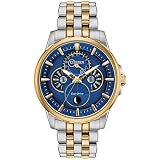
- Timeless styling that effortlessly takes you from work to play.
- Analog Month/Day/Date, Moonphase Indicator
- Two-Tone Stainless Steel
- Spherical Mineral Crystal
- 100 Meters Water Resistant and 5 Year Limited Warranty
Rank #3

- ⌚Automatic Slef-Wind Watch:The precision movement is equipped with fully automatic winding, stable ball bearings, 21,600 times per hour, built-in 21 synthetic diamonds, 45 hours of energy storage, and more than 10 years of use.
- ⌚Classic 6 Hand Dial Design:OLEVS meticulously designed 4 calendar functions of year/month/week/day to meet all customer needs, a multi-function watch with multiple times.The classic bottom moon phase window is a classic watch for gentleman men.
- ⌚Luxury 316L Stainless Steel Strap:Solid stainless steel watch bracelet, hidden butterfly pushed button, ventilate, prevent perspiration, quality assurance.Two adjustment tools are provided to easily adjust the strap length.
- ⌚30ATM Waterproof:Three-degree nano-level sealed waterproof, ultra-high waterproof performance, innovative and enhanced anti-fog, 30 meters strong pressure waterproof,suitable for everyday life waterproofing, such as washing hands, doing housework, and briefly soaking in water.
- ⌚OLEVS Warranty Service:We provide 30 days free returns,2 years product high-quality assurance for the automatic watch.If you have problems during the use of the wristwatch,please feel free to contact us. We will offer you a professional service!
Product prices and availability are accurate as of the date/time indicated and are subject to change. Any price and availability information displayed on Amazon at the time of purchase will apply.
Recommended Free Tools




