The WhiteFox Eclipse is a ready-to-use 68-key mechanical keyboard built around a magnetic, modular assembly, hot-swappable switches and QMK/VIA customization. Its appeal is that you can adjust or take apart the board without treating it as a full build project. The main decision is which case to buy: the plastic Standard Kit is the least expensive, while the aluminum versions cost more and the high-profile model is substantially heavier.
What the WhiteFox Eclipse is—and what makes it different
Developed by Alpaca Keyboards under Project Eclipse, the Eclipse has a compact 68-key layout: it omits a function row and adds a column of keys on the right. The vendor traces the design rethink to August 2022, the launch campaign to April 2023, first shipments to November 2023 and Project Eclipse’s formation to December 2023. The campaign drew more than 300 supporters, according to the product history page. Project Eclipse’s product page presents the board as the start of a modular product ecosystem; HotHardware noted in April 2024 that the broader ecosystem had not yet materialized at the time of its review.
As an Amazon Associate I earn from qualifying purchases.
The assembly combines a magnetic case and magnetic attachment for the switch assembly with a gasket-oriented construction, an aluminum flex plate, a cutout PCB and adjustable foam. Project Eclipse says removing foam can change flex and sound. Its descriptions of a “cloud-like” feel and reduced hand strain are vendor claims, not established ergonomic outcomes. Likewise, a case or construction description cannot establish how the keyboard will sound in every setup.
The Tool Desk
Outbyte PC Repair FREERepair Windows errors before they cause bigger problemsFix Now →Outbyte Driver Updater FREEFix the driver behind crashes, sound loss and screen glitchesFind Drivers →Which WhiteFox Eclipse configuration should you choose?
Project Eclipse’s buy page displayed the following USD prices on October 12, 2026. Prices and purchase terms can change; these are the page’s listed figures, not a price guarantee.
#1 Best Overall
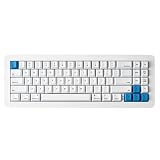
- 【Tool-Free Magnetic Customization, Endless Possibilities】Say goodbye to complicated tools! The WhiteFox Eclipse features a unique magnetic gasket-mounted design, allowing you to effortlessly open the keyboard without tools. Easily swap hot-swappable switches (like the pre-lubed Gateron Yellows), adjust internal components, or perform routine cleaning. Customize your typing feel and sound with unprecedented freedom.
- 【Dual-Mode Connectivity, Seamless Mac/PC Switch】 This keyboard supports both wired (USB-C) and Bluetooth 5.0 wireless dual-mode connectivity, powered by a 4000 mAh large battery for extended use anywhere inspiration strikes. Proprietary firmware ensures out-of-the-box, seamless compatibility with both Mac and PC systems, eliminating compatibility headaches and providing a stable, reliable typing experience for all users.
- 【Ultimate Comfort & Premium Sound Profile】An innovative double-gasket mounted design combined with a flexible custom PCB provides a "cloud-like" elastic response with every keystroke, effectively reducing hand fatigue during long typing sessions. Enjoy a factory-tuned "Thocky" sound profile right out of the box—no extra modifications needed—for a professional-grade keyboard resonance.
- 【Premium Materials & Personalized Aesthetics:】Choose from aluminum high/low profile or a plastic starter case to match your personal style. Paired with high-quality PBT dye-sublimated keycaps, it ensures durability and a superior feel. Its elegant, understated design seamlessly blends into any professional environment, while universal keycap compatibility allows for easy personalization.
- 【Powerful Features for Enhanced Productivity】More than just a keyboard, the WhiteFox Eclipse is a productivity tool. It supports VIA/QMK firmware for programmable macros and customizable hotkeys, streamlining complex operations and significantly boosting your efficiency. Additionally, office-appropriate adjustable RGB backlighting both enhances aesthetics and helps you quickly locate function keys, striking the perfect balance between work and style.
| Configuration | Case | Displayed price | Best fit |
|---|---|---|---|
| Standard Kit | Plastic | $140 | Buyers prioritizing the lowest listed price and a lighter case material. |
| Aluminum Low Profile Case | Aluminum, low profile | $225 | Buyers who specifically want an aluminum enclosure without choosing the high-profile version. |
| Aluminum High Profile Case | Aluminum, high profile | $315 | Buyers who want the taller aluminum enclosure and are comfortable with the added cost and weight. |
The high-profile sample reviewed by Tom’s Hardware weighed 5.02 pounds. That is a review measurement for that configuration, not a published weight for every Eclipse version. Project Eclipse describes the high-profile case’s added volume as acoustically rich, but that is not proof it sounds better than the other cases.
The buy page says purchases are through Apos and displays free shipping, a one-year warranty and a 45-day return policy. Check the live listing for the terms that apply to your order.
Rank #2
- 【Tool-Free Magnetic Customization, Endless Possibilities】Say goodbye to complicated tools! The WhiteFox Eclipse features a unique magnetic gasket-mounted design, allowing you to effortlessly open the keyboard without tools. Easily swap hot-swappable switches (like the pre-lubed Gateron Yellows), adjust internal components, or perform routine cleaning. Customize your typing feel and sound with unprecedented freedom.
- 【Dual-Mode Connectivity, Seamless Mac/PC Switch】 This keyboard supports both wired (USB-C) and Bluetooth 5.0 wireless dual-mode connectivity, powered by a 4000 mAh large battery for extended use anywhere inspiration strikes. Proprietary firmware ensures out-of-the-box, seamless compatibility with both Mac and PC systems, eliminating compatibility headaches and providing a stable, reliable typing experience for all users.
- 【Ultimate Comfort & Premium Sound Profile】An innovative double-gasket mounted design combined with a flexible custom PCB provides a "cloud-like" elastic response with every keystroke, effectively reducing hand fatigue during long typing sessions. Enjoy a factory-tuned "Thocky" sound profile right out of the box—no extra modifications needed—for a professional-grade keyboard resonance.
- 【Premium Materials & Personalized Aesthetics:】Choose from aluminum high/low profile or a plastic starter case to match your personal style. Paired with high-quality PBT dye-sublimated keycaps, it ensures durability and a superior feel. Its elegant, understated design seamlessly blends into any professional environment, while universal keycap compatibility allows for easy personalization.
- 【Powerful Features for Enhanced Productivity】More than just a keyboard, the WhiteFox Eclipse is a productivity tool. It supports VIA/QMK firmware for programmable macros and customizable hotkeys, streamlining complex operations and significantly boosting your efficiency. Additionally, office-appropriate adjustable RGB backlighting both enhances aesthetics and helps you quickly locate function keys, striking the perfect balance between work and style
How it feels and performs, according to independent reviews
This is an assessment of published reviews, not a hands-on test. HotHardware’s Ryan Whitwam praised the Eclipse’s feel and sound, hot-swap switches, modular disassembly and included switch and keycap quality. He also pointed to the then-unrealized ecosystem, no barebones option and limited included keycap choices. Those comments reflect the review and its date, not current stock or the ecosystem’s status today. Read HotHardware’s April 26, 2024 review.
Christopher Coke’s Tom’s Hardware review covered the high-profile aluminum configuration. He praised its magnetic construction, dampened keys, wireless connectivity and programmability; drawbacks included a single stock switch type, frequent cleaning and dim RGB lighting. These observations apply to the reviewed sample and configuration. Read Tom’s Hardware’s February 21, 2024 review.
Rank #3

- Gasket-Mounted Creamy Typing: The cushioned gasket structure and 6 layers of sound-dampening material work with factory-lubed linear switches to deliver smoother keystrokes and a fuller, softer sound for gaming, typing, coding and everyday work.
- Hot-Swappable 3-Pin and 5-Pin Support: Replace compatible mechanical switches without soldering to personalize the keyboard’s sound and key feel. The pre-lubed switches are rated for 50 million keystrokes, while double-shot keycaps help keep the legends clear through extended use.
- Responsive Wired Gaming Performance: A 1000Hz polling rate provides fast and consistent input for gaming and daily productivity. The detachable USB-C cable offers a stable wired connection without battery or charging interruptions and can be removed for easier transport or replacement.
- Volume Knob and Customizable RGB: Turn the dedicated knob to adjust volume and press it to play or pause media. Choose from 15 preset lighting effects and 16.8 million RGB colors to complement a gaming station, home office or clean white desktop setup.
- Browser-Based Key and Macro Control: Remap keys, record macros, assign shortcuts and personalize RGB lighting through the DIERYA web driver without installing traditional desktop software. Access the customization tools through a supported browser on Windows, macOS or Linux.
Can you change the switches and customize the layout?
Yes. The switches are hot-swappable, so you can replace them without soldering. HotHardware identifies the stock switches as pre-lubricated Gateron Yellow linears. That gives the out-of-box board a linear switch feel; buyers who prefer a different feel should factor in a switch swap rather than assume multiple switch choices are included.
The Eclipse supports QMK and VIA. Project Eclipse’s FAQ says layout and lighting changes can be made in VIA and saved to the keyboard’s memory. This makes it possible to remap keys without relying on a software setting that must remain open on the host device. Consult Project Eclipse’s FAQ.
Rank #4

- 【99 Keys 96% Layout】The 99 key layout reduces the size to 39x13.5x4cm while ensuring full keyboard functionality. Paired with pluggable USB-C to USB-A cable, the keyboard can save your desktop space, improve work efficiency, and game performance.
- 【Hot-swappable Custom Keyboard】The switches and keycaps can be freely replaced(keycap/switch puller are included in the package).This customizable keyboard with hot-swap PCB allows users to replace 3 pins/5 pins switches easily without soldering issue. Z-99 mechanical keyboards equipped with pre-lubed linear switches, bring smooth typing feeling and pleasant typing sound, provide fast response for exciting game.
- 【GASKET structure with Sound Absorbing Foams】 Gasket structure ensures the highest quality assurance with great durability and stable performance. Equipped with 5 layers of thicker sound-absorbing foams, silicone dampener pad, which reduces 40% noise and removes 80% hallow sound. Bringing creamy sounding, natural and clear feedback, no more cavities noise.
- 【Fully Anti-ghost】100% anti-ghosting 99 keys deliver reliably accurate performance without any program error. N-key rollover, keyboard can respond to multiple key presses at the same time, which is helpful in very exciting real-time games.
- 【Cool RGB Backlit Effect】 Z-99 RGB keyboard include 15 backlight effects and 8 solid backlight color switching. Different RGB setting enriches your typing time. Lighting speed and level can also be adjusted according to your need. Double shot Injection PBT Keycaps, character never fade.
Does it work with Mac, Windows and Bluetooth devices?
The official quickstart lists Windows, Mac OS, Linux, iOS and Android compatibility, with USB and Bluetooth connectivity. Bluetooth requires the host device to support Bluetooth 5.0 or newer. The FAQ suggests a Bluetooth dongle if a computer does not have suitable Bluetooth support.
To select a paired Bluetooth device, use Fn+Q, Fn+W or Fn+E. The keyboard supports up to three paired-device slots. These are the documented connection options; the available evidence does not establish battery endurance.
Best Value
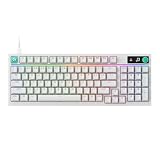
- Near-instantaneous responsiveness: Experience elite gaming performance with an 8 kHz report rate for quick signal transmission and precise, game-ready response times
- Personalize your play: Hot-swappable switches and double shot PBT keycaps allow you to easily customize the look and feel of your mechanical gaming keyboard, and helps with shine resistance
- Intuitive on-board controls: Joyful and interactive LED dot-matrix display and dial let you easily control report rate, volume, brightness, and media without leaving your game
- Premium sound and feel: Gasket-mounted structure with sound-dampening silicone and foam layers provides a refined, quiet typing experience and satisfying tactile feedback
- Dynamic LIGHTSYNC RGB lighting: interactive light bar reacts to your setup and dial adjustments, customize 30 different light zones and per key lighting for a truly immersive gaming environment
If the keyboard disconnects intermittently or its LEDs flicker over USB, Project Eclipse’s FAQ suggests trying another cable or port because some USB ports may not supply enough power. It does not establish that this is a widespread defect.
What keycaps fit the WhiteFox Eclipse?
The official guide says the 68-key layout uses standard key sizes, so many ordinary sets can physically fit. The qualification is the six keys in the far-right column: their sculpted profiles may not match the corresponding rows in a full-size or TKL set. A standard TKL set can fit those 1u keys, but their row height or sculpt may be slightly off. If uniform keycap sculpt matters to you, check the set’s layout and row profiles before buying. See the official quickstart guide.
Who should buy it—and who should pass?
- Consider it if you want a compact 68-key board that is usable out of the box but still allows switch swapping, remapping and magnetic disassembly.
- Choose the case deliberately if budget or portability matters: the three listed configurations differ substantially in price, and the reviewed high-profile aluminum model is heavy.
- Look elsewhere if you need a function row, a choice of stock switches, a light travel keyboard, or a fully established ecosystem of companion products.
- Check before customizing if Bluetooth host compatibility or exact keycap row sculpt is important to your setup.
The strongest case for the Eclipse is its combination of accessible customization and a distinctive magnetic design, rather than any single independently measured performance advantage. Whether that combination justifies the price depends on which case you choose and how much you value the modular assembly.
What’s actually slowing this PC down?
Pick the symptom - the matching free tool is one click away.
Quick Recap
Product prices and availability are accurate as of the date/time indicated and are subject to change. Any price and availability information displayed on Amazon at the time of purchase will apply.




