Free tools Windows power users keep installed
One-click scans. No signup required.
The biggest improvements come from three things: getting the ear-tip seal right, choosing the correct listening mode, and enabling the features that match how you use your AirPods. AirPods Pro 3 can do much more than play music, including adaptive noise control, hearing-health tools, workout heart-rate sensing, Personalized Spatial Audio, and Live Translation. However, some features require a compatible iPhone or iPad, a current operating system, updated firmware, supported languages, and availability in your region.
Use these 13 tips to configure AirPods Pro 3 properly, improve everyday comfort and reliability, and avoid treating features such as Hearing Protection or Live Translation as more capable than Apple says they are.
1. Start with the right ear-tip size
AirPods Pro 3 include five silicone ear-tip sizes: XXS, XS, S, M, and L. Do not assume that both ears need the same size. Your left and right ear canals can differ, so try sizes independently and judge each ear by comfort, stability, bass response, and how well it blocks outside sound.
A good seal matters for more than audio quality. It helps Active Noise Cancellation and Transparency mode work as intended, and it can help the earbuds maintain contact with the sensors used for features such as workout heart-rate measurements. A tip that is too small may leak sound or loosen during movement; one that is too large may feel uncomfortable or create pressure.
2. Run the Acoustic Seal Test
After choosing tips, verify the fit rather than relying only on how the earbuds feel. On a compatible iPhone or iPad:
#1 Best Overall

- 【What's New - Black Magic Version 6.0】 Black Magic tips are Super Soft, shaped More Ergonomically, and have been completely redesigned based on 1000+ of our last generation's feedbacks. We've listened to you so you can listen better with your new Foam Tips!
- 【ISO-9 MEMORY FOAM】 Only available on our Black Magic ear tips, ISO-9 blends comfort with durability, sweat resistance, and grip. The secret is a semi-permeable layer on top of the memory foam that feels invisible, but makes a world of difference.
- 【NEXT LEVEL SOUND QUALITY】 Benefit from better active noise cancellation (isolation) and natural bass response.
- 【MASTER FITMENT】 We've mastered the fitment and accounted for every 0.1mm of memory foam when designing these ear tips.
- 【WE UNDERSTAND HUMAN ANATOMY】 Each ear tip is tapered at the front allowing for a deeper, more secure fit. The rear of the tips are slightly widened to flow with the natural groove of the ear.
- Open Settings.
- Tap Bluetooth.
- Tap the information button next to your AirPods.
- Choose Acoustic Seal Test.
- Follow the instructions and repeat the test after changing a tip or repositioning an earbud.
If the result is poor, reseat the earbuds and try another size—possibly a different size in each ear. AirPods Pro 3 use the Acoustic Seal Test; this is distinct from the Ear Tip Fit Test used by earlier AirPods Pro generations.
If you regularly fail the test or lose the seal during exercise, AirPods Pro 3 ear tips can be a practical replacement or backup purchase. Choose tips explicitly listed as compatible with AirPods Pro 3, and treat them as a way to address fit, comfort, sealing, or sensor contact—not as a guarantee of better noise cancellation or heart-rate readings.
3. Use Adaptive Audio when your surroundings change
Adaptive Audio combines Active Noise Cancellation and Transparency mode, automatically adjusting how much outside sound you hear. It is useful when you move between quiet rooms, streets, shops, offices, and public transport without wanting to switch modes manually each time.
PC Slower Than It Used to Be?
A free scan shows the junk files, broken settings and background clutter dragging Windows down - then fixes them in one click.Free scan · Windows 10 & 11Outdated Drivers Are Slowing You Down
One free scan finds every outdated or missing driver and matches the right update for your exact hardware.Free scan · exact hardware matchOpen Control Center on the connected Apple device, press and hold the AirPods volume control, and select the listening-mode controls. You can also adjust Adaptive Audio from the AirPods settings. Apple allows the amount of ambient sound admitted in Adaptive mode to be customized, so experiment in a safe, familiar environment rather than assuming the default is ideal.
Adaptive Audio is not a substitute for awareness around traffic, machinery, or other hazards. For situations where you need to hear everything around you, Transparency mode may be the more appropriate choice.
4. Turn on Conversation Awareness if you talk frequently
Conversation Awareness detects when you begin speaking, lowers media volume, and emphasizes voices in front of you. When the conversation ends, it restores the previous listening experience.
Enable it from the connected-device AirPods controls. If you want to end the behavior manually, press and hold the stem. This feature is particularly convenient in shops, offices, and during brief interactions where removing the earbuds would be inconvenient.
What’s actually slowing this PC down?
Pick the symptom - the matching free tool is one click away.
It can also react when you speak to someone who is not actually trying to start a conversation—for example, if you hum along with music or talk to yourself. Turn it off temporarily when that behavior becomes distracting.
Rank #2
- 【What's New - Black Magic Version 6.0】 Black Magic tips are Super Soft, shaped More Ergonomically, and have been completely redesigned based on 1000+ of our last generation's individual feedbacks. We've listened to you so you can listen better with your new Foam Tips!
- 【ISO-9 MEMORY FOAM】 Only available on our Black Magic ear tips, ISO-9 blends comfort with durability, sweat resistance, and grip. The secret is a semi-permeable layer on top of the memory foam that feels invisible, but makes a world of difference.
- 【NEXT LEVEL SOUND QUALITY】 Benefit from better active noise cancellation (isolation) and natural bass response.
- 【MASTER FITMENT】 We've mastered the fitment and accounted for every 0.1mm of memory foam when designing these ear tips.
- 【WE UNDERSTAND HUMAN ANATOMY】 Each ear tip is tapered at the front allowing for a deeper, more secure fit. The rear of the tips are slightly widened to flow with the natural groove of the ear.
5. Let Personalized Volume learn your habits
Personalized Volume automatically adjusts media volume using environmental conditions and your previous listening behavior. Enable it in the AirPods settings instead of repeatedly making large manual changes whenever you move between environments.
Give the feature time to learn. If it chooses levels you dislike, correct the volume normally rather than disabling it immediately. Remember that personalized volume is a convenience feature, not a reason to ignore safe listening levels.
6. Create a Personalized Spatial Audio profile
Personalized Spatial Audio creates a listening profile based on the shape of your head and ears. Setup requires an iPhone with a TrueDepth camera:
- Open the AirPods settings on the compatible iPhone.
- Find the Spatial Audio controls.
- Choose the option to create a personalized profile.
- Follow the onscreen instructions to scan the required views of your head and ears.
The result is most noticeable with supported movies, television shows, music, games, and FaceTime calls. Spatial Audio is not universal: the content, app, device, and operating-system support all matter. If voices or instruments sound unnaturally positioned, compare Personalized Spatial Audio with it switched off and choose the setting you prefer.
7. Learn the stem gestures
The stems provide quick controls without reaching for your phone:
| Gesture | Action |
|---|---|
| Press once | Play or pause media |
| Press twice | Skip forward |
| Press three times | Go back |
| Swipe up or down | Raise or lower volume |
| Press and hold | Switch listening modes |
| Press and hold both stems | Start Live Translation when the required device and software conditions are met |
The stem controls are pressure-based rather than ordinary taps. If an action is not registering, press the flat stem firmly enough to feel the click without squeezing the earbud deeper into your ear.
8. Use hearing-health tools within their limits
AirPods Pro 3 include several hearing-related tools, depending on device, software, language, and regional availability. These include:
The Tool Desk
Outbyte Driver Updater FREEFix the driver behind crashes, sound loss and screen glitchesFind Drivers →Outbyte PC Repair FREEClear out junk files and repair common Windows errorsFree Scan →Rank #3

- Ultimate Upgrade: A combination of CPA17 adapter and Oval ear tips for a secure, "click-fit" connection to AirPods Pro 3. (NOT compatible with Pro 1 & 2)
- Dynamic Stability: The patented Aura-Rib with Color Ring enhances stability, improves grip, and maintains a secure seal during active movement.
- Advanced Protection: Integrated acoustic mesh protects against dust, earwax, and sweat while preserving sound quality.
- Supreme Comfort: Patented 3D-axis design combined with high-purity silicone delivers an adaptive, hypoallergenic fit for all-day comfort.
- Perfect Fit: 1:1 sizing matches the original ear tips for a seamless transition. An exclusive MS size is included for a more precise, customized seal.
- Hearing Test for assessing hearing in supported circumstances.
- Hearing Aid functionality for eligible users.
- Automatic Conversation Boost when using Hearing Aid.
- Hearing Protection.
- Live Listen.
- Headphone Levels monitoring.
- Headphone Accommodations.
Apple describes Hearing Aid as intended for adults with perceived mild to moderate hearing loss, and availability varies by region. These tools should not replace a professional hearing evaluation, especially if hearing loss is sudden, one-sided, painful, worsening, or accompanied by ringing or dizziness.
9. Enable Hearing Protection—but do not mistake it for industrial protection
Hearing Protection can help reduce exposure to loud environmental noise, but it has important limits. It is not suitable protection against extremely loud impulse sounds such as gunfire or fireworks, against jackhammers, or against sustained sounds above 110 dBA.
For construction, shooting, industrial work, concerts, motorsport, or other high-noise environments, use properly rated hearing protection appropriate to the hazard. AirPods should not be treated as a substitute for earmuffs or earplugs designed for that setting.
10. Use the built-in heart-rate sensor during workouts
AirPods Pro 3 can measure heart rate during workouts through Apple Fitness, Apple Fitness+, and supported third-party fitness apps on iPhone or iPad. The earbuds send heart-rate and motion data to the iPhone.
Quick wins for a faster PC:
Fix the driver behind crashes, sound loss and screen glitchesFind Drivers →Repair Windows errors before they cause bigger problemsFix Now →For the best chance of a usable reading:
- Use a secure, comfortable ear-tip seal.
- Keep the sensor area in consistent contact with your skin.
- Wear both earbuds as intended by the workout app.
- Check that the app has the necessary Health or fitness permissions.
- Pause to adjust a loose earbud if readings disappear during movement.
Missing or fluctuating readings can result from poor fit, movement, sweat, or loss of skin contact. Do not treat AirPods as a medical heart monitor or assume that every reading is accurate enough for diagnosis or emergency decisions.
11. Play audio from another Apple device while the iPhone receives workout data
Your iPhone does not always have to be the device playing the workout audio. Under the required Apple Account and operating-system conditions, the iPhone can receive heart-rate data while compatible audio plays from another Apple device such as an Apple TV, iPad, or Mac.
This is useful when following a workout on a larger screen or using an Apple TV in a gym or living room. Pair the AirPods with the appropriate device, keep the iPhone available to receive the sensor data, and confirm that the fitness app recognizes the earbuds before starting.
Rank #4

- Designed for AirPods Pro 3 (2025): Specially designed for AirPods Pro 3, the ear tips replacement parts are made from premium liquid silicone with a foam-infused filling layer. Compared to memory foam buds, the dual-layer structure of earbud conforms more naturally to the ear canal, helping create a better seal for improved comfort and supporting noise cancellation performance for a more enjoyable listening experience. Each airpod pro3 gen ear tip bud features a built-in dust guard mesh, and the precision snap-on design ensures a secure and seamless fit with the earbuds (Note: the cushion not compatible with AirPods Pros 2nd gen and Air Pod 4)
- All-Day Comfortable & Secure Fit: Made from soft, skin-friendly liquid rubber, these ear piece replacements accessories provide a comfortable wearing experience for extended use. The high in-ear fit helps the earbuds stay firmly in place during daily activities such as working, commuting, traveling, or exercising, keeping them stable and not easy to fall out
- Enhanced Noise Cancellation Performance: A closer in-ear seal helps the airpod earpiece replacement maintain the noise-canceling performance of Air Pods Pro 3rd Generation while reducing external distractions. Enjoy a more focused listening experience during travel, workouts, work, or relaxation without constantly being interrupted by surrounding noise
- Richer Sound with Improved Audio Detail: The enhanced seal of ears cushions helps deliver better overall sound performance by preserving audio detail and reducing sound loss. Enjoy deeper bass, clearer vocals, and more balanced sound reproduction, making music, calls, and entertainment sound fuller, clearer, and more immersive
- Various sizes & Storage Case: Includes 3 pairs upgrade air podspro3 silicon ear inserts pieces pads in small, medium, large sizes to suit different ear shapes and preference. XS and XXS 2 sizes, as well as black color, will be available soon. A portable storage case is included to keep unused ear tips clean, organized, and easy to carry.
If you wear an Apple Watch and AirPods Pro 3 together, the system may have multiple heart-rate data sources. That does not mean every app will display both sources or that the readings will always agree; the app and Apple device configuration determine what is used.
Do these 3 things before closing this tab:
1Clear out junk files and repair common Windows errors2Scan for outdated or missing drivers - takes under a minute3Repair Windows errors before they cause bigger problems12. Set up Live Translation only when the prerequisites are met
Live Translation is not a universal AirPods feature that works with any phone. AirPods Pro 3 Live Translation requires:
- An Apple-Intelligence-enabled iPhone 15 Pro or later.
- iOS 26 or later.
- The Translate app.
- Downloaded language models.
- Current AirPods firmware.
- A supported language and region.
Translation processing takes place on the iPhone. Once configured, pressing and holding both stems can start Live Translation when the requirements are satisfied. Before relying on it, download the necessary languages and test the feature while connected to the internet or in the intended real-world conditions.
Apple warns that generative translation output can be inaccurate or unexpected. Confirm names, numbers, medical instructions, legal statements, travel details, and other important information with the speaker or a qualified human translator.
Independent reader supportYour contribution helps us test, update, and keep practical guides available for everyone.13. Maintain the earbuds, case, and firmware
Clean carefully
Debris and earwax can affect sound, Active Noise Cancellation, Adaptive Audio, and Transparency performance. If noise control suddenly weakens, inspect the mesh and openings and clean the earbuds according to Apple’s instructions. Avoid forcing debris into the openings, using abrasive tools, or applying liquids where they can enter the earbuds.
A commercial AirPods cleaning kit is optional, not essential. Only use one if its tools and method are demonstrably compatible with Apple’s cleaning guidance; a soft, appropriate electronics-cleaning brush is preferable to aggressive scraping or unverified liquids.
Respect the IP57 rating
AirPods Pro 3 and their charging case have an IP57 rating under controlled laboratory conditions. Resistance can diminish with normal wear. The rating does not make them suitable for swimming, deliberate submersion, or charging while wet.
After exposure to sweat or water, let the earbuds dry fully before placing them in the case. Never charge wet earbuds or a wet case.
Best Value
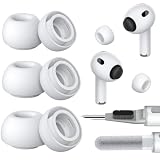
- Seamless Fit: Replacement silicone ear tips insert securely into the headphones and are only compatible with Apple's official devices. Replace worn-out ear tips with these new earbud tips for near-original comfort and functionality. Please note the differences between AirPods Pro 3 and AirPods Pro 2 & 1, select the correct version
- Built-in Dust Guard: Each earbud tip features an integrated mesh guard that blocks earwax, debris, and sweat from entering the speaker grille. The one-piece molded design ensures the replacement ear piece screen firmly stays in place, providing long-lasting protection for AirPods Pro. This prevents it from falling out during workouts or daily use, keeps speakers clean, consistently delivers optimal sound performance
- Ultra-Soft Silicone, All-Day Comfort: Made from high-quality, lightweight, skin-friendly silicone, silicone tips feature slight elasticity, and fine surface ridges increase static friction to ensure a secure fit in the ear canal, even during intense workouts. Whether you're running, on calls, or relaxing, these buds replacement non-slip tips ensure long-lasting comfort for your ears
- Easy-to-Clean & Durable: Compared to memory foam ear tips, silicone eartips resist aging, are long-lasting, and much easier to clean. Use included cleaner kit—dual-ended cleaning tool: one end features a cleaning tip and brush, the other a flocking sponge brush—to easily remove debris from rubber ear tips and earphones
- Multiple Sizes: Replacement ear tips are compatible with AirPods Pro corresponding models. Available in the most complete size sets and most-used size sets, easily find the ideal fit for you and your family. Please select the size for you: S/M/L, XS/S/M/L, XXS/XS/S/M/L (xxs: extra-extra small; xs: extra small; s: small; m: medium; l: large). The included storage case keeps spare ear tips neatly organized, preventing dirt or deformation, so replacement tips are always ready to use
Keep firmware current
Firmware updates are delivered automatically through Apple’s update process. To check the installed version, connect the AirPods, open Settings > Bluetooth, tap the information button beside the AirPods, and view the firmware details. Keeping the connected Apple device updated as well can matter because some features depend on both firmware and the operating system.
Battery and charging: what to expect
Under Apple’s stated test conditions, AirPods Pro 3 provide:
- Up to 8 hours of listening with Active Noise Cancellation enabled.
- Up to 7.5 hours with Spatial Audio and head tracking enabled.
- Up to 24 hours with the charging case.
- Approximately 1 hour of listening after about 5 minutes in the case.
These are controlled-condition ratings, not a guarantee for every user. Actual runtime changes with volume, listening mode, Spatial Audio, calls, environmental conditions, sensor use, and other settings.
The case supports MagSafe, Apple Watch, Qi-certified, and USB-C charging. Apple states that the USB-C cable is sold separately. If you need one, look for a USB-C cable for AirPods Pro 3 or a compatible MagSafe/Qi charging accessory, and verify the connector and product compatibility in the listing. Do not assume that a generic accessory is Apple-certified without checking its specific certification.
What to do when noise cancellation gets worse
Work through these steps in order:
- Run the Acoustic Seal Test again.
- Try a different tip size in the affected ear.
- Reseat the earbud and check whether it stays sealed while you move.
- Inspect the earbud openings for debris or earwax.
- Clean the earbuds using Apple’s recommended method.
- Check that the AirPods firmware and connected-device operating system are current.
- Reconnect or reset the AirPods if the problem affects both earbuds and persists.
- Contact Apple or an authorized service provider if the issue remains after fit and cleaning checks.
Fit problems are often mistaken for an ANC fault. A loose seal can make noise cancellation seem weak even when the electronics are functioning normally. Conversely, if one side remains substantially worse after a good seal test and careful cleaning, service may be more appropriate than buying more accessories.
A sensible setup order
If you have just unboxed AirPods Pro 3, configure them in this order:
- Try the included ear-tip sizes and choose independently for each ear.
- Run the Acoustic Seal Test.
- Update the paired Apple device and allow firmware updates to complete.
- Learn the stem gestures and choose a default listening mode.
- Enable Adaptive Audio, Conversation Awareness, or Personalized Volume only if each matches your routine.
- Create Personalized Spatial Audio if you regularly use supported content.
- Set up hearing-health tools only after checking regional availability and their intended use.
- Configure workout permissions before relying on heart-rate data.
- Set up Live Translation only after verifying the iPhone, iOS, language, and Apple Intelligence requirements.
Frequently Asked Questions
Do AirPods Pro 3 work with Android phones?
Basic Bluetooth audio functions may work with non-Apple devices, but many features in this guide depend on a compatible iPhone or iPad, Apple operating-system version, Apple apps, firmware, language, and region. The dossier does not establish feature-by-feature Android support, so check the specific feature requirements before buying for an Android phone.
Are AirPods Pro 3 waterproof enough for swimming?
No. The IP57 rating is based on controlled laboratory conditions and does not make the earbuds suitable for swimming or deliberate submersion. Resistance can diminish with wear, and the earbuds or case should be completely dry before charging.
Why is one AirPod reading heart rate inconsistently?
Check the ear-tip fit and sensor contact first. Movement, sweat, a loose earbud, or poor skin contact can cause missing or unreliable readings. AirPods heart-rate data should not be treated as a medical diagnosis or emergency measurement.
Recommended Free Tools
Can AirPods Pro 3 replace hearing protection at a shooting range or construction site?
No. Apple says Hearing Protection is not suitable for extremely loud impulse sounds such as gunfire or fireworks, jackhammers, or sustained sounds above 110 dBA. Use properly rated hearing protection for those hazards.
The Bottom Line
For most owners, the highest-value setup is simple: choose the correct tip for each ear, pass the Acoustic Seal Test, keep the earbuds clean and dry, and use Adaptive Audio or Conversation Awareness when they fit your routine. Treat battery figures as laboratory estimates, heart-rate readings as fitness data rather than medical measurements, and Hearing Protection as a convenience feature—not industrial safety equipment.
Quick Recap
Product prices and availability are accurate as of the date/time indicated and are subject to change. Any price and availability information displayed on Amazon at the time of purchase will apply.




