Free tools Windows power users keep installed
One-click scans. No signup required.
If your Apple Watch no longer lasts through your normal day, start with the settings and habits that most affect runtime—but do not assume every battery problem is a settings problem. Low Power Mode, Always On Display, complications, cellular use, GPS workouts, charging behavior, recent updates, and battery age can all make a difference. These steps can extend battery life between charges, but they cannot restore capacity lost through lithium-ion battery aging. Apple distinguishes battery life from battery lifespan: one is runtime between charges, while the other is how long the battery remains useful. Apple explains the difference here.
Start here: Turn on Low Power Mode, disable Always On Display for a day, simplify background activity and complications, reduce cellular/GPS/speaker use during long sessions, then check Battery Health and charging behavior.
As an Amazon Associate I earn from qualifying purchases.
Before changing settings, confirm the drain is unusual
Battery life varies by Apple Watch model, battery age, display features, connection type, workout duration, and software. A cellular watch used away from an iPhone can behave very differently from a GPS-only model.
Ask what changed. Is the watch failing to last through a routine day, or only during an outdoor workout, travel, sleep tracking, cellular use, or audio playback through the built-in speaker? Did the problem begin immediately after a watchOS update? Apple says background tasks can continue for several days after an update and temporarily affect battery life. Keep the watch connected to the iPhone, charge normally, and reassess after a few days before treating a post-update drain as permanent. Apple’s battery-drain guidance also recommends checking usage, charging, and software.
#1 Best Overall

- Give Your Watch a Second Life: Repurpose your compatible Apple Watch and bring it back into your daily routine. With TechPod RePod, your Watch is reborn in a retro-inspired handheld form, bringing back the pleasure of carrying a dedicated music player. Made for the Watch that still works but no longer gets worn. Case only; Apple Watch not included
- More Music, Less Phone Scrolling: RePod C1 lets you enjoy your playlist without reaching for your phone—and getting pulled into your feed. Listen to music downloaded to your Apple Watch through paired Bluetooth headphones, even when your iPhone stays behind. Streaming and other connected features depend on your Apple Watch model, apps, and network connection
- CNC-Machined Aluminum: Enjoy the cool metal touch and solid in-hand feel of a precision-machined aluminum enclosure. RePod pairs a retro-inspired shape with a metal finish for those who appreciate the look and feel of classic personal electronics
- A Wheel You Can Feel: Bring a physical touch to your listening routine. RePod’s external wheel mechanically turns your Apple Watch’s Digital Crown for scrolling and volume adjustment in supported apps. Controls vary by app and watchOS. The center button is decorative and does not control the Watch.
- Find the Right Fit: This version fits [verified Apple Watch Series 7/8/9, and case sizes]. Please check your Watch model and case size before ordering. RePod is an enclosure, not a standalone electronic device; your installed Apple Watch provides the music, apps, and connectivity
1. Turn on Low Power Mode when runtime matters most
Low Power Mode is the quickest broad battery-saving option.
- Press the side button to open Control Center.
- Tap the battery percentage button.
- Turn on Low Power Mode.
- If prompted, choose Turn On or Turn On For, then select 1 Day, 2 Days, or 3 Days.
You can also open Settings > Battery and turn it on there. Depending on the model, whether the iPhone is nearby, and the activity in progress, Low Power Mode can turn off Always On Display, reduce background refresh, update complications and Live Activities less often, limit Wi-Fi and cellular behavior, reduce animation smoothness, delay some notifications, and make Siri or calls slower. It can also turn off background heart-rate and blood-oxygen measurements, some heart-rate notifications, and gestures such as Double Tap and wrist flick. See Apple’s current Low Power Mode documentation for model-specific effects.
Use it for an emergency low-battery situation, a long travel day, or an endurance workout. It is a poor permanent setting if you depend on continuous health measurements, timely notifications, cellular connectivity, or gestures. In normal use, it turns off automatically after the watch charges above 80 percent unless you selected a multi-day duration.
Recommended Free Tools
2. Turn off Always On Display as a one-day test
On compatible models, the display remains visible in a reduced state instead of going fully dark. That convenience can contribute to drain, but it is not automatically the main cause of a fast-dead battery.
- Open Settings on the watch.
- Tap Display & Brightness.
- Scroll to Always On.
- Turn Always On off.
Use the watch normally for one day and compare the result. With Always On disabled, you will need to raise your wrist, tap the display, or use the Digital Crown to view the time and complications. If the improvement is negligible, turn the feature back on if it is important to you. This setting is irrelevant on models that do not support Always On Display. Apple lists the setting among its battery-saving recommendations.
Rank #2

- Ultra-Compact & Portable Design: Measuring just 3.6×1.9×0.66 inches and weighing only 2.59 oz, this charger is designed for true portability. A USB cable can be used as a keychain, an output port, or an input port. Easily slip it into a pocket, bag, or travel kit—perfect for daily commutes, workouts, travel, camping, and on-the-go lifestyles. An ideal gift choice for Christmas, stocking stuffers, or White Elephant exchanges for men, women, and adults
- 2500mAh Extended Battery Capacity: Powered by a built-in 2500mAh rechargeable battery, it delivers up to two full charges for Apple Watch Ultra 1–3 and up to four full charges for Apple Watch SE 1–3 or Series 2–11. Enjoy all-day power without searching for outlets—ideal for long trips and busy schedules
- Strong Magnetic Auto-Alignment: Equipped with a high-strength magnetic module, the charger instantly and securely aligns with your Apple Watch. Simply place your watch on top—it snaps into position and begins charging immediately. No cords, no hassle
- Advanced Multi-Protection Safety Chip: Integrated with a comprehensive safety chip for worry-free charging. Protects against overcharging, overheating, overvoltage, overcurrent, and short circuits—whether charging your watch or the charger itself. Ensures a stable, reliable, and secure charging experience
- Exclusive Apple Watch Compatibility | What’s Included: Compatible with all Apple Watch models and sizes, including Series 2–11, SE (1st–3rd Gen), Ultra, Ultra 2, and Ultra 3; fits 38/40/41/42/44/45/46/49 mm cases. Not compatible with Samsung Watch or other smartwatch brands. Package includes: 1× Portable Charger with Type-C Cable ,1× User Manual
3. Reduce background refresh—and audit your complications
Background App Refresh can allow apps to update when you are not actively using them.
- Open Settings.
- Tap General.
- Tap Background App Refresh.
- Turn it off globally, or disable it only for selected apps.
There is an important exception: apps represented by complications on the current watch face may continue to refresh. Turning off Background App Refresh alone therefore does not stop every background update.
Remove complications you do not use, particularly several that frequently retrieve weather, travel, finance, fitness, or location data. A simpler watch face can be a useful diagnostic test for a day. Do not rely on repeatedly force-quitting every app as a primary battery fix; Apple’s guidance does not establish routine app-closing as the solution, and reopening apps repeatedly may be counterproductive. Apple’s watchOS battery guide covers background refresh and complications.
4. Cut the biggest workout, connection, and audio drains
For long outdoor workouts
On supported watches, Low Power Mode can reduce the frequency of GPS and heart-rate readings during certain outdoor workouts. Open Settings > Workout, turn on Low Power Mode, then enable Fewer GPS and Heart Rate Readings if the option appears.
Apple lists this feature for watchOS 9.1 or later on Apple Watch SE (2nd generation) and later, Series 8 and later, and Apple Watch Ultra and later. It applies when Low Power Mode is active and you start an outdoor walking, running, or hiking workout in Apple’s Workout app.
Rank #3

- ✅【Compatible With】The portable apple watch charger case is suitable for 42mm 44mm 45mm 46mm apple watch, and for all iWatch series 1/2/3/4/5/6/SE/7/8/9/10/11/SE/SE2/SE3/12. 【Note】Apple Watch and Charging Cable not included.
- ✅【Full Protection】This travel apple watch charger case is ideal choice for you to take on business trip, travelling, hiking and home storage, protect your iWatch from bumps, dust and scratches.
- ✅【Cable Well-Organized】The charging stand is well deigned to fit your charging cable and apple watch, adjust the cable as you need, keep extra cable inside the stand to make it tidy and convenient.
- ✅【Premium Material】We use hard EVA material as surface with nylon lining, makes it not easy to deform and well protect it against crush, soft silicone charging dock makes it convenient and comfort to fit your charging cable and apple watch.
- ✅【Package】1*Carry Case, 1*Charging Dock, 1*Carabiner.
The trade-off is substantial: workout alerts are turned off, splits and segments are not recorded, and metrics such as current pace may be unavailable. This is sensible for a long hike, ultramarathon, or extended run where finishing matters more than receiving every live metric. It is a poor choice for interval training, pace-sensitive work, or users who need frequent heart-rate data.
Windows Errors? Fix Them Before They Spread
Repair common Windows errors and clear accumulated junk for a smoother, more stable PC - no reinstall needed.Free scan · no reinstallCrashes, No Sound, or Screen Glitches?
Random freezes, missing sound and display glitches usually trace back to one bad driver. Find and replace yours safely.Free scan · under a minuteFor cellular use
When the iPhone is not nearby, a cellular Apple Watch may use cellular data, which generally consumes more power than Bluetooth or nearby Wi-Fi. Keep the iPhone close during ordinary use, use Wi-Fi when available, and avoid extended calls or streaming over cellular unless necessary. Weak cellular coverage can make the drain worse because the watch may work harder to maintain a connection. Apple recommends keeping the watch near the iPhone when battery life is a priority.
For audio
Playing audio through the built-in speaker can drain the battery faster on newer models. Use Bluetooth headphones, such as AirPods or other compatible headphones, for watch-based audio when possible.
5. Check Battery Health, charging, heat, and updates
Check Maximum Capacity
- Open Settings on the Apple Watch.
- Tap Battery.
- Tap Battery Health.
- Scroll to Maximum Capacity.
Maximum Capacity shows the battery’s capacity relative to when it was new. A high capacity combined with sudden drain points first toward software, connectivity, charging contact, or usage patterns. A substantially reduced capacity means the watch stores less energy than it once did. A Battery Needs Service message, unexpected shutdowns, or a watch that cannot complete your ordinary day are reasons to contact Apple. There is no universal percentage at which every watch must be replaced; interpret the number alongside actual runtime, shutdown behavior, model, and service status.
Check whether charging is really completing
Use the included magnetic charger where possible. Place it on a flat, well-ventilated surface, align the connector correctly, and use an appropriate power adapter. If the watch appears to charge but still dies quickly:
The Tool Desk
Outbyte PC Repair FREERepair Windows errors before they cause bigger problemsFix Now →Outbyte Driver Updater FREEFix the driver behind crashes, sound loss and screen glitchesFind Drivers →Rank #4

- Compact & Travel-Ready Design: This sleek PU case fits all Apple Watch Series 11/10/9/8/7/6/5/4/3/2/1/SE3/SE2/SE models, offering a portable charging box solution for your watch on the go
- Compatible with All Apple Watch Models: Works with Apple Watch Series 11/10/9/8/7/6/5/4/3/2/1/SE3/SE2/SE, featuring a smooth and rigid 360-degree zipper that is easy to open and close, with sturdy hand strap for easy carrying (CASE ONLY)
- Water-Resistant Security: Specialized material protects your valuable Apple Watch Series from accidental spills, rain, and moisture when stored in this travel case
- Universal Fit for All Models: Versatile interior accommodates every Apple Watch generation (1-11 & SE variants), making this watch charging box a future-proof investment for Apple enthusiasts
- Military-Grade Protection: Shockproof and pressure-resistant construction safeguards your Apple Watch storage case against drops, impacts, and daily wear during travel or commutes
- Clean and dry the back of the watch and charger.
- Confirm that the charging symbol appears.
- Try a known-good Apple or certified charger.
- Check whether the watch reaches the expected charge level.
- Restart the watch.
- Install the current compatible watchOS update.
- Check Battery Health again.
Apple distinguishes counterfeit or uncertified chargers from Apple-made and certified products; do not assume every third-party charger is automatically unsafe. Look for an Apple Watch-certified charger carrying the Made for Apple Watch badge. Apple’s charger guidance explains the distinction.
Understand optimized charging
Open Settings > Battery > Battery Health to review Optimized Battery Charging or, on supported models, Optimized Charge Limit. These features can delay charging beyond approximately 80 percent in some situations to reduce long-term battery wear. They are battery-lifespan features—not a way to restore a degraded battery or make it hold more energy today.
If you need a full charge immediately, the charging screen may offer Charge to Full Now. Permanently disabling charge optimization may provide more immediate capacity in some situations, but can increase battery wear. Do not turn it off as a routine fix. Apple explains optimized charging and charge limits here.
Fast charging reduces charging time; it does not increase battery capacity or guarantee longer daily runtime. Compatibility depends on the watch model, cable, adapter, and region. Apple’s charging guide notes that fast charging requires a compatible setup and an 18W-or-greater USB-C power adapter.
Use this troubleshooting order
- Restart the Apple Watch.
- Check the charger, alignment, cleanliness, and charging symbol.
- Keep the watch near the iPhone and avoid unnecessary cellular use.
- Check Settings > Battery > Battery Health.
- If the problem followed an update, allow several days for background tasks to finish.
- Install the current compatible watchOS update.
- Contact Apple if abnormal drain persists, the watch overheats, it shuts down unexpectedly, or it displays Battery Needs Service.
When the pattern points to a particular cause
It dies only during long workouts: use Low Power Mode for workouts, enable fewer GPS and heart-rate readings when supported, keep the iPhone nearby, and use Bluetooth headphones.
Best Value
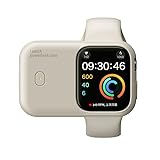
- 🔋Portable Apple Watch Charger: It is a compact, lightweight power bank that allows you to charge your Apple Watch on the go. It is designed for easy transport and convenience, making it ideal for travel, outdoor activities, or simply when you need to top up your watch's battery. Built-in 1200mAh battery extends iWatch battery life in an emergency, about 2.5 hours will get 100% power. you can get 1-1.5 times which means your watch has 100% to 150% extra battery.
It dies overnight: check the starting charge, charging contact, recent updates, battery health, sleep tracking, Always On Display, and unnecessary complications. Sleep tracking alone is not automatically the cause.
It began after an update: wait several days while keeping the devices connected, then reassess. Temporary post-update activity is possible, but severe or persistent drain still requires troubleshooting.
It works normally after a full charge, then dies at a predictable low percentage: reduced capacity or an inaccurate battery estimate is possible. Check Maximum Capacity and service status before endlessly changing settings.
It becomes unusually hot: persistent or extreme heat, swelling, charging failures, or shutdowns should not be treated as merely a settings issue. Stop using the watch if necessary and seek Apple support.
If you need a replacement charger because the existing one is damaged or inconsistent, buy a compatible Apple-made or certified charger. If battery aging is the likely cause, check Apple’s repair and service estimate for the exact model and region. Pricing, taxes, shipping, authorized-provider fees, coverage, and eligibility vary.
The Bottom Line
If these changes improve runtime, your usage pattern or an active feature was probably responsible. If they do not—and especially if Maximum Capacity is low, the watch overheats, shuts down, or says Battery Needs Service—the battery or hardware is more likely the problem. Do not keep sacrificing important health or safety features indefinitely to compensate for a failing battery.
Quick Recap
Product prices and availability are accurate as of the date/time indicated and are subject to change. Any price and availability information displayed on Amazon at the time of purchase will apply.




