Do these 3 things before closing this tab:
1Repair Windows errors before they cause bigger problems2Fix the driver behind crashes, sound loss and screen glitches3Clear out junk files and repair common Windows errorsThe biggest Garmin battery gains usually come from managing the display, Pulse Ox, GPS, connectivity, music, and third-party watch faces—not from one hidden setting. Start with Always-On Display, brightness, and Pulse Ox; then adjust GPS and connected features to match how you use the watch. Exact menus vary by model and software version, so treat the paths below as examples rather than universal instructions.
Garmin’s battery figures are “up to” estimates based on particular configurations and usage patterns. GPS, multi-band positioning, music, LTE, notifications, Pulse Ox, display settings, and Connect IQ content can all reduce real-world endurance. See Garmin’s battery-drain guidance for model-specific qualifications.
As an Amazon Associate I earn from qualifying purchases.
Before changing anything
Check your model and note whether it uses an AMOLED, MIP, or solar-assisted display. Also identify whether you use Always-On Display, all-day or sleep Pulse Ox, frequent GPS activities, music, LTE, LiveTrack, external sensors, or a Connect IQ watch face. These details matter more than the Garmin product family name alone.
Change one or two settings at a time and observe the result over a normal day or night. That makes it easier to identify the actual drain without disabling features you value.
#1 Best Overall

- 【Wide Compatibility】Compatible for Garmin Fenix 8 7 7S 7X Pro 6 6S 6X Pro 5 5S 5X Plus, Forerunner 965 955 945 935 745 265 255 245 165 55 45 45S Music, Approach S70 S62 S60 S50 S44 S42 S40 S12 S10 G12, X10, Instinct 3 2 2S 2X, Venu 3 2 plus 2S Sq, Vivoactive 6 5 4 4S 3, Quatix 7 6 6X 5, Vivosmart 5, Vivomove 3 3S Style Sport, Vivosport, D2 Charlie, D2 Delta PX, D2 Delta S, Impact Bat Swing Sensor, Tactix 8, Tactix 7, Tactix Charlie, BarkLimiter 2 2VT, Striker Cast, Rey, Swim 2, First Avenger, Darth Vader, Epix (gen 2), Enduro 3 2, Striker Cast GPS,Rey,First Avenger,Darth Vader,Enduro Smartwatch
- 【Durable & Premium Quality】Made of high quality wire; ensure the excellent charging experience for your Device. Durable High-quality ABS + TPE Material and Copper Wire ensures Stable Current Transmission, which assures the quality of the charge
- 【Fast Charge, Stable Performance】You can connect it to power source on PC, laptop, notebook, because this charging method can provide high efficiency and high stability charging experience for you. Also, Data Sync is available. Provides fast and stable charging speed
- 【Safe Charging】AWINNER Charging Cable has Voltage Regulator and PTC Inside to protect your Device being damaged by overcurrent when connected to power source. Made of over- voltage and over- current protection, they will protect your watch from being damaged when charging
- What You Get: Free Lifetime Replacement Warranty-As our fans
1. Turn off Always-On Display or shorten the timeout
Always-On Display is often one of the most effective settings to change, particularly on AMOLED Garmin watches. A continuously illuminated screen uses more power than a display that wakes only when needed.
Look for a path resembling Settings > System > Display, Settings > Display, or Watch Settings > Display and Brightness Settings. Then:
- Set Always-On Display to Off, if available.
- Choose the shortest comfortable screen timeout.
- Schedule Always-On Display only for times when you genuinely need it.
- Use gesture-to-wake on AMOLED models if that suits you.
The exact labels differ. For example, Garmin’s fēnix E manual uses “Display and Brightness Settings,” while other watches organize the controls differently. Garmin’s Forerunner 965 battery guidance also recommends reducing brightness and disabling Always-On Display.
PC Slower Than It Used to Be?
A free scan shows the junk files, broken settings and background clutter dragging Windows down - then fixes them in one click.Free scan · Windows 10 & 11Crashes, No Sound, or Screen Glitches?
Random freezes, missing sound and display glitches usually trace back to one bad driver. Find and replace yours safely.Free scan · under a minuteTrade-off: The screen will not be continuously visible, and gesture wake can be less convenient during workouts or at a glance.
2. Lower brightness and reduce unnecessary wake-ups
Lower the display brightness and backlight duration, then review what causes the screen to illuminate:
- Wrist-gesture or raise-to-wake sensitivity.
- Backlight activation during activities.
- Backlight activation for notifications.
- Touchscreen wake behavior.
- Brightness schedules and vibration intensity.
High brightness, frequent screen use, and repeated vibration or audio alerts all add to consumption. If a notification currently uses both sound and vibration, selecting one may save a modest amount of power while retaining the alert.
Rank #2

- Connect this cable to your USB-C AC adapter (sold separately) to recharge your compatible Garmin device.
- Item Package Dimension: 6.649999993217L x 2.6799999972664W x 0.749999999235H inches
- Item Package Weight - 0.09038952742 Pounds
- Item Package Quantity - 1
- Product Type - ELECTRONIC CABLE
Do not reduce brightness so far that you cannot read the watch safely outdoors or in low light. A moderate setting with a short timeout is usually a better compromise than making the display frustrating to use.
Do these 3 things before closing this tab:
1Clear out junk files and repair common Windows errors2Scan for outdated or missing drivers - takes under a minute3Repair Windows errors before they cause bigger problems3. Set Pulse Ox to manual or on-demand
All-day and sleep Pulse Ox can be a significant drain. For most battery-conscious users, change Pulse Ox to Manual, On Demand, or Off, depending on the model.
Possible paths include Settings > Health & Wellness > Pulse Ox, Settings > Sensors & Accessories > Pulse Ox, or Watch Settings > Health and Wellness Settings. Available choices may include All Day, During Sleep, Manual, On Demand, and Off.
Keep sleep or acclimation monitoring enabled if you specifically rely on it. Pulse Ox may be useful in those situations, but it is not required for ordinary wrist-heart-rate tracking. Garmin says the sensor is not a medical device and is not intended to diagnose or monitor medical conditions; see the relevant Garmin product information for that qualification.
4. Choose the least demanding satellite mode that meets your needs
GPS matters primarily while an outdoor activity or navigation session is running. It does not normally explain a large drain during ordinary watch mode. During activities, however, the satellite choice can make a substantial difference.
Depending on the watch, options may include:
- GPS only: A sensible battery-saving default in many open-sky environments.
- All-systems GNSS: Better availability in difficult conditions, with potentially higher consumption.
- Multi-band or dual-frequency GNSS: Useful in dense cities, mountains, or heavy tree cover when accuracy justifies the extra power.
- UltraTrac or reduced-frequency tracking: Suitable when endurance matters more than detailed tracks.
Use the least demanding mode that still produces acceptable data. Do not use UltraTrac for precise pace, technical navigation, racing, or any activity where detailed track points matter. Garmin discusses GPS choices and UltraTrac in its battery-life guidance.
Rank #3
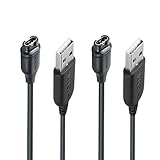
- 【Wide Compatibility】Compatible with Garmin Fenix 5 5S 5X Plus 6 6S 6X Pro Fenix 7 7S 7X and Approach S10 S40 S60 X10 G12 S12 S42,Vivosmart 5 Sapphire Editions,Vivoactive 3 Music 4 4S,Vivomove 3 3S Style,Forerunner 45 45S 155 165 158 265 265s 55 245 Music 745 935 945 LTE,Vivosport,BarkLimiter 2,2VT, Striker Cast GPS,Rey,First Avenger,Darth Vader,Enduro,Venu,Venu Sq 2 2S,Instinct Tactical Solar Edition,Tactix Charlie Delta,Quatix 5 6 Sapphire,Captain Marvel,D2 Charlie,D2 Delta PX S,Impact Bat Swing Sensor Smartwatch
- 【Durable & Premium Quality】Made of high quality Copper wire; ensure the excellent charging experience for your Device. Durable High-quality ABS + TPE Material and Pure Copper Wire ensures Stable Current Transmission, which assures the quality of the charge
- 【Fast Charge, Stable Performance】You can connect it with power source on PC, Powrbank,laptop, notebook, Wall Charger,because this charging method can provide high efficiency and high stability charging experience for you. Provides fast and stable charging speed, Data Sync is available.
- 【Safe Charging】JIUJOJA charging cable adopts the original charging cable direct connection technology and process, ensuring the stability of data transmission and the safety of charging of the product, and reducing the charging abnormalities caused by artificially adding power chips and overheating during charging.
- 【Quality Assured】 Two Years Warranty, Just Replace New or direct refund to you if quality problem.
5. Configure Battery Saver before an emergency
Battery Saver is more useful when customized in advance than when activated only at critically low battery. On supported watches, it can bundle changes to the watch face, music, phone, Wi-Fi, wrist heart rate, Pulse Ox, Always-On Display, and brightness. Some models show the estimated hours gained as you edit the profile.
For the Forerunner 970, Garmin’s manual gives this model-specific example:
- From the watch face, hold the middle-left button.
- Select
Watch Settings > Power Manager > Battery Saver. - Select
Statusto enable it. - Select
Editand choose the settings it should change.
On other watches, look for Power Manager, Battery Manager, or Battery Saver in the settings. Consider creating separate travel, race, and emergency profiles. A practical profile might turn off Always-On Display, lower brightness, use a low-power face, disable music and unnecessary radios, and set Pulse Ox to manual while preserving wrist heart rate or notifications if those remain important. Garmin’s Forerunner 970 manual documents that example.
Read the resulting profile carefully: Battery Saver may disable phone connectivity, Wi-Fi, music, display functions, Pulse Ox, or wrist heart rate.
6. Restrict notifications and connected features
Bluetooth syncing and occasional notifications do not necessarily create a dramatic drain, but continuous connected activity can. Calls, messaging, weather updates, LiveTrack, LTE, and repeated notification vibrations are more demanding.
- Allow notifications only from essential phone apps.
- Disable notification previews if your model supports that option.
- Use vibration or audio rather than both for low-priority alerts.
- Turn off Wi-Fi when it is not needed.
- Disable LTE outside the periods when calls, messages, or safety connectivity require it.
- Stop LiveTrack when the activity ends.
- Remove unused ANT+ or Bluetooth sensors.
Keeping Bluetooth on for syncing while limiting notifications is often the best compromise. Turning off Bluetooth on the watch removes or delays syncing and notifications; it is not a general solution for your phone’s own Bluetooth battery use.
Rank #4

- ⭕[Lay Flat to Charge] The watch is placed flat on the table to charge now, and it does not need to "Tilt Neck" to charge. Replacement for original charger cable: 010-12491-01. Compatible with all Garmin watches featuring a 4-PIN OVAL connector
- ⭕[Exquisite Workmanship] Aluminum alloy shell by micro-arc oxidation process makes the shell surface harder and more wearable. Strict quality inspection standards, fine appearance details, refuse to be shoddy. All components are made of environmentally friendly materials. Nylon braided cable, pets won't bite
- ⭕[Durable] 15000+ Bend Tested. Premium TPE ensure extreme temperatures (-50℃) without cracking. These cables are designed for the harshest routines. Premium TPE and nylon braided, surviving high pressure & extreme temperatures without cracking
- ⭕[Safe Charging & Stable Data Sync] Built-in intelligent protection module, double-sided plug, rigorous manufacturing process + EMI shielding ensures 100% safe charging & stable data sync. If you are not sure of the watch model, just compare with the shape of your watch charging socket, if the shape is the same, you can use it with confidence
7. Audit the watch face and Connect IQ content
A watch face that updates every second, makes network calls, uses positioning, or draws complex animations can consume more power than a simple built-in face. Garmin specifically recommends a face that does not update every second, such as one without a second hand.
Recommended Free Tools
For a quick test, switch temporarily to a built-in Garmin face and remove or disable unused Connect IQ apps, widgets, and data fields. Be particularly suspicious of faces with:
- Second-by-second animation.
- Frequent weather or network updates.
- Constant heart-rate refresh.
- GPS-dependent features.
- Complex animated graphics.
Use the built-in face for at least one normal day. If drain improves, add third-party content back one item at a time. Third-party content is not automatically inefficient; power use varies by implementation. Garmin explains this limitation in its support article on unexpected battery drain.
8. Turn off music, flashlight, broadcasting, and unused sensors
These features are easy to overlook because they may remain active after the original task is finished.
- Download music while the watch is charging rather than immediately before an activity.
- Avoid playing music from the watch when a phone or separate player is practical.
- Turn off the flashlight, or reduce its brightness and use it less often.
- Stop broadcasting wrist heart rate to a bike computer, tablet, or other device when finished.
- Disconnect external sensors that you no longer use.
- Where available, use Smart recording rather than every-second recording if reduced track detail is acceptable.
- Disable auto-scroll or auto-lap only if you do not need those workout behaviors.
Disabling wrist heart-rate broadcasting removes a useful training data source. Smart recording can store fewer track points, and changing auto-lap changes how workouts are organized. These are activity-specific trade-offs, not universally beneficial settings.
What’s actually slowing this PC down?
Pick the symptom - the matching free tool is one click away.
9. Update, restart, clean, and recharge correctly
Do not assume the battery has failed until you rule out software and charging problems. Garmin recommends the following sequence:
Best Value

- ✅【Multi-Directional Charging】: Our USB C to Garmin cable adapter features both right-angled and straight connectors, providing versatile charging options to suit your needs.
- ✅【Strong and Easy Storage】: USB C to Garmin Adapter combines compact design with a portable lanyard featuring a small keychain attachment, ensuring you'll never misplace it. Crafted from durable aluminum alloy, it enhances both usability and experience.
- ⌚【Widely Compatibility】Compatible with a wide range of Garmin devices including Garmin Fenix 9 8 7 7S 7X 6 5; Forerunner 165 965 955 265 255 45 45S 55 245 Music 745 935 945 LTE; Vivoactive 6 5 4 4S 3 Music; Vivomove 3 3S Style; Venu SQ 2 2S 3S; Epix Pro 2; Instinct; Vivosport, Approach S60 S42 S40 S12 S10 G12 and more.
- ⚡【Plug and Play】: Our adapter supports both data transfer and charging, ensuring you're always backed up with both information and power.
- ♥️【What You Get】: Type-C to Garmin Adapter 4-Pack + Keychain 4-Pack. Our worry-free lifetime warranty, Please feel free to contact us if you have any question.
- Install available software updates. Garmin Express may be useful for compatible devices: garmin.com/en-US/software/express.
- Restart or power-cycle the watch to clear a stuck background process.
- Clean the watch and cable charging contacts with rubbing alcohol and a cotton swab, then let them dry.
- Seat the cable carefully and charge for several hours, even if the charging indication does not appear immediately.
- Check whether the watch is actually reaching a full charge before measuring drain.
A software update may cause a one-time increase in consumption while it installs; Garmin says usage should return to normal afterward. If rapid drain continues, contact Garmin Support.
Settings by use case
Minimal compromise
- Always-On Display off or scheduled.
- Moderate brightness and a short timeout.
- Pulse Ox set to manual.
- Satellite mode matched to the activity.
- Selected notifications only.
- Built-in or efficient watch face.
- Bluetooth left on for syncing.
Maximum endurance
- Battery Saver enabled.
- Always-On Display off and brightness low.
- Pulse Ox off or manual.
- Wi-Fi, LTE, music, and unnecessary Bluetooth features off.
- Minimal notifications.
- Low-power built-in watch face.
- Heart-rate broadcasting disabled unless required.
Long GPS activity
- Charge fully before starting.
- Use the least demanding satellite mode that meets accuracy needs.
- Disable music and unnecessary sensors.
- Choose an appropriate recording interval.
- Use an activity Power Mode or Battery Saver profile if supported.
- Use Resume Later during long pauses rather than leaving the activity actively running.
Why is my Garmin battery draining quickly?
Common causes include Always-On Display, high brightness, frequent wake-ups, sleep or all-day Pulse Ox, frequent GPS or multi-band activities, music, LTE, LiveTrack, many notifications, Connect IQ content, flashlight use, external sensors, heart-rate broadcasting, outdated software, a stuck process, dirty charging contacts, heat or cold, and normal battery aging.
Advertised battery life is an “up to” figure, not a guarantee for every configuration. AMOLED and MIP watches behave differently, and solar charging is supplemental and model-specific rather than unlimited. Garmin’s product comparison pages show how battery claims can be separated by mode and display setting, such as these vívoactive comparisons.
The Tool Desk
Outbyte Driver Updater FREEScan for outdated or missing drivers - takes under a minuteDriver Scan →Outbyte PC Repair FREEClear out junk files and repair common Windows errorsFree Scan →If the watch loses a surprising amount overnight
Check sleep Pulse Ox, Always-On Display, a third-party face, unstable phone or LTE connectivity, Wi-Fi activity, a recent firmware update, temperature, and whether the watch actually charged fully.
For a controlled test, use the built-in watch face, turn off Pulse Ox and Always-On Display, limit connectivity, restart the watch, and compare one normal night. Re-enable features individually afterward. This identifies the culprit without permanently sacrificing health, safety, or convenience features.
Battery capacity also declines with use. Garmin says rechargeable batteries should retain approximately 80% of original capacity after a few years of frequent charge/discharge cycles under normal operating conditions, but this is general guidance rather than a guarantee. Extreme temperatures and leaving a battery completely full or empty for more than two weeks can accelerate degradation. Most Garmin watches do not have user-replaceable batteries. See Garmin’s battery-life expectancy guidance.
Before buying a replacement watch or cable
First check settings, update software, restart the watch, clean the contacts, and confirm a full charge. A replacement cable is reasonable when the existing one is damaged or unreliable, but buying one will not fix ordinary drain caused by display settings, Pulse Ox, LTE, music, or a Connect IQ face. Replacing the watch makes sense only after troubleshooting confirms meaningful battery degradation or when you need a different battery profile, newer GPS hardware, or solar assistance. Solar models are most useful to people who spend substantial time outdoors in suitable light; they still require normal charging in many real-world routines.
Quick Recap
Product prices and availability are accurate as of the date/time indicated and are subject to change. Any price and availability information displayed on Amazon at the time of purchase will apply.




