Windows Errors? Fix Them Before They Spread
Repair common Windows errors and clear accumulated junk for a smoother, more stable PC - no reinstall needed.Free scan · no reinstallOutdated Drivers Are Slowing You Down
One free scan finds every outdated or missing driver and matches the right update for your exact hardware.Free scan · exact hardware matchFor a June 2023 snapshot, the best Galaxy Watch 4 apps are Spotify or YouTube Music, Google Maps, Google Wallet, Google Keep, Google Messages, and Samsung SmartThings. They add useful watch-sized functions such as offline audio, navigation, payments, lists, quick replies, and smart-home controls. Calm, Facer, and Multi Calculator are worthwhile specialist choices rather than essential installs.
Important: the Galaxy Watch 4 requires a compatible Android phone and cannot be set up with an iPhone. This guide describes the app landscape and recommendations available or relevant in June 2023; availability, pricing, compatibility, and interfaces may have changed since then.
As an Amazon Associate I earn from qualifying purchases.
Quick picks
| App | Best for | Phone-free use | Main caveat |
|---|---|---|---|
| Spotify | Music and podcasts | Yes, with suitable downloads or Wi-Fi/LTE | Offline listening generally requires the appropriate subscription |
| Google Maps | Directions and place searches | Partly | Live data and navigation can require connectivity |
| Google Wallet | Contactless payments | Yes, after setup | Country, bank, card, NFC, and security restrictions apply |
| Google Keep | Shopping lists and short notes | Partly | Notes synchronize through the Google account |
| Google Messages | Reading and replying to texts | Usually no | Phone, carrier, network, and account dependencies vary |
| SmartThings | Smart-home control | Usually internet-dependent | Works only with compatible, configured devices |
| YouTube Music | Spotify alternative | Yes, with downloads or Wi-Fi/LTE | Offline features depend on account and subscription |
| Calm | Meditation and breathing | Partly | Much of the content is subscription-based |
| Facer | Watch-face variety | Installed faces can work offline | Individual faces vary in quality, battery use, and compatibility |
| Multi Calculator | Currency conversion | Mostly | Currency data may need updates or connectivity |
The Watch 4 is a particularly good candidate for third-party apps because it runs Wear OS with access to the Google Play Store, rather than Samsung’s older Tizen-only app ecosystem.
1. Spotify — best overall media app
Spotify is the strongest general recommendation for Watch 4 owners who already use the service. It handles wrist-based playback controls, music, and podcasts, and suitable accounts can download content to the watch for listening without the phone.
#1 Best Overall

- ⌚️⌚️⌚️Compatible for HW22 Smartwatch: This black charging cable is specifically designed for the HW22 Smartwatch, ensuring a perfect fit and reliable charging performance.
- ⌚️⌚️⌚️Charging Design: Features a strong connector for easy attachment and secure charging, making it hassle-free to power up your smartwatch.
- ⌚️⌚️⌚️Durable and Portable: The 30cm cable is made from high-quality materials, offering durability and convenience for home, office, or travel use.
- ⌚️⌚️⌚️Fast and Efficient Charging: Provides a stable and efficient charging experience, keeping your for HW22 Smartwatch powered up and ready to use.
- ⌚️⌚️⌚️Versatile Charging Solution: Includes a USB adapter, making it compatible with most USB ports, such as laptops, power banks, and wall chargers.
It is especially useful for running or exercising with Bluetooth earbuds. Direct playback requires headphones paired to the watch, while streaming requires Wi-Fi or an LTE connection. Offline downloads depend on the account tier, downloaded content, and available watch storage. Not every phone feature is available in the watch app. See Spotify’s support pages for account and device requirements.
2. Google Maps — best navigation utility
Google Maps turns the watch into a useful glanceable navigation screen. Searching for a place by voice is much more practical than typing a full address on the small display, and turn prompts can be useful when walking or when the phone is inconvenient to retrieve.
It is not a replacement for the full phone map. Live directions and map data may depend on the phone, Wi-Fi, or LTE, and the exact experience varies by region and watch configuration. Treat it as quick navigation assistance rather than assuming complete offline phone-map functionality. Samsung documents Maps access on Wear OS Galaxy watches in its Watch4 support guide.
3. Google Wallet — best for contactless payments
The June 2023 source referred to this service as Google Pay; the current name is Google Wallet. Where supported, it lets you pay from the watch without taking out your phone.
Typical requirements include an NFC-enabled watch, a supported country and payment card, current Google Play Services and Wallet software, and a screen lock. Google’s Wear OS Wallet requirements also cover setup and security restrictions.
Rank #2

- Plug and Play: This charger is compatible with Fitbit Sense/Sense 2/Versa 3/Versa 4 charger, Simply attach watch back to 4 pins for instant charge. Boost power effortlessly. Enjoy hassle-free charging (USB A to C cable included)
- Safe & Reliable: Vipcase Fitbit charger upgraded with strong magnetism, keeps Fitbit firmly in place. Stable current/voltage ensures safe, quick charging, protecting your Fitbit watch from damage
- Exquisite stand design: The design of the charger provides a safer charging environment for your watch. Safeguards Fitbit watch during charging, preventing scratches. Doubles as a stylish desktop accessory, enhancing your fashionable lifestyle
- View messages more timely: The angle of the base bracket (105° viewing angle), the perfect viewing angle allows you to see information in time while charging for your Fitbit Watches, so that you will not miss important information or meetings
- Portable & Lightweight: 44g Fitbit charger, ultra-compact for hassle-free carry. Charge your watch anywhere, home, office, or on-the-go. Blue LED blinks 3-5s on power-up, confirming operation
- Open Google Wallet on the watch.
- Tap Get started.
- Set a screen lock if prompted.
- Follow the phone instructions to add a supported card.
- At a contactless terminal, open Wallet and hold the watch near the reader.
Bank, card, country, NFC, and security-certification restrictions can prevent setup. Rooted, modified, developer, or otherwise uncertified devices may fail security checks. Do not assume that every transit system, loyalty pass, or payment card works from the watch; pass support can have additional software requirements, including Wear OS version requirements documented by Google.
4. Google Keep — best quick-list app
Google Keep is one of the most convincing watch-specific utilities. Shopping lists, checklists, and short reminders are easy to view and mark complete from the wrist, while voice input avoids awkward typing.
Quick wins for a faster PC:
Clear out junk files and repair common Windows errorsFree Scan →Scan for outdated or missing drivers - takes under a minuteDriver Scan →Keep is not a replacement for the full phone app. Long notes, links, formatting, and organization are better handled on a phone, and synchronization depends on the Google account and connectivity. Choose it over Samsung Reminder if you prefer Google-account synchronization; Samsung Reminder may be the better fit for a user invested in Samsung’s ecosystem. More information is available through Google Keep Help.
5. Google Messages — best for quick replies
Google Messages lets you read incoming texts and send short replies from the watch. Voice dictation is generally more comfortable than typing on the small keyboard, making the app useful for triage and brief responses.
It is not a fully independent messaging replacement on every Watch 4 configuration. Reply and synchronization behavior can depend on the paired phone, carrier, account, Bluetooth, Wi-Fi, or LTE setup. Long conversations are still better handled on the phone. See Google Messages Help for account and messaging support.
Rank #3

- Designed specially for S@pade & Co Health 4, 3 Smartwatch
- 【Easy to Place and Charge】 - Lamshaw Stand suit for S@pade & Co Health 4, 3 Smartwatch always holds your watch securely in place. This product is a charger as well as a stand. There is no need to install another charger. And you can take it off anytime. The charging cable can be organized in order if you use the charging stand, so that you can run away from messy desktop.
- 【Non-Shaking & Non-Slippery】- The bottom of the stand compatible with S@pade & Co Health 4, 3 Smartwatch have whole piece of high quality silicone to prevent shake and slip. The rubber cushion can protect your watch
- 【Exquisite & Elegant Design】- Standard 45 degree angle design for easy viewing and using. Sleek looking, it's a great watch charging stand for desk, table, nightstand. Even if it is not used as a charging stand, it is also a very beautiful and useful stand holder suit for S@pade & Co Health 4, 3 Smartwatch
- 【Warm Tips】- This product is just a charger. The watch Do Not Included
6. Samsung SmartThings — best for smart-home owners
SmartThings is a natural choice if your home already contains compatible SmartThings lights, appliances, sensors, doorbells, or other devices. A tap on the wrist can be more convenient than opening the phone app for routine controls.
It requires a configured SmartThings account and compatible devices. Remote actions may depend on internet access, and available controls vary by product and region. Security-sensitive actions should not be assumed to work exactly like they do in the phone app. Visit Samsung SmartThings for supported-device information.
7. YouTube Music — best Spotify alternative
YouTube Music is the obvious alternative for people who already subscribe to YouTube Premium or YouTube Music Premium. The Wear OS app supports music and podcast playback, watch downloads, and streaming over Wi-Fi or LTE.
Offline playback requires downloading content to the watch, and direct listening requires Bluetooth headphones. Watch storage is limited, and streaming over LTE requires a compatible data plan. Google explains these requirements in its Wear OS music documentation. Choose Spotify or YouTube Music based on the service you already use; subscribing to both is rarely necessary.
8. Calm — best mindfulness companion
Calm fits the watch because short breathing and meditation sessions do not require a large screen. It can be appealing to existing Calm subscribers who want a quick wellness session without handling a phone.
Free tools Windows power users keep installed
One-click scans. No signup required.
Rank #4

- 【Universal Compatibility】 Designed for multiple smart devices, this 2-pin 7.62mm magnetic charger dock fits most Smartwatches, Fitness Trackers, Smart Glasses, and Bone Conduction Headphones. Please confirm the 7.5–8mm pin spacing on your device before purchase.
- 【Charging Base Holder with Cable】Made from a durable Silicone material, with a Non-Slip Base, it is sturdy but also lightweight and compact, making it ideal to carry with you on trips or to use in the home or office.
- 【Humanized design】Portable charging dock provides a comfortable viewing angle,allows you to see the watch screen easily at a glance, so convenient to read and check the message during charging
- 【Fast & Safe Charging】Made of over- voltage and over- current protection. You can connect it to power source on PC, laptop, notebook, because this charging method can provide high efficiency and high stability charging experience for you. Also, Data Sync is available.
- 【Upgraded Strong Magnet】After market research, we have made key upgrades for the magnetic suction part to ensure strong enough suction. No need to Remove the Watch Band and Screen Protector Case Anymore for Charging.
The app may be free to download, but much of Calm’s library is subscription-based. The Wear OS experience is more limited than the phone or tablet version, and direct playback may require Bluetooth headphones. Casual users may find Samsung Health’s built-in mindfulness tools sufficient. Visit Calm for current membership details rather than relying on historical prices.
9. Facer — best for watch-face customization
Facer expands the watch-face catalog with free and paid designs, community creations, and customization options. It is worthwhile if you are bored with Samsung’s stock selection.
Free installation does not make every face free. Individual designs differ in battery use, complication support, quality, and update reliability; animated or data-heavy faces can be less practical than simple ones. Installed faces can generally be used without the phone, but downloading, syncing, and premium content need connectivity or the companion phone. Compatibility is version-sensitive, so this recommendation is specifically a June 2023 snapshot. See Facer for its catalog.
Independent reader supportYour contribution helps us test, update, and keep practical guides available for everyone.10. Multi Calculator — best specialist utility
Samsung’s built-in calculator already handles ordinary arithmetic, but Multi Calculator adds currency conversion and therefore makes sense for travelers or anyone who frequently shops across currencies.
It is not essential for most owners. Currency rates may require an update or connectivity, and a narrow utility should not be treated as a reason for everyone to install another app. The historical June 2023 source reported a $3.99 price, but prices vary by country, tax, platform, and later app changes.
Best Value
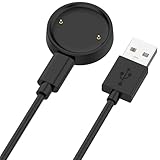
- 【Compatibility】This charger compatible with Amazfit Active 2, Bip 6 smart watch. with strong magnetic, firmly absorbing your watch well for charging. (Not compatible with Amazfit Bip 5/3, Active)
- 【Durable & Premium】The bip 6 charging cable is made of high quality wire; provides a stable charging performance. it works like the OEM charger. It is a good choice to replace lost or damaged charger cable.
- 【Safe & Fast Charging】The active 2 charger build-in smart chips, provides a stable charging performance and protects smart watch from over-current, over-voltage or short-circuit. and it charge your watch fast, a full charge takes about 2.5 hours.
- 【Portable & Easy to Use】To get a charging just plug it into USB port on your PC, laptop, notebook, wall charger or car charger. Easy to carry when you are on travel. Geting a better experience, we suggest you to use the recommended adapter (5V 1A).
- 【Package Includes】1 x charger for Active2/bip6, 1 x charging cable; with sincerely after-sales service, if have any question we will deal with it for you within 24 hours. Thank You!
Which apps should you install first?
- For most owners: Google Maps, Google Keep, and Google Messages.
- For fitness and media: Spotify or YouTube Music, plus Maps. Download audio before leaving Wi-Fi if you want phone-free listening.
- For Samsung smart-home users: SmartThings.
- For customization: Facer, if the stock watch faces are not enough.
- For travel: Google Wallet where supported, Google Maps, and Multi Calculator.
- For wellness: Calm if you already value its subscription library; otherwise start with Samsung Health’s built-in tools.
How to install apps on the Galaxy Watch 4
- Press the watch’s power button to open the app list.
- Open Google Play Store.
- Tap Search and enter the app name by voice, keyboard, or on-screen input.
- Select the app and tap Install, or tap the displayed price.
- Sign in or approve permissions when prompted.
You can also install compatible Wear OS apps from the connected Android phone or the web Play Store. Not every Android app has a watch version; if the watch is not offered as an installation target, it is probably not compatible. Google explains the watch, phone, and web installation methods in its Google Play help documentation. Samsung also describes installing compatible apps through the Galaxy Wearable-connected phone in its support guide.
Important limitations
Phone compatibility
Samsung states that Galaxy Watch4 models cannot be set up with an iPhone. A compatible Android phone and the Galaxy Wearable setup process are required. This is a purchase limitation, not merely an app limitation.
Standalone does not mean unlimited
Spotify and YouTube Music can support downloaded audio; Wallet can pay after setup; and installed Facer faces can display without a phone. By contrast, Messages normally depends more heavily on the phone and network, while Maps, Keep, and SmartThings can need connectivity for live data or synchronization. Bluetooth, Wi-Fi, LTE, GPS, NFC, headphones, an account, and a subscription each change what “phone-free” means.
Do these 3 things before closing this tab:
1Scan for outdated or missing drivers - takes under a minute2Clear out junk files and repair common Windows errors3Fix the driver behind crashes, sound loss and screen glitchesBattery and storage
Offline music, LTE streaming, frequent GPS use, animated watch faces, and always-on display settings can increase battery demand. Downloaded audio and watch faces also consume storage. Samsung’s Watch4 specifications list 16GB of internal storage and different battery capacities for the 40mm and 44mm models, so independent use has real hardware limits. Manage downloads and remove apps or media you no longer use.
Prices and availability
The June 8, 2023 source reported US-facing historical signals of $9.99 per month for Spotify and YouTube Music, $14.99 per month for Calm, Facer purchases from $0.49 to $39.99, and $3.99 for Multi Calculator. These are not current universal prices. Subscription costs, taxes, currencies, promotions, and app availability vary by country and can change after June 2023.
Bottom line
Start with Google Maps, Google Keep, and Google Messages. Add Spotify or YouTube Music if you want phone-free audio, then choose Google Wallet, SmartThings, Calm, Facer, or Multi Calculator according to your payment, home, wellness, customization, or travel needs.
Quick Recap
Product prices and availability are accurate as of the date/time indicated and are subject to change. Any price and availability information displayed on Amazon at the time of purchase will apply.
Recommended Free Tools




