What’s actually slowing this PC down?
Pick the symptom - the matching free tool is one click away.
Yes—if you mean running without carrying your phone. After setup, Garmin Forerunner and COROS PACE watches can generally record GPS activities on the watch itself. If you mean using one without phone access at all, the answer is more limited: setup, syncing, updates, and some connected features still depend on a phone. Details vary by model and generation.
What works without a phone on a run?
Both watch families can generally use their built-in GPS to record an activity without a phone nearby. Garmin says most of its devices with integrated GPS do not require a phone to record GPS activities. The COROS PACE 4 guide shows the same basic pattern: wait for GPS signal, start the activity on the watch, then finish and save it there.
As an Amazon Associate I earn from qualifying purchases.
That is phone-free recording, not necessarily phone-free use forever. Garmin recommends connecting a Forerunner to a smartphone to complete setup and use its full features. COROS requires pairing with its app before use and relies on syncing for some continuing services.
Outdated Drivers Are Slowing You Down
One free scan finds every outdated or missing driver and matches the right update for your exact hardware.Free scan · exact hardware matchPC Slower Than It Used to Be?
A free scan shows the junk files, broken settings and background clutter dragging Windows down - then fixes them in one click.Free scan · Windows 10 & 11What still needs a phone?
| Task | Garmin Forerunner | COROS PACE |
|---|---|---|
| Initial setup | Garmin recommends connecting the watch to a smartphone to complete setup and use its full features. Garmin pairing guidance | Pairing requires a compatible smartphone running iOS 13 or later or Android 5.0 or later, with the COROS app. COROS pairing guidance |
| GPS activity recording | Most Garmin devices with built-in GPS can record GPS activities without the phone. Garmin GPS guidance | The PACE 4 can start and save an activity on the watch after GPS signal is acquired; check the specific manual for other generations. PACE 4 setup guide |
| Live tracking and connected features | Garmin says LiveTrack requires a phone. Other feature requirements depend on the specific model and service. Garmin GPS guidance | Activity data syncs through Bluetooth or Wi-Fi to the connected smartphone. Firmware updates, bug fixes, GPS satellite data, and weather data require syncing; COROS does not support wired USB syncing. COROS pairing guidance |
Do not assume that music, maps, notifications, safety features, or other services work the same way across all Forerunner or PACE generations. Check the manual for the exact model and feature you plan to use.
#1 Best Overall

- Easy-to-use running watch monitors heart rate (this is not a medical device) at the wrist and uses GPS to track how far, how fast and where you’ve run.Special Feature:Bluetooth.
- Battery life: up to 2 weeks in smartwatch mode; up to 20 hours in GPS mode
- Plan your race day strategy with the PacePro feature (not compatible with on-device courses), which offers GPS-based pace guidance for a selected course or distance
- Run your best with helpful training tools, including race time predictions and finish time estimates
- Track all the ways you move with built-in activity profiles for running, cycling, track run, virtual run, pool swim, Pilates, HIIT, breathwork and more
How to record a run without carrying your phone
- Set up and pair the watch first. Use Garmin’s smartphone setup guidance or pair a COROS watch in its app. For COROS, the phone must meet the stated operating-system requirements.
- Before starting, give GPS time to lock. On a COROS PACE 4, wait for a strong, solid GPS indicator before starting the activity.
- Start the activity from the watch. The watch records using its own satellite reception; the phone does not have to accompany you for this GPS recording.
- Finish and save on the watch. The PACE 4 guide describes saving the activity on the device and syncing it later through the app.
- Reconnect when needed. Syncing makes activity data available in the app and supports COROS services such as updates and satellite data. Garmin LiveTrack also needs a phone connection.
The detailed COROS steps above are for the PACE 4. Button names and menus can differ on other models, so use the matching manual rather than assuming the same workflow applies to every generation.
Will GPS work accurately without a phone?
A phone-free watch relies on its own satellite reception. COROS says that, under normal conditions with a strong signal, wearable GPS devices are accurate within 3 meters (10 feet) of the actual location. This is COROS’s published statement, not a guarantee for every watch, route, or activity. Its GPS guidance, updated September 28, 2026, notes that heavy tree cover, tall buildings, and signal refraction from large bodies of water can interfere with or block satellite signals, causing distance, pace, or track discrepancies. COROS GPS troubleshooting guidance
Rank #2

- Easy-to-use running smartwatch with built-in GPS for pace/distance and wrist-based heart rate; brilliant AMOLED touchscreen display with traditional button controls; lightweight design in 43 mm size
- Up to 11 days of battery life in smartwatch mode and up to 19 hours in GPS mode
- Reach your goals with personalized daily suggested workouts that adapt based on performance and recovery; use Garmin Coach and race adaptive training plans to get workout suggestions for specific events
- 25+ built-in activity profiles include running, cycling, HIIT, strength and more
- As soon as you wake up, get your morning report with an overview of your sleep, recovery and training outlook alongside weather and HRV status (data presented is intended to be a close estimation of metrics tracked)
COROS recommends waiting until the satellite indicator is solid and, for best results, allowing GPS to settle for another minute before starting. Obstructions and surroundings matter whether or not a phone is present.
Recommended Free Tools
What to check before choosing or using a model
- Whether first-time activation and setup require the app.
- Whether the exact model records GPS activities on the watch without a phone.
- Which live tracking, safety, notification, or other services need a phone connection.
- How activities and updates sync, including whether a phone must be available regularly.
- How well the watch’s GPS is likely to receive satellite signals in your usual terrain.
The available official guidance establishes the general distinction between phone-free activity recording and phone-dependent setup or connected services; it does not provide a complete feature matrix covering every Forerunner and PACE generation. Verify the intended model’s manual before relying on a particular offline feature.
Quick Recap
Best Value
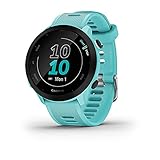
- Easy-to-use running watch monitors heart rate (this is not a medical device) at the wrist and uses GPS to track how far, how fast and where you’ve run
- Battery life: up to 2 weeks in smartwatch mode; up to 20 hours in GPS mode
- Plan your race day strategy with the PacePro feature (not compatible with on-device courses), which offers GPS-based pace guidance for a selected course or distance
- Run your best with helpful training tools, including race time predictions and finish time estimates
- Track all the ways you move with built-in activity profiles for running, cycling, track run, virtual run, pool swim, Pilates, HIIT, breathwork and more
Rank #4

- Brilliant AMOLED touchscreen display with traditional button controls; lightweight design in 46 mm size
- Up to 13 days of battery life in smartwatch mode and up to 20 hours in GPS mode
- As soon as you wake up, get your morning report with an overview of your sleep, recovery and training outlook alongside HRV status, training readiness and weather (data presented is intended to be a close estimation of metrics tracked)
- Plan race strategy with personalized daily suggested workouts based on the race and course that you input into the Garmin Connect app and then view the race widget on your watch; daily suggested workouts adapt after every run to match performance and recovery
- Training readiness score is based on sleep quality, recovery, training load and HRV status to determine if you’re primed to go hard and get the most out of your workout (data presented is intended to be a close estimation of metrics tracked)
Rank #3

- Easy-to-use running smartwatch with built-in GPS for pace/distance and wrist-based heart rate; brilliant AMOLED touchscreen display with traditional button controls; lightweight design in 43 mm size
- Up to 11 days of battery life in smartwatch mode and up to 19 hours in GPS mode
- Reach your goals with personalized daily suggested workouts that adapt based on performance and recovery; use Garmin Coach and race adaptive training plans to get workout suggestions for specific events
- 25+ built-in activity profiles include running, cycling, HIIT, strength and more
- As soon as you wake up, get your morning report with an overview of your sleep, recovery and training outlook alongside weather and HRV status (data presented is intended to be a close estimation of metrics tracked)
Product prices and availability are accurate as of the date/time indicated and are subject to change. Any price and availability information displayed on Amazon at the time of purchase will apply.




