Install Amazfit watch updates through the Zepp app while the watch is connected to its phone. The exact menu depends on the watch model: on the Bip 6, open Device > Amazfit Bip 6 > General > System Update > System Update. Before starting, charge the watch or ensure it has at least 10% battery, keep the phone screen on, and avoid using the phone during the upgrade.
Before you start an Amazfit update
- Connect the watch to the phone it is paired with and open the Zepp app. The update is managed through Zepp, though menu names and paths vary by watch model.
- Fully charge the watch if possible. Amazfit’s support guidance says the watch should be fully charged or have at least 10% battery remaining. Amazfit support: Why can’t I update the watch?
- Keep the phone screen on and do not perform other operations on the phone while the upgrade is in progress, as Amazfit advises in its support guidance.
Find and install the update in Zepp
Amazfit Bip 6
- Open Zepp on the phone connected to the watch.
- Tap Device, then select Amazfit Bip 6.
- Go to General > System Update > System Update to view or update the system.
- If the watch displays a system-update message, the Bip 6 manual recommends tapping Update Immediately. Follow the prompts shown in Zepp and on the watch. Amazfit Bip 6 User Manual
Other Amazfit models
Do not assume the Bip 6 path applies to every Amazfit watch. For example, the GTS 2e manual documents the route as Profile > model > System Update. Amazfit GTS 2e User Manual In Zepp, select the exact model you own and use its matching manual if the labels or navigation differ.
As an Amazon Associate I earn from qualifying purchases.
How to check whether the update completed
After the installation, check the status shown on your model’s System Update screen in Zepp. Amazfit’s published materials establish how to reach update screens for the examples above, but do not establish one confirmation message or version-check path that applies to every model. Use the status and instructions for your specific watch; do not rely on a generic success message or version number.
Recommended Free Tools
If an update will not start or finish
Amazfit support suggests the following recovery steps. They are troubleshooting suggestions, not a guarantee that every update problem will be resolved.
#1 Best Overall

- STYLISH DESIGN, VIBRANT DISPLAY: The lightweight aluminum build blends effortless style with workout durability, while the vivid 1.97" AMOLED display keeps your data easy to read, even under bright sunlight.
- ALL-IN-ONE ACTIVITY TRACKING: The Amazfit Bip 6 fitness tracker watch offers 140+ workout modes including HYROX Race and Strength Training, plus personalized AI coaching and 50m water resistance.
- UP TO 14 DAYS BATTERY LIFE: The Amazfit Bip 6 smart watch powers through your training and recovery for up to two weeks at a time - no nightly charging needed.
- ACCURATE GPS TRACKING & NAVIGATION: Stay on course with free downloadable maps and turn-by-turn directions. Support from 5 satellite systems ensures precise tracking of every move and fast GPS connection.
- 24/7 HEALTH MONITORING: The Amazfit Bip 6 smartwatch provides precise, real-time monitoring of heart rate, sleep, blood-oxygen and stress, empowering you with actionable insights to optimize your health and fitness.
- Sign out of Zepp, sign back in, and reconnect the watch.
- If the problem continues, reinstall Zepp and reconnect the watch.
- On Android, clear Bluetooth Share Data and the app caches, then restart the phone.
For the applicable instructions, see Amazfit’s update troubleshooting guidance. If the issue remains, consult the support information for your exact watch model.
Quick Recap
Rank #4

- STYLISH DESIGN, VIBRANT DISPLAY: The lightweight aluminum build blends effortless style with workout durability, while the vivid 1.97" AMOLED display keeps your data easy to read, even under bright sunlight.
- ALL-IN-ONE ACTIVITY TRACKING: The Amazfit Bip 6 fitness tracker watch offers 140plus workout modes including HYROX Race and Strength Training, plus personalized AI coaching and 50m water resistance.
- UP TO 14 DAYS BATTERY LIFE: The Amazfit Bip 6 smart watch powers through your training and recovery for up to two weeks at a time - no nightly charging needed.
- ACCURATE GPS TRACKING & NAVIGATION: Stay on course with free downloadable maps and turn-by-turn directions. Support from 5 satellite systems ensures precise tracking of every move and fast GPS connection.
- 24/7 HEALTH MONITORING: The Amazfit Bip 6 smartwatch provides precise, real-time monitoring of heart rate, sleep, blood-oxygen and stress, empowering you with actionable insights to optimize your health and fitness.
Rank #3
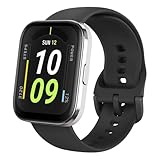
- Sleek Design & Customizable Display: A durable stainless steel frame, 1.91" high-resolution vibrant anti-fingerprint screen, and 70+ smartwatch faces for a stylish, personalized look.
- Up to 11 Days Battery Life: Enjoy up to 11 days of use, or 26 days in battery-saver mode—no need for constant charging.
- 70+ Downloadable Mini Apps: Access a wide range of apps and games through Zepp OS 3.0, with easy installation and removal.
- Track Your Fitness: Over 120 sports modes to track steps, distance, calories, and more—keep moving, stay motivated.
- Reliable Health Monitoring: Monitor heart rate, blood oxygen levels, stress, and sleep, plus get reminders to stay active throughout the day. You can even track menstrual and fertile periods.
Rank #2

- STAINLESS STEEL DESIGN: The lightweight stainless steel frame ensures the Amazfit Bip 5 Unity smartwatch is able to stand up to the rigors of daily life, and adds a stylish touch.
- UP TO 11 DAYS OF BATTERY LIFE: Go for up to 11 days with typical usage, or even 26 days in battery saver mode - without stopping to recharge.
- 70+ DOWNLOADABLE MINI APPS: The enhanced Zepp OS 3.0 provides access to an even deeper ecosystem of mini apps and games, all of which can be downloaded to the smart watch from the Zepp App, and easily installed or uninstalled at any time.
- TRACK STEPS, DISTANCE, CALORIES: Get moving with a choice of over 120 sports modes, from walking, running, cycling, yoga, strength training and more.
- RELIABLE HEALTH MONITORING: Track heart rate, blood oxygen, stress level, and sleep quality, and get sedentary reminders to help you stay active. You can even track menstrual and fertile periods.
Product prices and availability are accurate as of the date/time indicated and are subject to change. Any price and availability information displayed on Amazon at the time of purchase will apply.
Independent reader supportYour contribution helps us test, update, and keep practical guides available for everyone.



