Do these 3 things before closing this tab:
1Repair Windows errors before they cause bigger problems2Scan for outdated or missing drivers - takes under a minute3Clear out junk files and repair common Windows errorsBest overall for active children: Fitbit Ace LTE. It combines parent-approved calling and messaging, location sharing, School Time controls, and movement-based games in a deliberately restricted device. Garmin Bounce is the better fit for fitness and simple phone-free communication, while Verizon Gizmo Watch 3 makes the most sense for Verizon households. For an iPhone family with an older, responsible child, choose an Apple Watch SE GPS + Cellular with Apple Watch For Your Kids.
There is no universal best kids smartwatch. The right choice depends on the parent’s phone, cellular coverage, recurring service cost, the child’s age and independence, and how tightly the family wants to control contacts and features. These recommendations are based on documented manufacturer and carrier features—not personal testing or a broad parent survey.
Buying-guide note: This is a 2025-focused guide. Product facts and service caveats were rechecked against current manufacturer and carrier documentation on August 11, 2026. Prices, plans, coverage, app names, and availability can change, so confirm them before checkout.
Quick verdict
A kids GPS smartwatch is best understood as a controlled communication and location device, not a miniature version of an adult smartwatch. The strongest options let parents approve contacts, set school or quiet hours, view a child’s location, and configure an SOS workflow without opening the watch to the entire internet.
What’s actually slowing this PC down?
Pick the symptom - the matching free tool is one click away.
| Watch | Best for | What stands out | Important limitation |
|---|---|---|---|
| Fitbit Ace LTE | Active children and families wanting games without open internet access | Movement-based games, parent-approved contacts, location sharing, School Time, polished parent app | Requires Ace Pass; LTE availability is limited to the United States except Alaska and U.S. territories; it does not use a conventional phone number |
| Garmin Bounce | Fitness-focused children and parents who want a simple, low-distraction device | GPS, LTE, activity features, chores, alarms, timers, texting, and voice messaging | A subscription is required for LTE features, and coverage and eligibility must be checked |
| Verizon Gizmo Watch 3 | Families already using Verizon | Calling, messaging, supported video calling, GPS, boundary alerts, scheduled location updates, SOS, and caregiver permissions | Requires Verizon activation and a companion smartphone; app and model details are changing |
| Apple Watch SE GPS + Cellular with Apple Watch For Your Kids | iPhone households and older children ready for more independence | Family-managed calls, texts, Find My location, Activity, Maps, Music, and other Apple features | Requires compatible Apple hardware, software, accounts, and a cellular plan; it is less child-specific |
| Cosmo JrTrack 5 SE | Parents seeking a dedicated calling and GPS watch | Dedicated kids-watch design, GPS tracking, calling, texting, and customizable controls | Confirm the exact model’s current price, plan, compatibility, battery, and water-resistance details |
The table compares the documented product categories rather than promising identical features across every regional version. Cellular watches are not one-time purchases: service plans, coverage, activation requirements, and app support matter as much as the hardware.
How we evaluated these watches
The most useful question is not which watch has the longest feature list. It is whether the watch gives a child an appropriate amount of independence while giving a parent meaningful control.
#1 Best Overall

- 【All in One Smart Watch for Kids】Kids smart watch with selfie-cam, MP3 player, voice recorder, habit tracking, games, pedometer, flashlight, alarm, stopwatch, calculator, theme, screensaver select, parental control, silent profile, time format, volume, etc. Which can bring convenience, fun and unprecedented new experience to children's lives.
- 【Upgrade Kids Watch】As the fun kids smart watch, with 39 games to choose from kids. These games are more playable and suitable for children of multiple ages. That can effectively exercise kids logical thinking ability, reaction ability and hand-eye coordination. It is a gift for 4-12 year old boys and girls. There are Habits Tracking and Parental Control that traditional watches don't have.
- 【HD Selfie-Camera & Video】The kids touchscreen smartwatch not only has camera and video support, but also has amazing HD pixels. Children can take photos and record videos, capture record every wonderful moment in their lives. With pop big head sticker shooting, children can take some hilarious photos with family or friends. The first step in training a child to be a photographer.
- 【Powerful Battery Life】Kids watch built-in rechargeable battery that lasts more than 7 days on a full charge, the battery of this girls watch is upgraded to 500mA, allows kids to play anywhere, anytime, and is equipped with a USB cable. Let the children enjoy a happy playtime and give them a good childhood!
- 【Great Gift for Kids】Our kids watches is designed with a durable aluminum frame design and a 1.54 inch IPS HD touch screen, it's easier to operate for kids. This watch introduces a fun function: habit tracking, cultivating children's good habits. Perfect birthday, Christmas, festival, and holiday gifts for boys and girls aged 6~10. We provide friendly customer service.
- Communication: Can the child call, text, or send voice messages, and can the parent restrict communication to trusted contacts?
- Location: Does the service provide GPS location, boundary alerts, or scheduled location updates, and is the network supported where the family lives?
- Safety workflow: What happens when the child presses SOS, and who is contacted? An SOS feature should not be treated as a guarantee of emergency-service dispatch.
- School controls: Can parents schedule School Time, quiet hours, or other periods when communication and distractions are limited?
- Total cost: What hardware, activation, cellular plan, and recurring subscription costs are required?
- Practical ownership: Is the watch suitable for the child’s maturity, daily activity, charging habits, and exposure to water and impacts?
- Privacy: What location, contact, message, image, voice, and account data does the service collect, retain, and share?
The best kids smartwatches for different families
1. Fitbit Ace LTE — best overall for active kids
Choose it if: you want a parent-controlled communication and location watch that makes physical activity part of the entertainment.
Fitbit Ace LTE is the clearest all-around choice for active children. Google lists the device at $179.99 and the required Ace Pass at $9.99 per month or $119 per year at the time of the latest documentation review. Ace Pass is required to activate LTE calling, messaging, location sharing, and the Fitbit Arcade game catalog, so the device price is not the complete cost of ownership.
The watch is designed for children aged 7 and up, works with the Fitbit Ace app on Android and iOS, and supports up to 20 trusted contacts. Parents can schedule School Time, while the child gets games whose progression depends on physical activity. That combination makes the watch more engaging than a basic locator without turning it into an unrestricted app platform.
Fitbit also lists Gorilla Glass, a protective bumper, and water resistance to 50 meters. Water resistance is not the same as a blanket promise that every swimming, bathing, or water-sport situation is appropriate, so follow the current product guidance rather than treating the rating as a license for any use.
The biggest conceptual difference is communication. Ace LTE does not operate like a conventional phone with an ordinary phone number. Calling and messaging use Fitbit’s service and approved-contact model. That is a strength for parents who want a closed communication circle, but a drawback if the child needs to contact friends freely or interact with ordinary phone numbers outside the family-and-caregiver setup.
Bottom line: Fitbit Ace LTE is the best fit for families prioritizing activity, location sharing, and controlled communication, especially when the child is too young for an open smartphone but wants something more engaging than a tracker.
2. Garmin Bounce — best for fitness and simple phone-free communication
Choose it if: you want a focused children’s watch for activity, routines, GPS, and parent-managed messaging rather than a general-purpose smartwatch.
Garmin Bounce provides LTE connectivity, GPS location, texting, voice messaging, and safety features through Garmin’s ecosystem. The watch communicates with the Garmin Jr. app and other approved Bounce watches, allowing parents to manage the communication environment instead of handing a child an unrestricted messaging platform.
Garmin’s broader family ecosystem includes activity tracking, chores, alarms, and timers. Those tools make Bounce particularly suitable for a child who benefits from reminders and movement goals but does not need games, social apps, or a full phone experience.
LTE functions require an active subscription. The exact plan terms, supported coverage, and eligibility should be checked for the family’s location before purchase; do not assume that an unlocked or independently purchased watch will work on any network. The original Garmin Bounce should also be distinguished from the later Bounce 2. Features reported for Bounce 2, including calling through its built-in speaker and microphone, should not be silently attributed to the original model.
Crashes, No Sound, or Screen Glitches?
Random freezes, missing sound and display glitches usually trace back to one bad driver. Find and replace yours safely.Free scan · under a minuteWindows Errors? Fix Them Before They Spread
Repair common Windows errors and clear accumulated junk for a smoother, more stable PC - no reinstall needed.Free scan · no reinstallBottom line: Garmin Bounce is the better recommendation for parents who value fitness and routine-building over entertainment. It is deliberately narrower than an Apple Watch, which is an advantage when distraction control matters.
Rank #2

- All-Day Activity Tracking: BIGGERFIVE BRAVE 2 Smart Watch for Kids Teens Automatically counts steps, distance, calories burned, and active minutes. Supports 80 sports modes like walking, running, cycling, basketball, and more.
- Without/With APP: BIGGERFIVE kids fitness tracker watch can be used seperately without APP and phone. But with APP, you could explore more functions. Compatible with Android 6.0+ and iOS 9.0+ smartphones.
- Comprehensive Health Monitoring: Monitors real-time heart rate and tracks sleep patterns to promote your child's well-being.
- Customizable Watch Face &1.8" HD Touch Screen:Our kids smartwatch boasts a 1.8" HD touch screen and offers 100+ exquisite cloud dials in APP BIGGERFIVE. Elevate personal style with custom dials using your kids' own photos and ignite their creativity!
- Puzzle Games under Parents' Control: 5 built-in puzzle games can help train your child's reaction ability and calculation ability. You could restrict your child from playing games at school in the BIGGERFIVE APP (supports also lock game all the time). Note: The game has no sound effects.
3. Verizon Gizmo Watch 3 — best for Verizon families
Choose it if: your household already uses Verizon and you want carrier-integrated calling, location tools, and caregiver controls.
Verizon’s Gizmo Watch 3 ecosystem supports two-way calling and messaging, GPS location, scheduled location updates, boundary alerts, SOS functionality, approved contacts, and caregiver permissions. Video calling is available on supported models or configurations, so confirm the exact version before treating it as a standard feature. Parents manage the watch through the Verizon Family app.
Gizmo Watch 3 requires a companion smartphone for setup and management, but Verizon says the caregiver’s phone does not have to use Verizon’s mobile network. The watch itself still depends on compatible cellular activation and Verizon’s account workflow, making it most convenient for existing Verizon customers and less appealing to families seeking carrier flexibility.
Verizon documentation indicates that the older GizmoHub app is being retired in favor of Verizon Family. That means setup instructions found in older reviews may no longer match the current app. The Gizmo Watch 3 and Gizmo Watch 3 – Adventure are also not interchangeable for every feature; verify the model-specific specifications before buying accessories or relying on a particular capability.
Bottom line: Gizmo Watch 3 is a practical carrier choice when Verizon coverage and support are already part of the household. It is not the best neutral option for comparing plans across carriers.
4. Apple Watch SE GPS + Cellular with Apple Watch For Your Kids — best for iPhone households and older children
Choose it if: the parent uses an iPhone, the child is ready for a broader device, and the family wants managed independence rather than a narrowly limited kids watch.
Apple Watch For Your Kids allows a parent to set up and manage a cellular Apple Watch for a child who does not have their own iPhone. Apple describes support for calls, texts, location identification through Find My, Activity goals, Apple Maps, Apple Music, Apple Cash, and family-managed features. A GPS + Cellular Apple Watch is required; a GPS-only model is not enough for this setup.
This option is more capable than the dedicated kids watches. That can be useful for an older child who needs more independence, but it also creates a wider platform to manage. Parents should decide whether access to broader Apple features is appropriate before choosing it simply because the hardware is familiar.
Apple Watch For Your Kids is not the same as pairing an ordinary Apple Watch to a child’s personal iPhone. The family-managed setup has requirements involving compatible hardware, software, Apple accounts, and a cellular plan. Exact requirements and regional availability can change, and some features may depend on location, age, or carrier support.
Bottom line: This is the strongest choice for an iPhone family with an older, responsible child, but it is overqualified if the main need is simply approved calling, school-time controls, and occasional location checking.
5. Cosmo JrTrack 5 SE — best dedicated alternative for calling and GPS
Choose it if: you want a child-focused communication device with GPS and customizable controls, but the leading ecosystem choices do not fit your household.
Quick wins for a faster PC:
Fix the driver behind crashes, sound loss and screen glitchesFind Drivers →Repair Windows errors before they cause bigger problemsFix Now →Scan for outdated or missing drivers - takes under a minuteDriver Scan →Rank #3

- This super-cool smartwatch has two cameras, a large screen, high resolution, a premium metal body, a music player and more; set to English, Spanish or French
- Get out and play with this splash-proof watch, featuring exciting activities, challenges and reaction games designed to get you moving
- Explore your creativity with the dual cameras, adding effects to photos and videos or making music with the composer app
- Includes 50 built-in clock faces, plus more to download to practice telling time, or shake the watch to hear the time out loud
- Intended for ages 4+ years; rechargeable lithium-ion battery; charge device using included micro-USB cable only and avoid third-party adapters
Cosmo markets the JrTrack 5 SE as a dedicated kids smartwatch with GPS tracking, texting, calling, and customizable controls. Its positioning is closer to a phone alternative than to a general smartwatch, which may appeal to parents who want the child to communicate without opening access to a full app ecosystem.
Because product terms can differ by exact model and market, verify the current JrTrack 5 SE documentation before purchase. In particular, confirm the service plan, total cost, carrier compatibility, battery expectations, water-resistance rating, parent-app functions, and return or replacement terms. The available evidence supports describing its advertised calling, texting, GPS, and control features, but not adding unverified claims about independent testing or durability.
Bottom line: JrTrack 5 SE is a credible dedicated-watch alternative, but it needs a more careful model-and-service check than the better-documented top picks.
Which watch should you choose?
| If your priority is… | Start with… | Why |
|---|---|---|
| Movement-based games and controlled communication | Fitbit Ace LTE | It combines activity-driven entertainment with approved contacts and School Time |
| Fitness, chores, alarms, and fewer distractions | Garmin Bounce | It is designed around routines and activity rather than a broad smartwatch platform |
| Keeping the purchase inside an existing Verizon account | Verizon Gizmo Watch 3 | Carrier activation, caregiver permissions, location tools, and support are integrated |
| An iPhone family and an older child | Apple Watch SE GPS + Cellular | Apple’s family-managed setup offers more autonomy and broader features |
| A dedicated calling-and-GPS watch | Cosmo JrTrack 5 SE | It is marketed as a child-focused phone alternative with customizable controls |
Plan for the recurring cost before buying
Cellular kids watches usually involve at least two purchases: the hardware and an ongoing service. A low device price can be misleading if the required plan is expensive or unavailable in your area.
| Product | Service requirement | What to verify |
|---|---|---|
| Fitbit Ace LTE | Ace Pass is required for LTE calling, messaging, location sharing, and Fitbit Arcade | Current monthly or annual price, coverage in your state or territory, and whether the child’s contacts fit the approved-contact model |
| Garmin Bounce | Subscription required for LTE features | Current subscription price, supported coverage, eligibility, and which features remain available without service |
| Verizon Gizmo Watch 3 | Compatible Verizon cellular activation and account workflow | Current plan cost, coverage, activation fees, app requirements, and exact model features |
| Apple Watch For Your Kids | GPS + Cellular hardware and an eligible cellular plan are required | Carrier support, family setup requirements, regional availability, and whether the child’s Apple account can use the intended features |
| Cosmo JrTrack 5 SE and Xplora X6Play | Service terms vary by product and market | Exact model, country, carrier partnership, plan price, activation rules, and cancellation terms |
Controls matter more than the feature count
Approved contacts
For a young child, the ability to limit communication is usually more valuable than access to every messaging service. Fitbit uses a trusted-contact model, while Garmin, Verizon, and Apple provide their own forms of parent-managed communication or family controls. Compare the details: whether contacts can be added by the child, whether caregivers have different permissions, whether other children can be contacted, and whether messages are text, voice, video, or app-based.
School Time and quiet periods
A watch should not become a classroom distraction. Look for scheduled School Time, quiet hours, or equivalent restrictions. Also check what remains available during those periods—for example, whether location and emergency functions continue while ordinary notifications are suppressed. Do not assume that every watch’s school mode blocks the same features.
Location and boundaries
GPS is a useful location aid, not a guarantee of continuous, perfectly accurate tracking. Buildings, network availability, device settings, and the surrounding environment can affect updates. Boundary alerts and scheduled updates are helpful only when the watch has coverage and enough battery to communicate. Before relying on them, test the family’s normal routes and understand how often the service refreshes location.
SOS and emergency expectations
Read the exact SOS workflow before purchase. Determine whether pressing the button contacts approved caregivers, starts a call or message sequence, shares a location, or invokes a carrier-specific emergency function. Teach the child what the button does and when to use it. No smartwatch replaces adult supervision, a phone when one is genuinely needed, or local emergency services.
The Tool Desk
Outbyte Driver Updater FREEScan for outdated or missing drivers - takes under a minuteDriver Scan →Outbyte PC Repair FREEClear out junk files and repair common Windows errorsFree Scan →Coverage, water, and durability checks
Coverage is a purchase requirement, not a footnote. Fitbit’s listed LTE coverage is limited to the United States excluding Alaska and U.S. territories. Garmin and carrier watches depend on supported coverage and active service. Xplora’s carrier partnerships and availability vary by market. A watch that works well in one country—or even one carrier area—may not work the same way after a move or family trip.
Water ratings also need careful interpretation. A water-resistance number does not automatically establish suitability for swimming, diving, hot tubs, soap, or high-pressure water. Check the exact manufacturer guidance for the model and remember that seals and damage can affect water resistance over time.
Durability is partly about the accessory ecosystem. A child who regularly drops or scratches devices may benefit from a compatible case or screen protector, but compatibility must be matched to the exact watch generation and case shape. A replacement band can be useful for fit or personalization, and a spare charging cable can prevent a lost or damaged cable from taking the watch out of service.
Rank #4
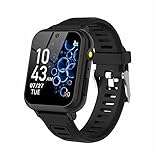
- 👍⌚【Muti-Functional Smart Watch for Kids】Kids smart watch with selfie-cam, 39 puzzle games, torch, MP3 player, voice recorder, pedometer, alarm, stopwatch, calculator, theme, screensaver select, backlight time, audiobooks, learn card, habit tracker, silent profile, five country language, ringtone volume etc.
- 👍⌚【Fun Selfie-Cam & Video】Kids touchscreen smart watch supports such as camera and video perfectly. Children usually use "VCRS + magic cameras" to record every happy moment in their lives. Set your favorite photo as wallpapers. Kids watch is capable of store 10000+ HD photos or 6+ hours video.
- 👍⌚【Easy to Use】No SIM Card Required. The watch for kids don't have call function, don’t need to download app, all the functions are built-in the kids watch, very easy to operate for kids. We also provide SD memory cards Built-in this kids smart watch, helps your child download MP3 children's songs, pictures and videos.
- 👍⌚【Longer Lasting Battery】Kids watch built in re-chargeable battery, the working time can be 3-7 days (varies with use and other factors), this kids smart watch has excellent battery life allows for uninterrupted fun throughout the day and night, and USB cable included (About 2 hours charging fully).
- 👍⌚【Our Forever Guarantee】Smart watch for kids using environmentally friendly silicone material, soft and comfortable, leaving no trace. Please fully charge the kids smart watch before first use. And we provide 90 days money-back, 1 year warranty and life-time friendly customer service. If you have any questions, please contact us in time. We will solve the problem for you as soon as possible.
Privacy: what parents should check
Kids watches can process a surprisingly sensitive collection of data: a child’s location, phone numbers, messages, photos, voice recordings, account identifiers, and device information. That makes privacy a core buying criterion rather than a legal page to ignore.
Free tools Windows power users keep installed
One-click scans. No signup required.
Before activating a watch, read the product and service privacy policies and look for answers to these questions:
- What location data is collected, and how frequently?
- Are messages, photographs, or voice recordings stored, and for how long?
- Which employees, contractors, caregivers, or service providers can access the information?
- Is data shared for advertising, analytics, safety, or other purposes?
- How can a parent delete an account or request deletion of a child’s data?
- Can the child communicate with anyone outside the parent-approved contact list?
- What happens to the data if the subscription ends or the watch is resold?
Location, communications, images, recordings, and identifiers may constitute children’s personal information under COPPA. Parents of children under 13 may have rights under COPPA when a covered online service is directed to children or knowingly collects their information, but legal coverage is not a substitute for reading the individual product’s terms. COPPA also does not make every privacy practice automatically desirable.
What else you may need after buying
Accessories are optional, but they can solve ordinary ownership problems:
- Fitbit Ace LTE band: useful for personalization, replacement, or keeping a second band available. Confirm compatibility with Ace LTE rather than buying a band for another Fitbit generation.
- kids smartwatch screen protector: sensible for children who are hard on their devices. Match the protector to the exact screen dimensions and model.
- Protective case: consider one if drops and scratches are a recurring problem, but check that it does not obstruct buttons, microphones, speakers, sensors, or charging.
- Replacement charging cable: buy the model-specific cable. A generic magnetic cable may not align correctly or support the watch’s charging system.
None of these accessories fixes poor network coverage, an unsuitable service plan, or weak parental controls. Choose the watch and plan first, then add protection based on how the child actually uses it.
Alternatives worth checking
Xplora X6Play
Xplora X6Play is a relevant dedicated kids-watch alternative with child-focused communication and personalization features. Xplora documents carrier partnerships, but U.S. availability, supported networks, and service terms should be verified for the reader’s location before it is treated as a practical option.
TickTalk 5 and Gabb Watch
TickTalk 5, Gabb Watch, and other dedicated kids-watch brands may deserve comparison, but they are not ranked here. A reliable recommendation requires current, model-specific evidence for the U.S. service plan, parent app, age guidance, communication controls, carrier compatibility, and privacy documentation. Product names alone are not enough to establish that one is the best overall choice.
A parent’s pre-purchase checklist
- Check the parent phone: confirm whether the required app works on Android, iPhone, or both. Apple Watch For Your Kids has Apple-specific requirements; Verizon Gizmo requires a companion smartphone for setup and management.
- Check the carrier and address: verify LTE availability where the child lives, goes to school, and spends weekends. Pay particular attention to geographic exclusions.
- Price the first year: add the watch, activation, monthly or annual service, taxes, and likely accessories. Fitbit Ace LTE, Garmin Bounce, carrier watches, and Apple’s child setup all involve service requirements.
- Map the contact model: write down who the child needs to contact and whether each person can be approved. Confirm whether the product uses a normal phone number, app-based communication, voice messages, or watch-to-watch messaging.
- Configure school controls: schedule School Time or quiet periods before giving the watch to the child, then test what still works.
- Explain SOS: show the child how to use it and tell them what happens when it is pressed. Confirm that caregivers receive the intended notification.
- Read the privacy terms: pay special attention to location history, recordings, photos, contact information, retention, sharing, and account deletion.
- Test the basics: make a call or message, request a location update, test a boundary alert, and check charging before depending on the watch away from home.
Frequently Asked Questions
Does a child need their own phone to use a kids smartwatch?
Usually, the child does not need their own compatible phone, but a parent generally needs a smartphone for setup and management. Verizon specifically requires a companion smartphone for Gizmo Watch 3 setup and management. Fitbit, Garmin, and other dedicated watches use parent apps, while Apple Watch For Your Kids is specifically designed to let a parent manage a cellular Apple Watch for a child without the child having their own iPhone.
Can a kids smartwatch replace a phone?
It can replace some basic phone functions for a younger child, such as approved calling, messaging, location sharing, and selected safety workflows. It is not a universal phone replacement. Contact restrictions, service coverage, battery life, app compatibility, and emergency behavior vary, and a smartwatch should not replace adult supervision or emergency services.
Do kids smartwatches have monthly fees?
Most cellular models require recurring service. Fitbit Ace LTE requires Ace Pass for LTE calling, messaging, location sharing, and Fitbit Arcade. Garmin Bounce requires a subscription for LTE features. Verizon Gizmo requires compatible cellular activation, and Apple Watch For Your Kids requires GPS + Cellular hardware plus an eligible cellular plan. Confirm current pricing before buying.
Is GPS on a kids smartwatch always accurate?
No. GPS is a useful location aid, but accuracy and update frequency can vary with buildings, network coverage, device settings, battery level, and the surrounding environment. Test the watch in the places where the child will use it and understand whether the product provides live location, scheduled updates, or occasional refreshes.
The Bottom Line
Bottom line: Choose Fitbit Ace LTE for active children and tightly controlled communication, Garmin Bounce for fitness and routines, Verizon Gizmo Watch 3 when Verizon integration matters, and Apple Watch SE GPS + Cellular with Apple Watch For Your Kids for an iPhone family with an older child ready for more independence. Consider Cosmo JrTrack 5 SE as a dedicated calling-and-GPS alternative, but verify its exact service and hardware terms. In every case, check coverage, recurring costs, privacy, contact controls, and the actual SOS workflow before treating the watch as a safety device.
Quick Recap
Product prices and availability are accurate as of the date/time indicated and are subject to change. Any price and availability information displayed on Amazon at the time of purchase will apply.
Recommended Free Tools




