Start with the settings that shape everyday use: display and wake behavior, your sleep schedule, phone notifications, and focus modes. The right setup depends on what matters most to you—at-a-glance visibility, fewer interruptions, sleep tracking, or conserving battery. The menu paths below follow Garmin’s Forerunner 970 Owner’s Manual, version 6, dated September 2026; labels may change with software or manual updates.
1. Set the display for your priorities
On the watch, open Watch Settings > Display & Brightness. Adjust brightness to a comfortable level, then decide how you want the screen to wake and how long it should stay on. Garmin says battery life depends on use and configuration, so treat screen changes as tradeoffs—not promises of a particular runtime.
As an Amazon Associate I earn from qualifying purchases.
- Always On Display: Keeps watch-face data visible at reduced brightness and background. Garmin says it affects battery and display life.
- Watch Face Seconds: Showing seconds also affects battery and display life when Always On Display is enabled.
- Wake On Gesture: Wakes the display when you raise and turn your arm.
- Wake On Alert: Controls whether an incoming notification or alert turns on the screen.
- Timeout: Sets how long the display remains on.
- Touch: You can disable touchscreen input or limit it to map use.
If visibility is the priority, consider Always On Display. If you would rather reduce screen activity and preserve battery and display life, consider turning it off, lowering brightness, or limiting wake behavior. Garmin does not provide a setting-specific runtime estimate for these choices; actual battery life varies with use and configuration. Garmin Forerunner 970 Owner’s Manual · Garmin battery-life assumptions
Do these 3 things before closing this tab:
1Clear out junk files and repair common Windows errors2Fix the driver behind crashes, sound loss and screen glitches3Repair Windows errors before they cause bigger problems2. Set a sleep schedule and Sleep focus
Set your usual bedtime and wake time on the watch at Watch Settings > Focus Modes > Sleep > Schedule, or set the schedule in Garmin Connect. Garmin describes the schedule as a guide the watch uses to measure sleep; it is not a substitute for wearing the watch overnight. Sync with Garmin Connect to view sleep information, including total sleep, stages, movement, and sleep score. Garmin also says naps contribute to sleep statistics and can affect recovery.
#1 Best Overall

- Our brightest AMOLED touchscreen display with button controls, a lightweight titanium bezel and sapphire lens, plus a built-in LED flashlight for greater awareness in the dark during early morning or late-night runs
- Up to 15 days of battery life in smartwatch mode and up to 26 hours in GPS mode for a more complete picture of your training and recovery
- Understand your overall energy efficiency with running economy, and see how much you’re slowing down when your foot hits the ground with step speed loss (HRM 600 monitor required; sold separately); running tolerance helps you understand the real impact running has on your body so you can adjust your training to avoid overload and improve
- Train for an event, achieve a milestone, or improve your fitness with Garmin Coach training plans; these running and triathlon plans are personalized to you and adapt based on your performance and recovery
- Built-in microphone and speaker let you make and take phone calls from your wrist when your watch is paired to your smartphone — and you can even use your smartphone’s voice assistant to respond to text messages and more
If you want fewer interruptions or a different screen and sound behavior overnight, configure the Sleep focus to suit you. Focus modes can adjust display, sounds, or alerts. Do Not Disturb suppresses notifications and alerts, but alarms are an exception. Sleep tracking outputs are wellness information, not clinical measurements. Garmin sleep-tracking documentation
3. Trim phone notifications
On the watch, go to Watch Settings > Connectivity > Phone > Notifications to choose whether phone notifications are enabled and review privacy and timeout options. Filtering notifications by app is handled through Garmin Connect, with different controls by phone operating system: the manual describes connected-app controls for iOS and app-notification selection for Android.
Rank #2
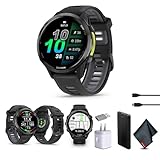
- Bundle Includes: Garmin Forerunner 970 Running Smartwatch, GPS Fitness Smart Watch For Men And Women, Carbon Gray DLC Titanium with Black Case and Black/Translucent Whitestone Band + USB Wall Plug Charging Adapter Cube + USB3.0 to type-c female adapter Space Gray + Microfiber Cleaning Cloth + P-Bank
- Precision Navigation with Built-In Maps and SatIQ: Run city streets or mountain switchbacks confidently with full-color built-in maps and multi-band GPS enhanced by SatIQ technology. Whether you’re exploring new routes or racing unfamiliar terrain, get pinpoint accuracy and turn-by-turn directions—ideal for trail runners, cyclists, and multisport athletes who train off-grid.
- Advanced Training, Recovery, and Readiness Tools: Train smarter with premium metrics like running economy, endurance score, and training readiness. Get adaptive coaching, recovery time, and workout suggestions —perfect for high-performance runners and triathletes looking to optimize every session and minimize risk of burnout or injury.
- Durable, Lightweight Design with Smart Safety Tools: Built with a titanium bezel, sapphire lens, and a built-in LED flashlight, this watch is rugged yet light for ultra comfort during long workouts. Stay connected with phone calls, smart notifications, and safety tracking—all from your wrist. Designed for committed athletes who value performance, safety, and real-world utility.
- Vivid AMOLED Display with Long Battery Life: Train harder, longer, and in any light with the 1.4-inch AMOLED display—bright, responsive, and crystal clear even in direct sun. With up to 26 hours of battery in GPS mode, it’s built for endurance athletes who demand visibility and reliability through every mile, from early morning long runs to all-day trail adventures.
A practical starting point is to allow calls and alerts you genuinely need, then disable distracting apps. That is a personal setup suggestion, not a Garmin default.
What’s actually slowing this PC down?
Pick the symptom - the matching free tool is one click away.
4. Check focus modes before changing workout behavior
Focus modes let you keep sleep and activity behavior separate. Garmin says changes made while a focus mode is active apply only to that mode. Depending on the mode, you can configure display, notifications, sound and vibration, and satellite systems. Satellite selection may also be customized for an individual activity.
Rank #3

- IN THE BOX: 1x Garmin Forerunner 955 Smartwatch, Black, 1x Power/Data Cable, 1x Wearable4U Black EarBuds
- EXTENDED BATTERY LIFE & TOUCHSCREEN: Get up to 15 days of battery life in smartwatch mode. In GPS mode, get up to 42 hours. And in UltraTrac mode, go even longer with up to 80 hours. Click or swipe through maps and stats with traditional button controls or a new, responsive touchscreen
- OUTSHINE THE COMPETITION: Confidently run any route using full-color, built-in maps and multi-band GPS. Know when you’re primed for a productive session with training readiness and plan your strategy with daily suggested workouts, course details and more on the race widget
- MULTI-BAND SUPPORT: Access multiple global navigation satellite systems, and get access to multiple frequencies sent by navigation satellites for improved accuracy in areas where GNSS signals are reflected, weak or typically don't penetrate — giving you superior accuracy for how far and how fast you’ve run — even in challenging environments
- Wearable4U ULTIMATE EARBUDS + POWER PACK: Wearable4U 2 in 1 EarBuds + Power Pack contains Wearable4U Power Case1500 mAh, Wearable4U Bluetooth EarBuds Pro. Keep your device charged at all times and enjoy your music during sports activities with our Wearable4U 2in1 Earbuds Pro!charged at all times with our Wearable4U E-Bank (keeps at least one charge!)
If a setting seems different during a workout than it does elsewhere, check the active focus mode and activity profile first. The watch may be applying a separate preference rather than ignoring a change you made in another mode.
5. Choose the health and wellness alerts you want
Review Watch Settings > Notifications & Alerts > Health & Wellness. Garmin lists alerts for stress, rest, abnormal heart rate, movement, and goals. Enable only the prompts that are useful to you; these alerts do not diagnose a health problem.
Rank #4

- Our brightest AMOLED touchscreen display with button controls, a lightweight titanium bezel and sapphire lens, plus a built-in LED flashlight for greater awareness in the dark during early morning or late-night runs
- Up to 15 days of battery life in smartwatch mode and up to 26 hours in GPS mode for a more complete picture of your training and recovery
- Understand your overall energy efficiency with running economy, and see how much you’re slowing down when your foot hits the ground with step speed loss (HRM 600 monitor required; sold separately); running tolerance helps you understand the real impact running has on your body so you can adjust your training to avoid overload and improve
- Train for an event, achieve a milestone, or improve your fitness with Garmin Coach training plans; these running and triathlon plans are personalized to you and adapt based on your performance and recovery
- Built-in microphone and speaker let you make and take phone calls from your wrist when your watch is paired to your smartphone — and you can even use your smartphone’s voice assistant to respond to text messages and more
6. Decide whether to enable overnight pulse-oximeter tracking
Garmin says overnight breathing-variation insights require pulse-oximeter sleep tracking to be enabled. Treat this as general wellness information, not a medical reading. Garmin explicitly states that the Forerunner is not a medical device and is not intended to diagnose or monitor a medical condition. If you have health concerns, consult a healthcare professional.
Free tools Windows power users keep installed
One-click scans. No signup required.
Additional tracking may affect battery life, but Garmin’s published battery guidance does not give a setting-specific runtime estimate for this feature. Battery life depends on use and configuration. Garmin sleep-tracking documentation · Garmin battery-life assumptions
Best Value
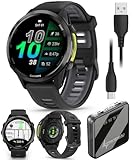
- Our brightest AMOLED touchscreen display with button controls, a lightweight titanium bezel and sapphire lens, plus a built-in LED flashlight for greater awareness in the dark during early morning or late-night runs
- Up to 15 days of battery life in smartwatch mode and up to 26 hours in GPS mode for a more complete picture of your training and recovery
- Understand your overall energy efficiency with running economy, and see how much you’re slowing down when your foot hits the ground with step speed loss (HRM 600 monitor required; sold separately); running tolerance helps you understand the real impact running has on your body so you can adjust your training to avoid overload and improve
- Train for an event, achieve a milestone, or improve your fitness with Garmin Coach training plans; these running and triathlon plans are personalized to you and adapt based on your performance and recovery
- Built-in microphone and speaker let you make and take phone calls from your wrist when your watch is paired to your smartphone — and you can even use your smartphone’s voice assistant to respond to text messages and more
A quick setup decision guide
- Prefer a screen you can glance at? Consider Always On Display, accepting Garmin’s stated battery and display-life tradeoff.
- Prefer fewer screen activations and more battery-life potential? Consider reducing brightness, screen-on time, or Always On Display use. Garmin confirms settings and usage affect runtime, but does not quantify the gain from any one change.
- Want sleep data aligned with your routine? Set your usual sleep schedule and wear the watch overnight.
- Getting too many interruptions? Adjust phone notifications and Sleep focus or Do Not Disturb; alarms still come through Do Not Disturb.
- Seeing different behavior during a workout? Check the active focus mode and activity-specific settings.
Garmin’s battery-life assumptions generally use default software settings and configurations unless otherwise noted. They should not be read as a guarantee for a particular setup or usage pattern. Garmin battery-life assumptions
Quick Recap
Product prices and availability are accurate as of the date/time indicated and are subject to change. Any price and availability information displayed on Amazon at the time of purchase will apply.




