Recommended Free Tools
Follow the owner’s manual for your exact watch before winding, setting, cleaning, or wearing it in water. Mechanical watches differ in winding direction, crown positions, date-setting restrictions, water resistance, and service needs. General care is straightforward: operate the crown gently, keep the watch away from damaging conditions, and have it checked if its performance or condition changes.
How does a mechanical watch get wound?
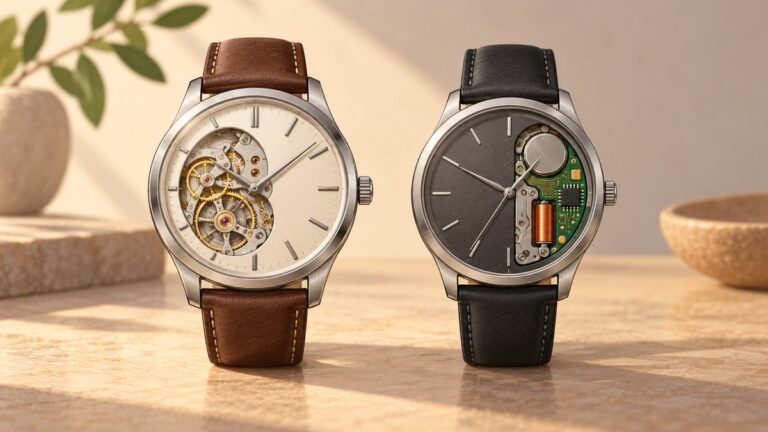
A mechanical watch runs on energy stored in its mainspring. A manual-wind watch receives that energy through the crown. An automatic watch also uses wrist movement to turn a rotor that winds the mainspring; many automatic movements can be wound by hand as well. Check the specific model’s manual to confirm whether hand-winding is supported and how to do it.
As an Amazon Associate I earn from qualifying purchases.
Winding a manual or automatic watch
- If the watch has a screw-down crown, unscrew it as directed by the manual before winding.
- Turn the crown gently, in the direction specified for that model. Do not force it if it resists or feels abnormal.
- When finished, press the crown in or screw it down fully as designed. A crown left unscrewed can compromise the seal on watches that rely on one.
There is no universal number of turns for all mechanical watches. As brand-specific examples, Rolex says its guidance for a stopped watch or one being worn for the first time is to unscrew the crown fully, turn it clockwise at least 25 times for an adequate partial wind, then screw it down carefully (Rolex care guidance). Seiko India advises about 20 clockwise turns daily for automatic models with manual-winding capability, while recommending slow, gentle winding (Seiko India support). These are not interchangeable instructions; use your watch’s manual.
Free tools Windows power users keep installed
One-click scans. No signup required.
What to expect from an automatic
Wrist movement winds an automatic watch during wear, but the power reserve and winding behavior vary by model. Rolex notes that normal daily wear winds its automatic watches and that reserve varies by model (Rolex FAQ). If the watch stops, consult its manual rather than shaking it vigorously or assuming it cannot be hand-wound.
#1 Best Overall

- Read Before You Buy — No Video Output: These adapters support charging and USB 2.0 data transfer, but cannot transmit video signals. Except for standard USB webcams (which use USB data only), they are not compatible with HDMI/DisplayPort cables, video-capable USB-C hubs, or docking stations with video output.
- Convert USB-A Ports to USB-C: Designed to connect USB-C earphones, cables, flash drives, card readers, and other USB-C accessories to standard USB-A ports. Plug-and-play with no drivers or software required.
- Aluminum Alloy Housing: Built with a sturdy aluminum alloy shell that aids in heat dissipation and protects against daily wear and scratches. Designed to maintain a stable and secure connection.
- Compact & Travel-Friendly: The ultra-compact design allows the adapter to stay plugged into your device without blocking adjacent ports or adding bulk, reducing wear and tear on your original USB ports.
- 12-Month Warranty: Backed by a 12-month manufacturer warranty for peace of mind. Designed to meet strict quality control standards for reliable everyday performance.
How should you set the time and date?
Crown positions and setting procedures vary between watches, especially those with day, date, GMT, or chronograph functions. Follow the model’s instructions for each function; do not assume one crown-position sequence or date-setting rule applies to every calibre.
For a brand-specific example, Rolex’s general care page describes unscrewing the crown and pulling it to the second notch to set the time, which stops the seconds hand. Rolex also directs owners to the detailed guide for their model because functions vary (Rolex watch care).
Rank #2

- 5-in-1 USB-C Hub: Experience comprehensive connectivity featuring a Power Delivery input, two USB-A 2.0 ports, a USB-A 3.0 port, and an HDMI port. (Note: The USB-C power delivery input port is only for connecting an external wall charger to power your laptop and cannot power peripheral devices.)
- 90W Pass-Through Charging: Achieve optimal charging with 90W pass-through power to your laptop, supported by a total input of 100W, with the hub reserving 10W for operational efficiency. (Note: Wall charger not included.)
- Quick Data Transfers: Accelerate your productivity with rapid data transfers using a high-speed 5Gbps USB 3.0 port and two 480Mbps USB 2.0 ports.
- 4K HDMI Display: Enhance your visual experience with a hub capable of delivering 4K resolution at 30Hz in both mirror and extend modes. Please note that this hub is compatible with MacBook (macOS 12 and newer), Windows 10 and 11, ChromeOS, and laptops equipped with DP Alt Mode and Power Delivery. Note: This device is not compatible with Linux.
- What You Get: Anker USB-C Hub (5-in-1, 4K HDMI), welcome guide, 18-month warranty, and our friendly customer service.
- Use the manual to identify the correct crown position for the function you want to set.
- Operate the crown gently and follow any stated restrictions for the date or other complications.
- When finished, return the crown to its normal sealed position: press it in or screw it down, as the design requires.
Where should you store a mechanical watch?
Choose a stable, dry place away from strong magnetic fields, extreme heat or cold, shocks, strong vibration, dust, and chemicals. A watch box is optional; the important part is avoiding harmful conditions.
Windows Errors? Fix Them Before They Spread
Repair common Windows errors and clear accumulated junk for a smoother, more stable PC - no reinstall needed.Free scan · no reinstallOutdated Drivers Are Slowing You Down
One free scan finds every outdated or missing driver and matches the right update for your exact hardware.Free scan · exact hardware matchTemperature, gravity, shock, time worn, arm movement, and the mainspring’s state can all influence a mechanical watch’s rate, according to Seiko Watch Corporation’s accuracy guidance (Seiko accuracy FAQ). Resting position can matter too. If you are interested in how position affects your watch, Seiko suggests comparing gain or loss after leaving it in different positions for 7 to 8 hours while off the wrist. This is an optional observation, not a basic-care requirement.
Rank #3

- Sleek 7-in-1 USB-C Hub: Features an HDMI port, two USB-A 3.0 ports, and a USB-C data port, each providing 5Gbps transfer speeds. It also includes a USB-C PD input port for charging up to 100W and dual SD and TF card slots, all in a compact design.
- Flawless 4K@60Hz Video with HDMI: Delivers exceptional clarity and smoothness with its 4K@60Hz HDMI port, making it ideal for high-definition presentations and entertainment. (Note: Only the HDMI port supports video projection; the USB-C port is for data transfer only.)
- Double Up on Efficiency: The two USB-A 3.0 ports and a USB-C port support a fast 5Gbps data rate, significantly boosting your transfer speeds and improving productivity.
- Fast and Reliable 85W Charging: Offers high-capacity, speedy charging for laptops up to 85W, so you spend less time tethered to an outlet and more time being productive.
- What You Get: Anker USB-C Hub (7-in-1), welcome guide, 18-month warranty, and our friendly customer service.
What if the watch suddenly gains or loses time?
Magnetism can affect a mechanical watch’s rate, and moving it away from a magnetic source does not necessarily undo the effect. Seiko lists phones, speakers, magnetic clasps, hair dryers, and electric razors among possible sources, and advises contacting an authorized Seiko service center for demagnetization if a watch is affected (Seiko magnetism FAQ).
Do not assume magnetism is the cause of a sudden timing change. Temperature, position, the watch’s power state, or damage may also play a part. Seiko warns that strong shocks or drops can damage small movement parts and recommends removing a watch for sports involving strong impacts (Seiko accuracy FAQ). If the change persists, have the watch assessed by an authorized service center or qualified watchmaker.
Rank #4

- Dual Converters, Infinite Potential:Includes 2× USB C male to USB A female adapters and 2× USB A male to USB C female adapters. Perfect for a wide range of uses—tablets with Bluetooth keyboards, expand USB ports on macbook, and more. Two different converters for all your daily needs
- Next-Level 10Gbps & 3A Charging: No more slow 480Mbps, this usb to usb c adapter has a transfer speed of up to 10Gbps, allowing you to do more transferring in less time. This usb adapter fits both USB A and USB C charger, supporting up to 3A fast charging
- Upgraded Exquisite Craftsmanship: With an aluminum alloy housing and metal connector, the usbc to usb adapter is extremely durable and sturdy. Rigorously tested to withstand more than 10,000 times of plugging and unplugging, ensuring long-lasting performance
- Broad Compatible: The usb c to usb adapter widely supports all USB C/ USB A devices like laptops, tablets, cellphones, car chargers, and phone chargers. Such as compatible with MacBook Pro/Air 2023/2022, Thunderbolt 4/3 Devices,Apple MagSafe Watch 9/8/7/SE/Ultra, iPad Pro 2022/2021, Samsung Galaxy S23/S20/S10, and iPhone 17/16/15 Pro. Plug and play
- Please Note: To reach 10Gbps speed, keep the cable under 3.3 ft. For USB A Male to USB C adapters, try flipping the USB C connector. USB C Male to USB A adapters support bidirectional 10Gbps transfer within 3.3 ft
Can you wear a mechanical watch in water?
Only rely on the water-resistance marking and manual for your exact watch, and consider its present condition. “Mechanical” does not mean suitable for swimming or showering. Water resistance is not permanent: gaskets age, and shocks to the watch can affect its seal. OMEGA says water resistance cannot be guaranteed permanently and recommends regular checks; Seiko likewise warns that seals age (OMEGA preservation guidance; Seiko Boutique maintenance guidance).
Do these 3 things before closing this tab:
1Clear out junk files and repair common Windows errors2Scan for outdated or missing drivers - takes under a minute3Repair Windows errors before they cause bigger problemsWater-resistance ratings and permitted activities differ by model. Seiko Boutique notes that stated pressure figures are test pressures, not actual diving depths. Do not infer that a meter marking alone makes a watch appropriate for a particular activity. Avoid operating the crown or pushers when wet or underwater, as Seiko’s guidance advises.
Best Value

- 5-in-1 Connectivity: Equipped with a 4K HDMI port, a 5 Gbps USB-C data port, two 5 Gbps USB-A ports, and a USB C 100W PD-IN port. Note: The USB C 100W PD-IN port supports only charging and does not support data transfer devices such as headphones or speakers.
- Powerful Pass-Through Charging: Supports up to 85W pass-through charging so you can power up your laptop while you use the hub. Note: Pass-through charging requires a charger (not included). Note: To achieve full power for iPad, we recommend using a 45W wall charger.
- Transfer Files in Seconds: Move files to and from your laptop at speeds of up to 5 Gbps via the USB-C and USB-A data ports. Note: The USB C 5Gbps Data port does not support video output.
- HD Display: Connect to the HDMI port to stream or mirror content to an external monitor in resolutions of up to 4K@30Hz. Note: The USB-C ports do not support video output.
- What You Get: Anker 332 USB-C Hub (5-in-1), welcome guide, our worry-free 18-month warranty, and friendly customer service.
For watches whose manuals permit salt-water exposure, Rolex and OMEGA advise rinsing with fresh water afterward and drying the watch. OMEGA also advises keeping leather straps away from moisture and prolonged direct sunlight. Follow your own watch’s instructions, as cleaning and strap care vary (Rolex watch care; OMEGA preservation guidance).
How should you clean the case and strap?
For routine dust or fingerprints, an optional microfiber watch-cleaning cloth is a low-risk choice. Avoid treating every watch as water-safe or using the same method on every strap.
Rolex says its metal-bracelet watch may be cleaned with soapy water and a soft brush when the crown is properly screwed down. That is Rolex-specific guidance, not a general instruction for leather straps or other watches (Rolex watch care). If you are unsure whether a watch can be cleaned with water, use a dry cloth and consult its manual or service provider.
The Tool Desk
Outbyte PC Repair FREERepair Windows errors before they cause bigger problemsFix Now →Outbyte Driver Updater FREEFix the driver behind crashes, sound loss and screen glitchesFind Drivers →When should a mechanical watch be serviced?
Service intervals depend on the brand, model, use, and environment. Manufacturer recommendations illustrate the variation rather than establish a universal schedule: OMEGA’s Hong Kong English care page recommends an annual water-resistance check and a complete service every 5 to 8 years, with frequency depending on use and environment. Rolex’s FAQ says approximately every 10 years, depending on model and real-life use (OMEGA preservation guidance; Rolex FAQ). Check the maker’s guidance for your watch or ask an authorized service center or qualified watchmaker.
Arrange prompt professional assessment if you see moisture under the crystal, the watch has taken a hard impact, the crown is damaged, its timing changes sharply, or you are unsure whether its water resistance remains reliable. Do not open the case or attempt movement repairs without the appropriate expertise.
Quick Recap
Product prices and availability are accurate as of the date/time indicated and are subject to change. Any price and availability information displayed on Amazon at the time of purchase will apply.