What’s actually slowing this PC down?
Pick the symptom - the matching free tool is one click away.
To use a Rolex Daytona chronograph, unscrew both pushers counterclockwise, reset the stopped chronograph with the lower pusher, then use the upper pusher to start and stop timing. The tachymeter uses that elapsed time to show average speed over a known distance: time one mile and the scale reads miles per hour; time one kilometre and it reads kilometres per hour.
What the Daytona chronograph measures
The Daytona’s chronograph records elapsed time independently of the watch’s time display. Its central chronograph seconds hand shows elapsed seconds; the counter at 3 o’clock records elapsed minutes, and the counter at 9 o’clock records elapsed hours. Rolex describes the tachymetric scale as a way to read average speed over a given distance using the chronograph function (Rolex Cosmograph Daytona features).


As an Amazon Associate I earn from qualifying purchases.
How to time an event
- Unscrew the chronograph pushers by turning them counterclockwise before operating them.
- Check that the chronograph is stopped. If it is running, press the upper pusher once to stop it.
- Press the lower pusher to reset the chronograph seconds hand and counters to zero.
- Press the upper pusher to start timing.
- Press the upper pusher again to stop timing.
- Read elapsed seconds from the central hand, elapsed minutes from the counter at 3 o’clock, and elapsed hours from the counter at 9 o’clock.
- When finished, screw the pushers down clockwise.
This sequence follows the operating instructions in Rolex’s official user guide.
Free tools Windows power users keep installed
One-click scans. No signup required.
How to read the tachymeter for average speed
A tachymeter calculation needs a known distance and the time required to travel it. The chronograph measures the time; the scale converts that time into an average speed for the distance unit you chose.
#1 Best Overall
- Choose a known distance, such as one mile or one kilometre.
- Unscrew the pushers, stop the chronograph if needed, and reset it with the lower pusher.
- At the start of the measured distance, press the upper pusher to start the chronograph.
- At the end of the distance, press the upper pusher to stop it.
- Find the tachymetric-scale value indicated by the stopped central chronograph seconds hand. Interpret it in the unit you measured: a one-mile timing gives miles per hour, while a one-kilometre timing gives kilometres per hour.
- Screw the pushers down clockwise after use.
For example, if a one-kilometre distance takes 30 seconds, read the scale at the stopped seconds hand and interpret the result as kilometres per hour. The same elapsed time over one mile is interpreted as miles per hour. The scale reports average speed across the measured distance, not instantaneous speed.
What the scale’s range means
Rolex states that the Daytona tachymetric scale reads speeds up to 400 units per hour, expressed in kilometres or miles. The product page does not state a publication year for this figure (Rolex Cosmograph Daytona). The reading depends on accurately timing the full known distance; the scale does not measure distance or speed by itself.
Quick Recap
Best Value

- Stainless steel case 39.5mm diameter x 14mm thick; Black dial; Luminous hands and hour markers
- Japanese quartz movement, VD53B-14 Caliber; Assembled in Japan; SR920SW battery included; Watch weight: 146 grams
- Stainless steel band, 205mm L x 20mm W; Band is adjustable by adding/removing links; Fold over safety clasp
- Mineral crystal;Screw-down crown; Stationary stainless steel bezel; Functional Subdials: 60min, 60sec, 24hr; 200 meter water resistant: Suitable for professional marine activity and surface water sports. Suitable for diving.
Rank #4
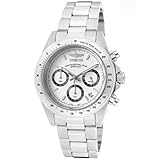
- Stainless steel case 39.5mm diameter x 14mm thick; White dial; Luminous hands and hour markers
- Japanese quartz movement, VD53B-14 Caliber; Assembled in Japan; SR920SW battery included; Watch weight: 146 grams
- Stainless steel band, 205mm L x 20mm W; Band is adjustable by adding/removing links; Fold over safety clasp
- Mineral crystal;Screw-down crown; Stationary stainless steel bezel; Functional Subdials: 60min, 60sec, 24hr; 200 meter water resistant: Suitable for professional marine activity and surface water sports. Suitable for diving.
Rank #3
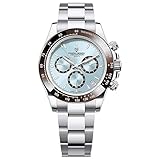
- Experience precision like never before with the Pagani Design PD1644 Men’s Chronograph Watch. Powered by a reliable VK63 Japanese quartz movement, this timepiece offers true chronograph functionality with smooth and accurate timing – no gimmicks, just real performance.
- VK63 movement:Equipped with the trusted VK63 movement, this watch delivers pinpoint accuracy and long-lasting performance. Say goodbye to time drift and constant battery worries—just dependable, everyday precision you can count on.
- 100m waterproof:Whether you're caught in the rain, jumping into the pool, or heading out on a weekend adventure, the PD1644 has your back. With 100 meters (330 feet) of water resistance, it’s perfect for daily wear and water-based activities—without sacrificing style.
- 316L stainless steel:From its scratch-resistant sapphire glass to its stainless steel case and gemstone bezel, this watch is all about the details. Luminous hands ensure easy reading day or night, while the secure folding clasp keeps it comfortably in place wherever life takes you.
- Parameters:With a 40mm case, 20mm band width, and a lightweight 140g build, the PD1644 is designed to feel as good as it looks. The 220mm band fits most wrists comfortably, making it the go-to choice for men who value both function and refined style.
Using the controls safely
- Unscrew the pushers before operating the chronograph, then screw them down clockwise afterward, as Rolex’s user guide directs.
- Use the upper pusher to start or stop timing and the lower pusher to reset after the chronograph has stopped.
- If your Daytona’s controls or configuration differ from the guide, consult the instructions for your specific watch or an official Rolex retailer. The retrieved guide does not identify every Daytona reference it covers.
Product prices and availability are accurate as of the date/time indicated and are subject to change. Any price and availability information displayed on Amazon at the time of purchase will apply.
Recommended Free Tools

