What’s actually slowing this PC down?
Pick the symptom - the matching free tool is one click away.
Overall Verdict:
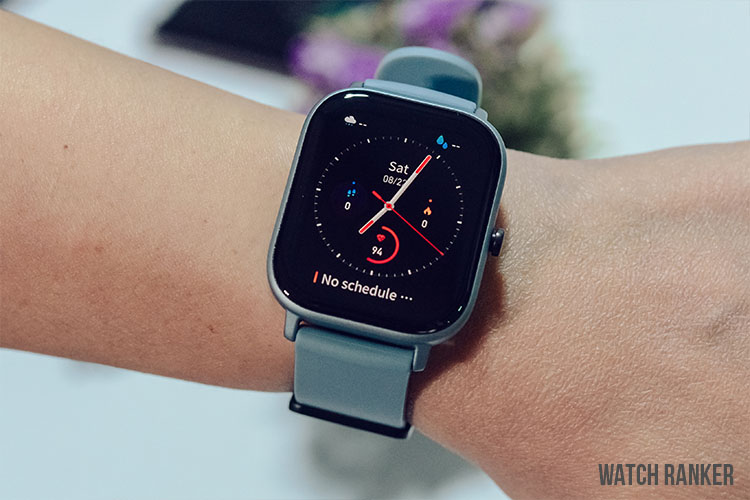
The Amazfit GTS is a capable smartwatch when it comes to its build quality, hardware, and features. However, when it comes to the software experience, it falls flat compared to the rest of the competition.
| PROS | CONS |
| ✅ 2-Week Battery Life | ❌ Poor Notification Implementation |
| ✅ Clear and vibrant display | ❌ Slow Watch Face Syncing |
| ✅ Small and lightweight form factor | ❌ Not the best button implementation |
| ✅ Good Aesthetics | ❌ Software is not on par with the rest of the competition |
| ✅ Good amount of customization via Amazfit App |
The Amazfit GTS is Amazfit’s entry into the midrange smartwatch market. It is the lower-priced version of the Amafit GTR. It is primarily aimed at casual consumers and is marketed by Amazfit as a fashion accessory.
It has a lot of features going on and a form factor that is well optimized for daily use. But with how packed the midrange market is, can the Amazfit GTS compete? Keep on scrolling to find out.
You can also head over to our Huawei Watch GT 2e vs. Amazfit GTS article for a detailed comparison.
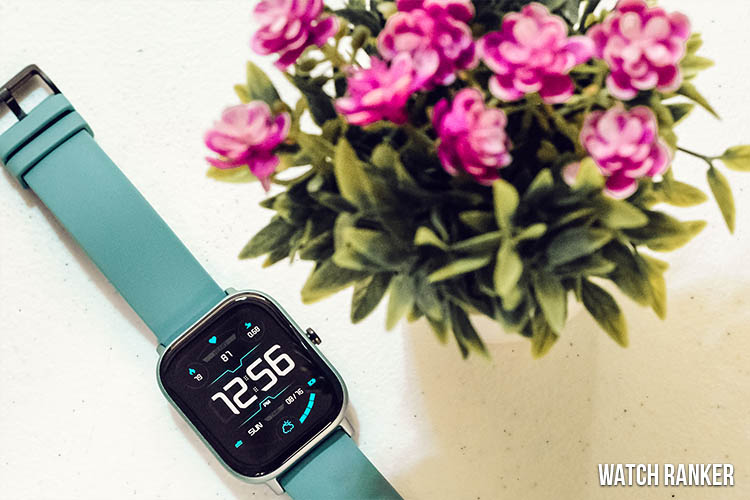
I personally purchased the Amazfit GTS in August 2020 for $149.99 USD.
As an Amazon Associate I earn from qualifying purchases.
Packaging & Accessories
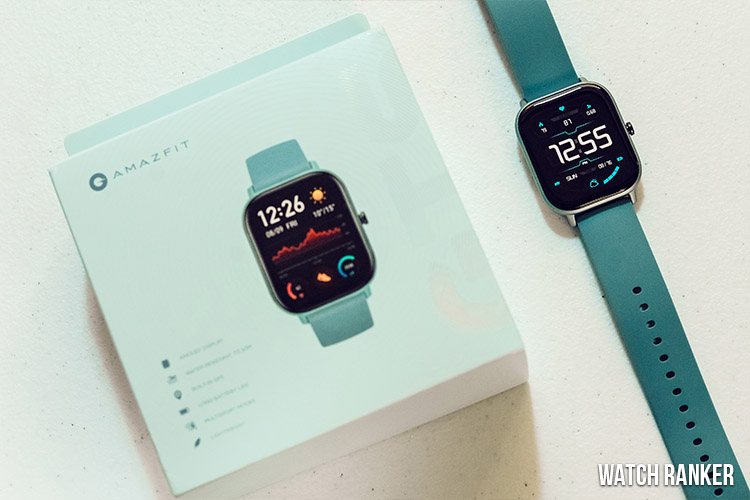
Before we get to the watch, let us briefly tackle the unboxing experience. Of course, the packaging does not affect the performance of a smartwatch. However, we still put a fair amount of emphasis here since this is our way of gauging how much effort a company has put in designing a product.
And with this regard, the GTS is not off to a good start. The box is rather simple, especially compared to other products that we have reviewed. Aside from the color-matched box, there isn’t a lot going on here.
The presentation of the watch is straightforward. Once you open the outer box, you will find another white box that contains the watch and all the accessories. The only accessory that comes with the Amazfit GTS is the proprietary charging cable, which we will be talking about later.
I will give props to Amazfit for keeping the presentation clean. However, the whole experience feels like opening an electronic device rather than a luxury item. But now, with that out of the way, let us officially start with the review.
Design & Build Quality
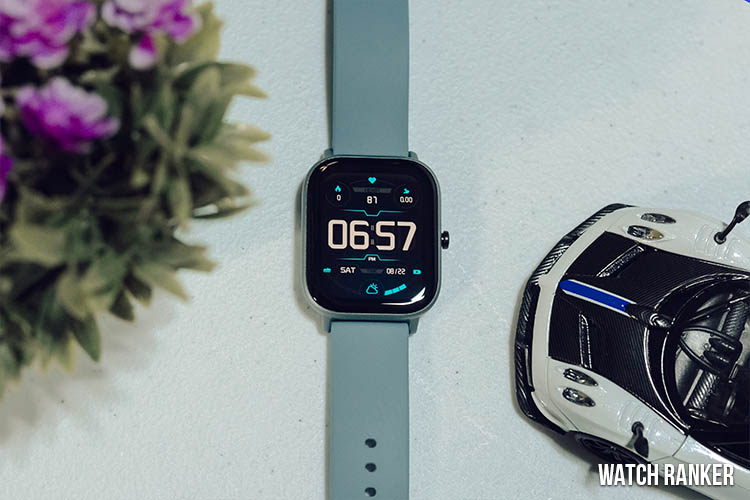
The GTS is a small and lightweight watch that’ sporting an overall clean and minimalist look.
#1 Best Overall
Sale Amazfit Bip 6 Smart Watch, 1.97" AMOLED Display, GPS, iOS/Android | 46mm, 14-Day Battery, Bluetooth Call & Text, Water-Resistant, Free Maps, AI, Health & Sleep Tracker, 140+ Workout Modes
- STYLISH DESIGN, VIBRANT DISPLAY: The lightweight aluminum build blends effortless style with workout durability, while the vivid 1.97" AMOLED display keeps your data easy to read, even under bright sunlight.
- ALL-IN-ONE ACTIVITY TRACKING: The Amazfit Bip 6 fitness tracker watch offers 140+ workout modes including HYROX Race and Strength Training, plus personalized AI coaching and 50m water resistance.
- UP TO 14 DAYS BATTERY LIFE: The Amazfit Bip 6 smart watch powers through your training and recovery for up to two weeks at a time - no nightly charging needed.
- ACCURATE GPS TRACKING & NAVIGATION: Stay on course with free downloadable maps and turn-by-turn directions. Support from 5 satellite systems ensures precise tracking of every move and fast GPS connection.
- 24/7 HEALTH MONITORING: The Amazfit Bip 6 smartwatch provides precise, real-time monitoring of heart rate, sleep, blood-oxygen and stress, empowering you with actionable insights to optimize your health and fitness.
Design Language
The Amazfit GTS is a square watch with a very minimalist and clean-looking design. It is a simple-looking watch that is not littered with any branding or special features.
It is worth noting that the Amazfit GTS looks substantially different from its more expensive counterpart, the Amazfit GTR. Aside from the difference in the shape, the strap design and materials used are also entirely different.
The Amazfit GTS comes in a variety of different colors, which is great to see, especially since Amazfit is advertising the GTS as a fashion accessory. The unit featured in this review is rocking the blue color scheme, which looks as good as it does on camera.
And if that’s not your style, there are other colors such as black, grey, gold, orange, and pink. The various color options make the watch more interesting, which is good since this price segment is filled with the same neutral color schemes.
Weight and Dimensions
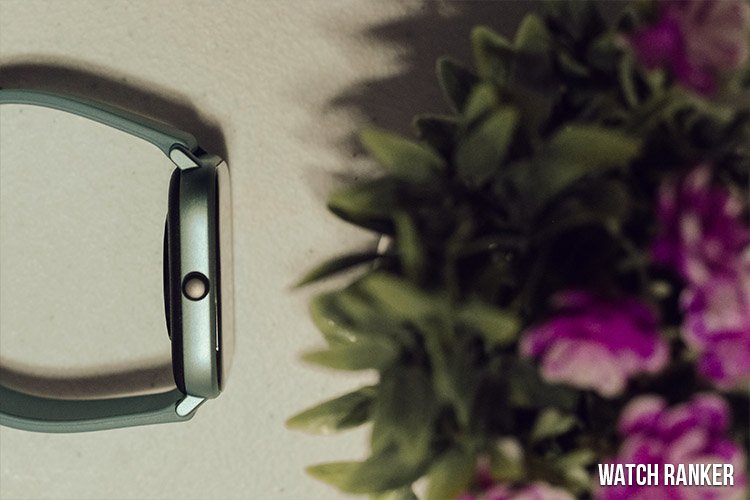
The Amazfit GTS is a light smartwatch weighing at only 24.8g. It almost feels as if there is nothing strapped on my wrist. Some users may perceive this as a bad thing, but I find that it helps with overall comfort, especially during workouts.
In terms of size, the GTS is a small smartwatch. Here are its dimensions: 43.25 x 36.25 x 9.4mm. Its smaller size helps reduce the overall weight of the watch. I initially thought the size would bother me, especially since I am coming from bigger and heavier smartwatches. However, I have grown to like its compact form factor, and I wish that other manufacturers would also produce smaller smartwatches.
Overall, the size and weight would depend on your personal preferences. However, I enjoyed using this smartwatch largely due to its form factor.
Build Quality
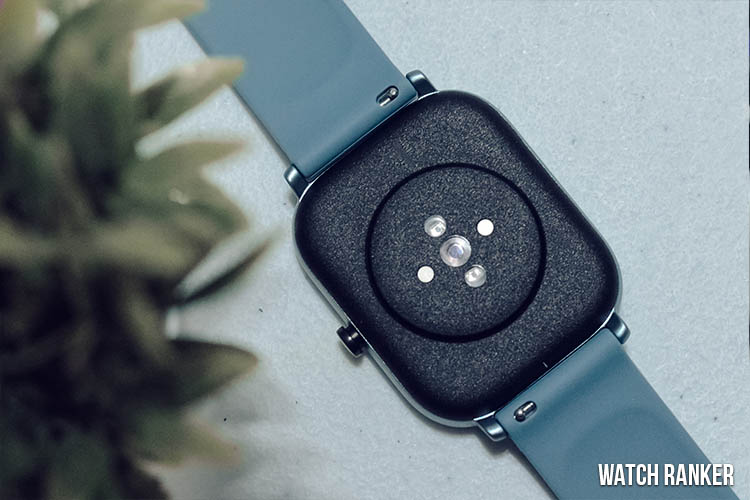
The overall build quality of the Amazfit GTS is good, but it doesn’t feel as premium as the similarly priced Huawei GT 2e or the higher-priced Amazfit GTR. The back portion of the watch seems like it is made of plastic. The sides feel like metal, but it is still probably some sort of plastic due to the weight.
But that is the kind of tradeoff that you need to sacrifice for the lightweight nature of the watch. And overall, I believe that the build is good enough to be a daily driver.
Quick wins for a faster PC:
Scan for outdated or missing drivers - takes under a minuteDriver Scan →Clear out junk files and repair common Windows errorsFree Scan →Fix the driver behind crashes, sound loss and screen glitchesFind Drivers →Strap
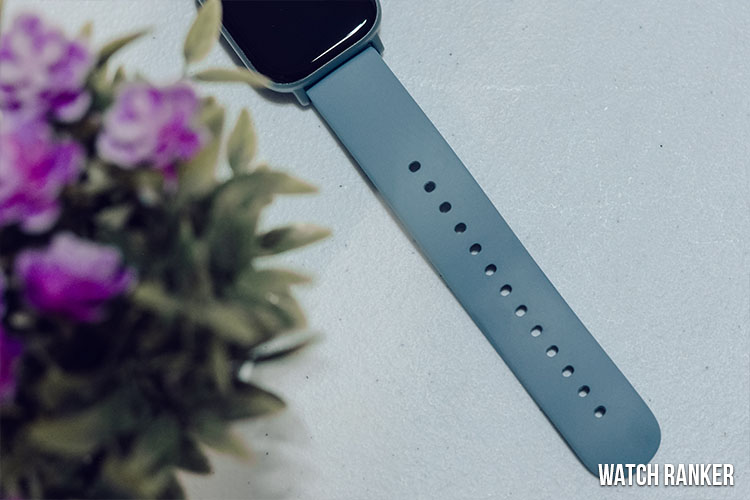
I was initially not too fond of the strap. It initially had a plasticky feel that gave the impression that it is a lower quality strap compared to my other smartwatches. However, after a few weeks of use, I was surprisingly not bothered by it at all. I could comfortably use the GTS for the whole day without taking it off.
Button
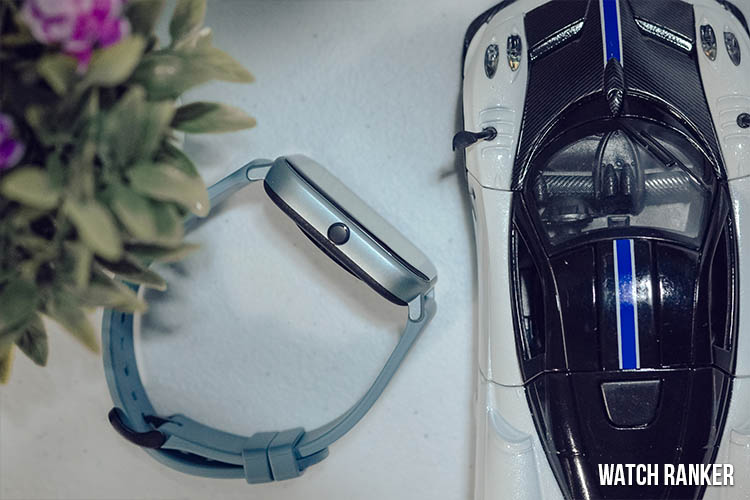
As mentioned earlier, the Amazfit GTS only has one button. This perfectly fits the overall clean design of the GTS, so this isn’t an issue for me. The problem lies with the functionality of the button.
The single press functionality is only utilized for turning the screen on and off. This is pretty much useless for my use case.
I never needed to turn off the screen. Putting my wrist down automatically shuts it off. I would have preferred if Amazfit gave us the option to program this button as well.
Huawei utilizes the first button on the GT 2 and GT 2e better. It gives access to the main menu, which would have been a lot better, especially given the GTS cluttered menu. We’ll talk more about the UI in its dedicated section.
But the good thing is that you can assign a secondary command via a long press. By default, the long press gives quick access to the workout modes. You can, however, assign other functions such as quick access to notifications, weather, etc.
In terms of the size of the button, it is slightly sticking out of the main body. However, due to the size of the watch, the button won’t interfere with your wrist during workout sessions.
Display
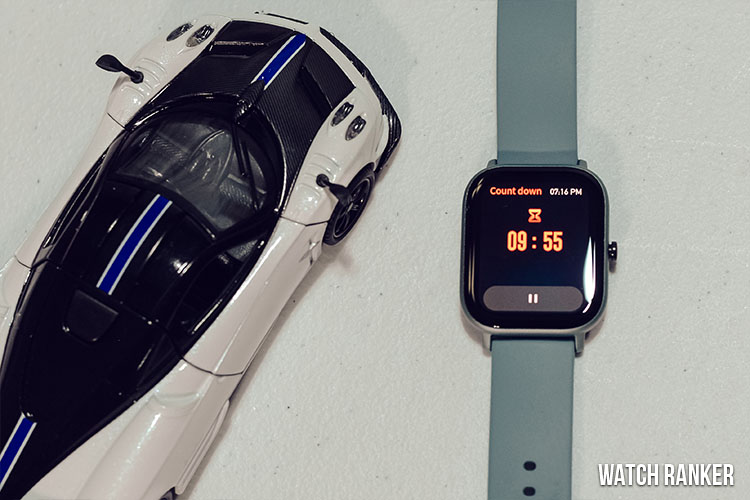
The Amazfit GTS has a solid OLED display that is able to reproduce sharp text that is visible regardless of the lighting condition.
Rank #2
 Amazfit Bip 5 Core Smart Watch for Men Women 46mm, 11-Day Battery, Fitness Activity Tracker with 120+ Sports Modes, Heart Rate & Sleep Monitor, for Android Phone & iPhone, Water Resistant, Black
- Sleek Design & Customizable Display: A durable stainless steel frame, 1.91" high-resolution vibrant anti-fingerprint screen, and 70+ smartwatch faces for a stylish, personalized look.
- Up to 11 Days Battery Life: Enjoy up to 11 days of use, or 26 days in battery-saver mode—no need for constant charging.
- 70+ Downloadable Mini Apps: Access a wide range of apps and games through Zepp OS 3.0, with easy installation and removal.
- Track Your Fitness: Over 120 sports modes to track steps, distance, calories, and more—keep moving, stay motivated.
- Reliable Health Monitoring: Monitor heart rate, blood oxygen levels, stress, and sleep, plus get reminders to stay active throughout the day. You can even track menstrual and fertile periods.
The Amazfit GTS is rocking a 1.65-inch OLED display. It has a resolution of 348 x 442 with a pixel density of 341 PPI. The screen size and resolution are perfect for the watch’s small form factor. The text on the GTS’ display is sharp and is easy to read regardless of the lighting conditions.
The bezels on the GTS are not visible. This is mostly thanks to the screen’s excellent black color reproduction and the operating system’s design aesthetics.
The touch screen is accurate. I did not miss inputs throughout my testing period. I did encounter problems, but those are software-related and not hardware-related. We’ll be talking more about that later. Overall, despite the small size, the screen was a treat to use.
Features
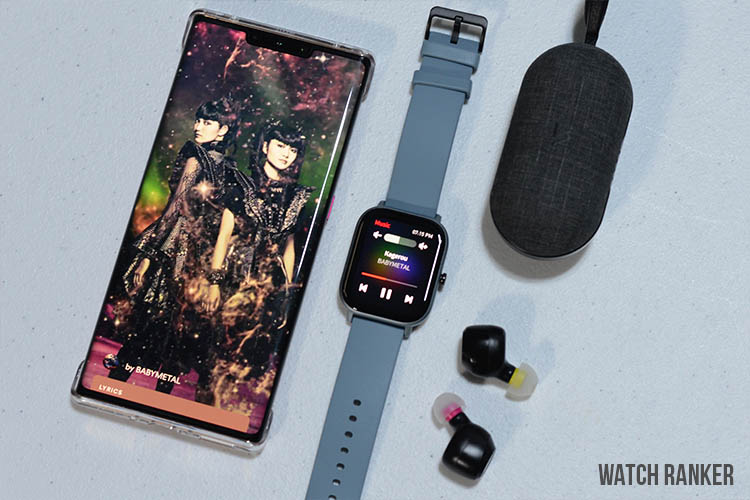
The GTS has most of the features that you would expect in a smartwatch at this price point.
The Amazfit GTS has all of the standard features that you would expect from a mid-range smartwatch. It has Bluetooth 5.0, which helps provide a solid connection. It also has all the standard health and fitness tracking features.
The Amazfit features playback controls for your smartphone. However, I did not find this feature to work well due to the latency. The button presses are not instantaneous, and there is a one-second lag. It is tolerable, but for people like me, I do not enjoy the slight delay.
There are also the rest of the standard features such as the compass, stopwatch, timer, countdown, and find mobile. Interestingly, there is also a find my watch feature on the Amazfit App. Unfortunately, it’s not too practical since the GTS has no built-in speaker.
Using this feature will trigger a vibration on the watch. It can help when you are at home, but I don’t see much use if you ever lose your watch in a noisy or outdoor environment. Additionally, you can also set your alarms through the watch, which is always convenient.
Health and Fitness Tracking
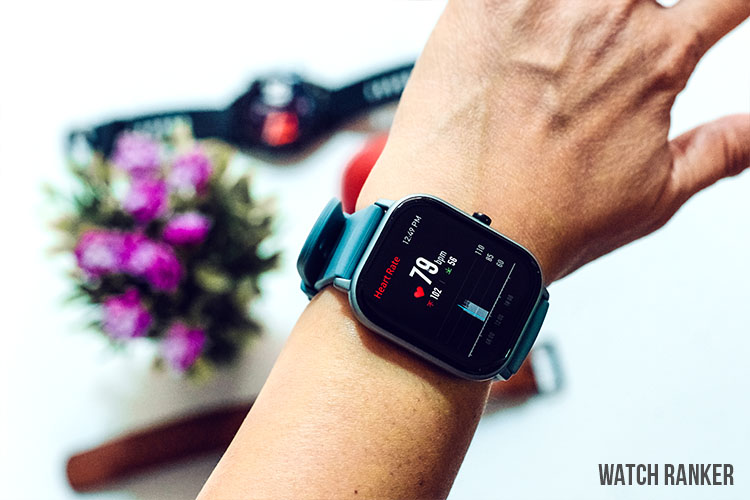
The GTS offers a wide variety of health and fitness tracking options that are standard with most smartwatches.
Health Tracking
The Amazfit GTS supports several health-tracking features that are commonly found in most smartwatches. These include heart rate monitoring, step and activity tracking, sleep tracking, and idle alerts.
The Amazfit GTS is equipped with the BioTracker PPG Bio-Tracking Optical Sensor, which is advertised for accurate 24-hour heart rate tracking. While it works, for the most part, there were instances where my heart rate was way off compared to the Huawei GT 2e. It even counts my heart rate even when I am not wearing it.
The GTS also supports sleep tracking. However, I think it is one of the GTS’ weakest features. The GTS cannot display your sleep records in the watch. Instead, you have to access the Amazfit application to see all of your sleep data. This is extremely annoying, especially when I am still half asleep in the morning, and I am trying to check if I already got enough sleep.
The step and activity tracker was, by far, my favorite feature. You can access it by swiping right from the home screen. It shows a basic breakdown of your data but can show additional details such as calories when you press the screen.
You would need to check the app, even for a basic breakdown, on other smartwatches so kudos to Amazfit for this. Of course, you still have the option to check the Amazfit app for a more detailed breakdown of your daily stats.
The idle alerts work well. However, there were instances where it was telling me to stand up even if I have been standing for hours. But this happens in my other smartwatches, so it isn’t entirely the GTS’ fault.
I also noticed that the GTS made occasional mistakes with step tracking. I was reaching a thousand steps even while I was sitting the entire time. However, I believe that is a problem with smartwatches and is not isolated to the GTS or Amazfit’s watches.
The Tool Desk
Outbyte Driver Updater FREEScan for outdated or missing drivers - takes under a minuteDriver Scan →Outbyte PC Repair FREERepair Windows errors before they cause bigger problemsFix Now →Rank #3

- BIGGER DISPLAY. MAX CLARITY: Active Max features a shine brighter screen with a 3,000-nit display engineered for ultimate clarity, even under the harshest sunlight. See your data clearly on a large 1.5″ ultra-bright AMOLED display built for easy readability in any condition — from the gym to the mountains.
- BIGGER BATTERY, MAX ENDURANCE: Go longer between charges with reliable power built for every routine. With up to 25 days of battery, the Active Max smart watch keeps up with your routine day and night.
- BIGGER STORAGE. SMARTER MAPS: With 4GB of onboard storage, you have more space for your favorite music and downloaded maps with turn-by-turn directions — all accessible right from your wrist.
- BIGGER TRAINING, SMARTER INSIGHTS: From strength sessions to long runs, the Active Max tracker adapts to how you train with 170+ workout modes and personalized Zepp Coach running plans.
- BIOCHARGE ENERGY MONITORING: Your BioCharge score adjusts based on your daily workouts and stress levels to help you understand when to push harder and when to rest, so you can train smarter and recover better.
Fitness Tracking
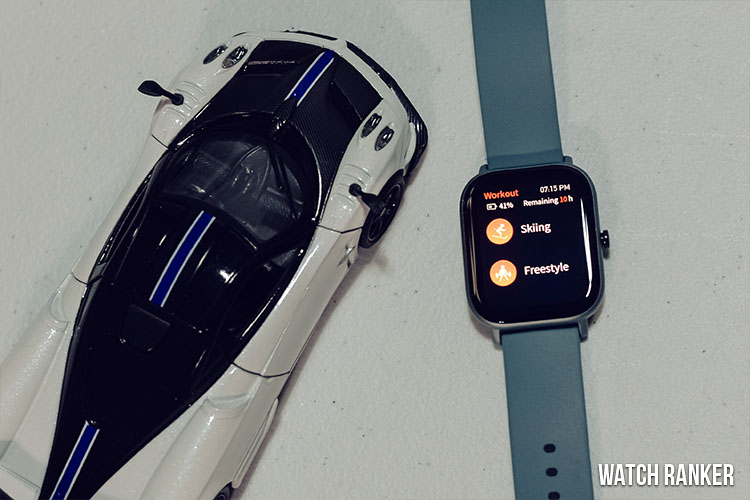
In terms of fitness tracking, the Amazfit GTS covers all of the basics. These include Outdoor Running, Walking, Outdoor Cycling, Treadmills, Indoor Cycling, Open Water Swimming, Pool Swimming, Elliptical Trainer, Climbing, Trail Running, Skiing, and Freestyle.
The sensors found on the GTS were able to produce satisfactory results. There is no option to add custom workouts. Instead, you get a freestyle mode that automatically detects your movements. Overall, the fitness tracking works well with the Amazfit GTS.
Amazfit GTS Software Experience
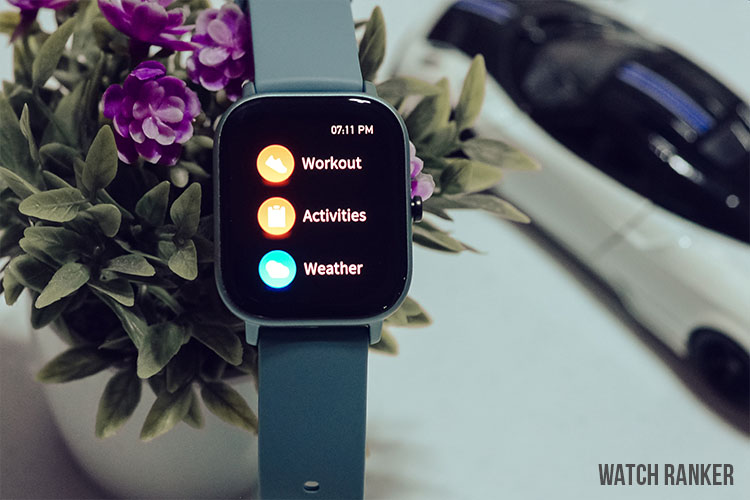
The messy software experience is argaubly the GTS’ biggest weakness.
User Interface
The most crucial aspect of any smartwatch is the software experience. And unfortunately, my experience with the GTS’ operating system has been a mixed bag.
Booting the GTS for the first time was not a fun experience. After the horrendous login process on the app (which we’ll get to in the Amazfit App section), you are forced to do a series of updates that take a couple of minutes. There is no option to reject these updates.
In comparison, the similarly priced Huawei Watch GT 2e was immediately usable after pairing. Perhaps this is evident in the weaker processor that was not disclosed on the spec sheet. Once this whole process is finished, then the watch starts being usable.
Let us start with the good points. The Amazfit user interface is similar to other smartwatches in its price range. It is fairly easy to understand, and I was able to get used to it in just a few hours.
The menus are also customizable through the Amazfit smartphone app. This is crucial, and I will explain why when we get to the downsides of the user interface.
The Amazfit GTS encountered a few frame drops, especially when accessing the main menu. However, it did not make my tasks slower, and the overall experience was still pretty smooth. The operating system also did not crash on me during my whole testing process.
Now onto my issues with the software. The whole experience can be best described as unoptimized. This is because the GTS has the features but doesn’t nail the presentation.
On the home screen, you only get two additional apps. Swiping left gives you the heart rate scanner, and swiping right gives you the activity tracker. This is great since the home screen is free from clutter.
However, I think Amazfit should have given you the option to add more apps, or they should have added commonly used apps such as the weather. This is because you have to dig through the menu to get to these apps.
Another issue I have is there is no dedicated shortcut to access the settings. So if you ever needed to change anything such as the screen auto-off or AOD, then you have to dig through the menu.
You can change the arrangement of the menu to allow quick access to the ones you often use. However, I think this isn’t a real solution to these problems.
Watch Face
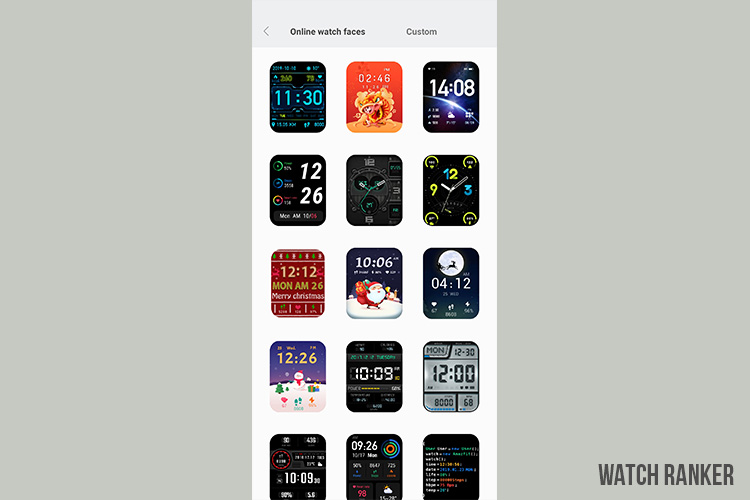
I have mixed feelings when it comes to the watch faces of the Amazfit GTS. The square form factor was very promising. It presented an opportunity to have unique watch faces that are not possible to achieve with traditional round smartwatches.
And they were able to deliver on some watch faces. The stock watch faces did something special. You could modify the elements that you wanted to see, such as the date, the temperature, etc.
This is a feature that is not possible, even on the more expensive Amazfit GTR. But from there on, it starts going downhill.
The majority of the watch faces are repetitive and bland. A lot of the designs look as if they belong in a low-resolution smart band rather than a smartwatch. But don’t get me wrong. If you spend some time with the Amazfit app, you will see some well-designed watch faces.
But then again, you shouldn’t have to look too hard to see a design that resonates with your style. And in this case, it mostly feels like a chore, which is why I mostly used the stock watch faces. And to make matters worse, the GTS does not support custom watch faces. There are two additional “customizable” watch faces for you, but those only allow you to change the background image.
The GTS can only store up to one watch face from the app. This wouldn’t be an issue if it weren’t for the painfully long syncing process. Applying a new watch face takes around a minute.
This might not seem long, but if you are experimenting with different watch face designs, then the whole process will become long and tedious. This pretty much discouraged me from cycling through the different watch faces.
Notifications
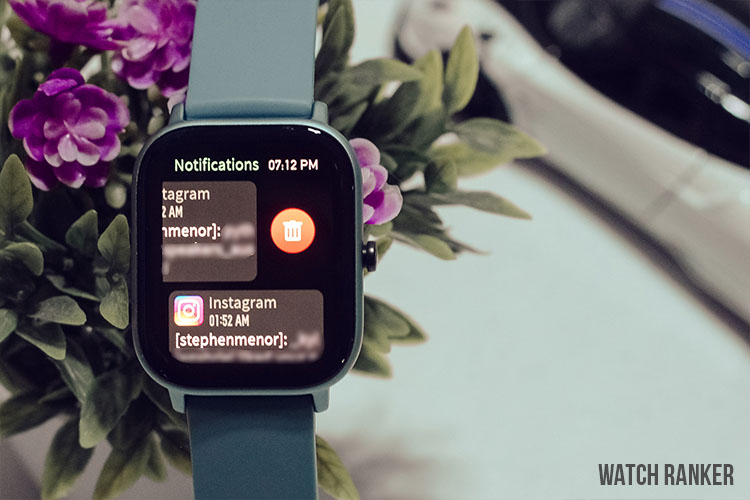
I am not a big fan of how the Amazfit GTS handles notifications. Like the Huawei GT 2e, your notifications pop up as soon as you receive them. You cannot interact with these notifications on both models.
However, if you miss your notifications on the GTS, then you will have to navigate to the notifications tab (which is buried under the main menu). This takes significantly longer compared to the Huawei Watch GT 2e, where you simply have to swipe up to access all your notifications.
There are several ways to get around this. You can change the order of the GTS’ menu via the smartphone app, or you can reprogram the long-press functionality to access the notifications. However, I still think it would have been easier, faster, and more natural to have a smartphone-like gesture instead.
Another gripe I have with the notifications is that you cannot clear all of your notifications unless you reach a certain number. So if you have three or four notifications, you’d have to delete them one by one by swiping and pressing the delete prompt. And to make matters worse, the delete prompt does not always work.
And to add to my list of complaints, notifications are sometimes not automatically cleared even if you already read them. This means that if you do not manually clear your notifications, you will eventually stop receiving them.
I also do not like how notifications are presented on the Amazfit GTS. Long texts are broken into two lines. This can be confusing, especially when reading usernames on your social media alerts. The GT 2e does a better job and utilizes the larger space better.
Rank #4

- 【Compatible Models】AK 20mm Quick Release replacement Bands Compatible with Amazfit GTR mini / GTS 4 / GTS 4 Mini / GTS 3 / GTS 2 / GTS 2e / GTS mini, Amazfit GTR 42mm, Amazfit Bip 3 / Bip 3 Pro / Bip U Pro / Bip / Bip Lite / Bip S / Bip S lite / Bip U smartwatch. Also fit for smart watch with 20mm width watch lugs. (Note: Please confirm your watch model before purchase)
- 【Skin-Friendly Silicone Material】This Amazfit GTR mini band/ Bip 3 / GTS 4 watch bands are made of Premium Soft Silicone material, it's soft, flexible, durable and comfortable to wear, which will bring you the best wearing experience. No irritation or allergy to your skin. Multi-Colors for you to personalize your Amazfit GTR mini / Bip U Pro / Bip 3 / GTS 4 watch every day.
- 【Multiple Unique Colors】Available in multiple colors and One Adjustable size for Amazfit watch band women men. Each color is seemed like a brand new watch. One Size for 5.1" -8.1" (130mm-205mm) wrist. Size can be adjustable with buckle according to individual's wrist.
- 【Secure Buckle & Easy Installation】 Aluminum Buckle Design can hold your Amazfit GTS 4 Band in the place securely. No longer to worry about falling off your watch. The sport bands with quick release spring bars on both sides, which allows you to change Amazfit Strap easily. Easy to install and remove in seconds.
- 【Package Included】 1 Sport Band for Amazfit GTR mini / GTS 4 / GTS 4 Mini / GTS 3 / GTS 2 / GTS 2e / GTS 2 mini / GTS / Amazfit Bip 3 / Bip 3 Pro / Bip U Pro / Bip / Bip Lite / Bip S / Bip S lite / Bip U (The Smart Watch is NOT included).
Amazfit Smartphone App
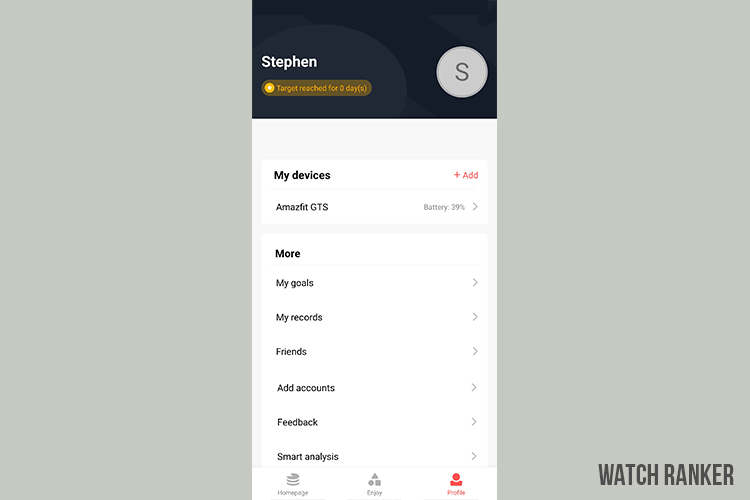
The Amazfit smartphone app is, unfortunately, just as cluttered as the watch’s software.
Unfortunately, Amazfit’s smartphone application is just as cluttered as the watch’s user interface. There are a lot of settings that you can modify on the smartphone app. However, I think it would have been better to have these options on the watch instead. Huawei’s implementation may not be the best, but at least it is far cleaner and easier to understand compared to Amazfit’s app.
Setting up the Amazift app is also not a great experience. It offers you the option to log in with your social media accounts. But these options ironically do not work. Tapping on the various social media icons results in an error, regardless of which device I used.
This then leads us to the incredibly tedious account creation process. Instead of being a quick one minute process, the app continues to ask lots of information even if they are not related or directly usable by the smartwatch.
But the biggest issue that I have with the Amazfit smartphone app is that it constantly needs to sync with the smartwatch. Every time you open the app, it takes a few seconds to update various data such as sleep tracking and steps. Again, this is incredibly annoying when you are half asleep in the morning, and you just want to have a quick look at your sleep stats.
Overall, Amazfit’s app is usable, but it was not a fun experience. Amazfit needs to rethink its approach to its smartphone app if they want to be competitive in this price range.
The Amazfit App can be acquired via the Google Play Store for Android users and the Apple App Store for iOS users.
Battery Life
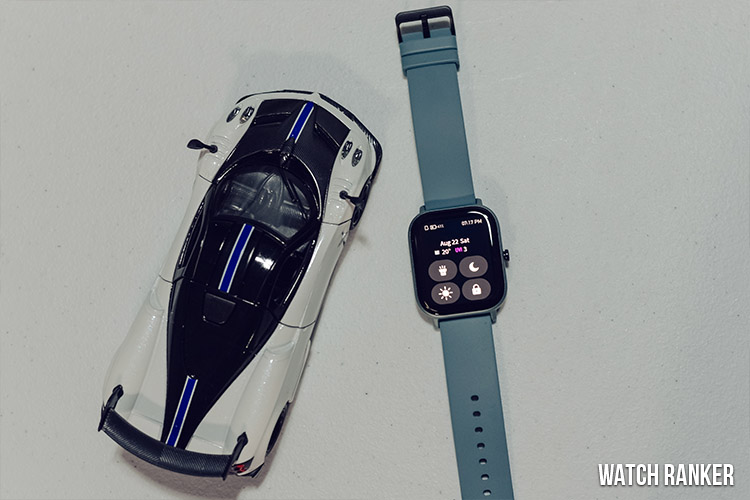
The GTS’ battery life is impressive and can last up to two weeks.
Special offer. See more information about Outbyte and uninstall instructions. Please review EULA and Privacy policy.
The Amazfit GTS has excellent battery life. It can last up to two weeks. Of course, features like the Always On Display (AOD) will drain the battery faster. But you will still be enjoying the GTS for at least one week before needing a recharge. The Amazfit GTS is able to achieve this despite only having a 220 mAH battery.
In terms of charging, I am not fond of the GTS’ magnetic charger. Like a lot of smartwatches, the charging cable is proprietary. However, the cable cannot be removed, meaning if you were to travel, you’d have to take the whole charger with you. But then again, this shouldn’t be a problem for daily use due to how good the battery life of the GTS is.
Verdict
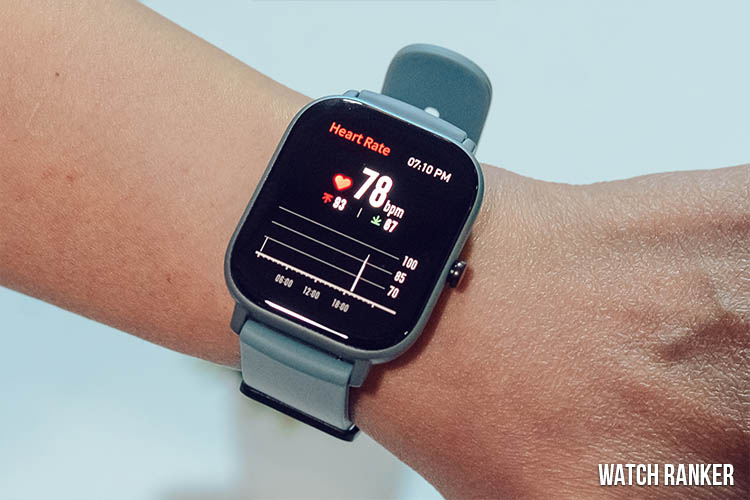
Overall, the Amazfit GTS is a great budget smartwatch. It has good build quality, good battery life, and has most of the features that you would expect from any smartwatch. It isn’t perfect, but it is good enough for its price range.
I loved using the GTS small and lightweight form factor. And I was almost willing to forgive the flaws in its software performance. However, it becomes hard to recommend, especially since there are better alternatives that can execute most of its features better.
If you like its design, form factor, and square display, then the GTS is a good option. However, if you highly value the efficiency and fluidity of the software experience, there are better alternatives, such as the Huawei Watch GT 2e.
See our detailed comparison of the Amazfit GTS vs Huawei Watch GT 2e here.
Quick Recap
Amazfit GTS Specs
| Huami Amazfit GTS | |
| DIMENSIONS | 43.25×36.25×9.4mm |
| WEIGHT | 24.8g (without the strap) |
| WATCH CASE MATERIAL | Aircraft-grade aluminum alloy, polymer material |
| WATCH STRAP | Silicone strap |
| DISPLAY | 1.65 inch AMOLED 348 X 442 341 PPI |
| CONNECTIVITY | BT5.0 BLE |
| COMPATIBILITY | Android 5.0 or iOS 10.0 and above |
| SENSORS | BioTracker PPG Biological tracking optical sensor 6-axis acceleration sensor 3-axis geomagnetic sensor Air pressure sensor Ambient brightness sensor |
| BATTERY | Daily use mode:14 days |
| Basic watch mode:46 days | |
| GPS continuous working:25 hrs | |
| BATTERY | 220mAh |
| CONTROL | Touch+1 function key |
| WATER RESISTANCE | 5 ATM water-resistant |
| GPS | GPS + GLONASS |
| SPORTS MODE | 12 |
| NFC | Supported (limited in China Version) |
| Mic and Speaker | Not supported |
| Music Storage | Not supported |
| SpO2 | Not supported |
| Heartrate | Normal |
| Chip | Unspecified |
| RAM+ROM | Unspecified |
Product prices and availability are accurate as of the date/time indicated and are subject to change. Any price and availability information displayed on Amazon at the time of purchase will apply.